
Sensitive Data Obfuscator 제작자: Shahin
This extension enables confident and secure interaction with AI tools, ensuring your sensitive data remains protected while maintaining the full utility of LLM assistance.
사용자 2명사용자 2명
확장 메타 데이터
스크린샷
정보
Sensitive Data Obfuscator Extension
Overview
The Sensitive Data Obfuscator extension is a lightweight Data Loss Prevention (DLP) tool designed to protect sensitive information when interacting with Large Language Models (LLMs). It automatically detects and obfuscates confidential data—such as credit card numbers, passwords, and personal identifiers—when users copy and paste content into LLM chat interfaces.
What It Does
This Firefox extension acts as a security layer between you and AI tools, ensuring that sensitive data is protected before being sent as prompts. When you paste text containing sensitive information into LLM platforms like Claude.ai, ChatGPT, or other AI chat interfaces, the extension:
Supported Data Types
The extension detects and protects:
How to Use
Basic Usage
Interactive Management
When sensitive data is detected, a floating shield button appears:
Supported Platforms
Currently optimized for:
- Claude.ai
- ChatGPT/OpenAI
- Google Bard/Gemini
- Bing Chat
- Perplexity.ai
- You.com
Privacy & Security
Use Cases
Benefits
Overview
The Sensitive Data Obfuscator extension is a lightweight Data Loss Prevention (DLP) tool designed to protect sensitive information when interacting with Large Language Models (LLMs). It automatically detects and obfuscates confidential data—such as credit card numbers, passwords, and personal identifiers—when users copy and paste content into LLM chat interfaces.
What It Does
This Firefox extension acts as a security layer between you and AI tools, ensuring that sensitive data is protected before being sent as prompts. When you paste text containing sensitive information into LLM platforms like Claude.ai, ChatGPT, or other AI chat interfaces, the extension:
- Automatically detects sensitive data patterns in real-time
- Obfuscates the data with contextual tokens (e.g.,
[CREDIT_CARD],[PASSWORD]) - Provides interactive management through a floating panel interface
- Allows selective reveals where you can choose to use original values when needed
Supported Data Types
The extension detects and protects:
- Financial Data: Credit card numbers, account numbers, transit numbers, institution numbers
- Personal Identifiers: Social Security Numbers (SSN), SIN, phone numbers, email addresses
- Credentials: Usernames, passwords, security codes
- Custom Patterns: Additional sensitive data patterns
How to Use
Basic Usage
- Copy sensitive data to your clipboard
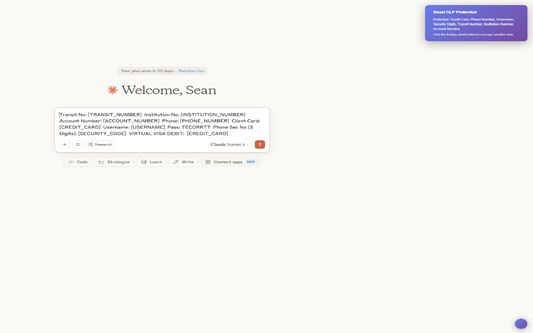
- Paste into the LLM chat interface - sensitive data is automatically obfuscated
- Review the prompt - sensitive information appears as tokens like
[CREDIT_CARD],[USERNAME] - Manage data via the floating shield button that appears
Interactive Management
When sensitive data is detected, a floating shield button appears:
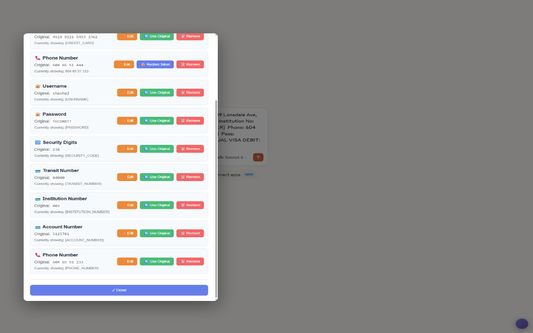
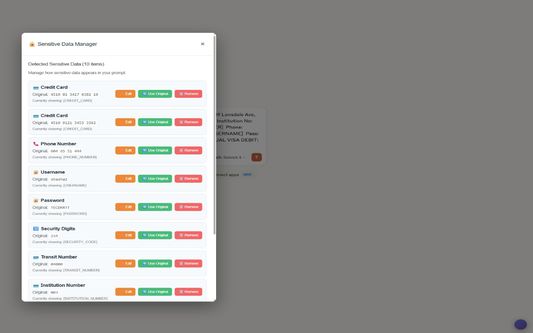
- Click the shield to open the Sensitive Data Manager
- View all detected items with their current display status
- Use available actions:
- Use Original: Show the actual value in the prompt
- Remove: Delete the sensitive field entirely
Supported Platforms
Currently optimized for:
- Claude.ai
- ChatGPT/OpenAI
- Google Bard/Gemini
- Bing Chat
- Perplexity.ai
- You.com
Privacy & Security
- Local Processing: All detection and obfuscation happens locally in your browser
- No Data Transmission: Sensitive data never leaves your machine
- Temporary Storage: Original values are stored only in browser memory during the session
- Clean Prompts: Only obfuscated or user-approved data reaches LLM services
- Firefox Security Model: Follows Firefox's strict security guidelines
Use Cases
- Enterprise users sharing data snippets with AI tools
- Developers seeking code review while protecting credentials
- Researchers analyzing datasets containing personal information
- General users wanting to interact safely with AI assistants
Benefits
- Instant Protection: No need to manually redact sensitive information
- Selective Sharing: Choose exactly what data to reveal
- Mistake Prevention: Automatic detection prevents accidental data exposure
- Compliance Support: Helps maintain data protection standards
- Productivity: Streamlined workflow without compromising security
- Firefox Integration: Native Firefox experience with proper permissions
리뷰어 1명이 5점으로 평가함
권한 및 데이터
추가 정보
- 부가 기능 링크
- 버전
- 1.0.2
- 크기
- 41.74 KB
- 최근 업데이트
- 일 년 전 (2025년 6월 30일)
- 관련 카테고리
- 버전 목록
- 모음집에 추가