
SEO META 1 COPY 제작자: macha
This is an extension that allows you to easily check SEO-related meta information and copy it with one click.
사용자 3,171명사용자 3,171명
확장 메타 데이터
스크린샷



정보
This is an extension that allows you to easily check SEO-related meta information and copy it with one click.
You can quickly check META information, headings, and structured markup (JSON-LD, Microdata, RDFa).
You can also easily copy information in Markdown or tab format.
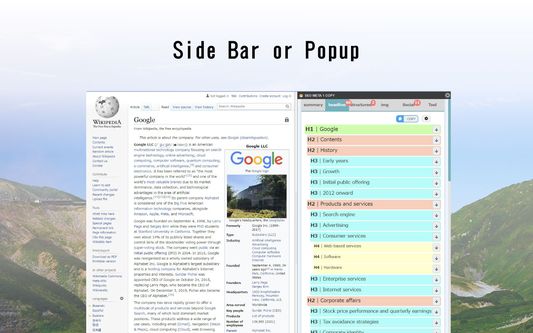
Sidebar display is now supported. It can be changed from Options.
++++++ Usage ++++++
Simply install the extension in your browser and access the page you are interested in. When the icon is clicked, the metadata that is often checked by SEOs will be displayed.
++++++ Features ++++++
Summary Tabs
headings tab
JSON-LD tab
Microdata tab
RDFa tab
Image Tab
You can quickly check META information, headings, and structured markup (JSON-LD, Microdata, RDFa).
You can also easily copy information in Markdown or tab format.
Sidebar display is now supported. It can be changed from Options.
++++++ Usage ++++++
Simply install the extension in your browser and access the page you are interested in. When the icon is clicked, the metadata that is often checked by SEOs will be displayed.
++++++ Features ++++++
Summary Tabs
- Basic Information
** Displays information in Head tags such as Title, Description, etc.
** Total number of DOM elements
** Number of Style tags and bytes
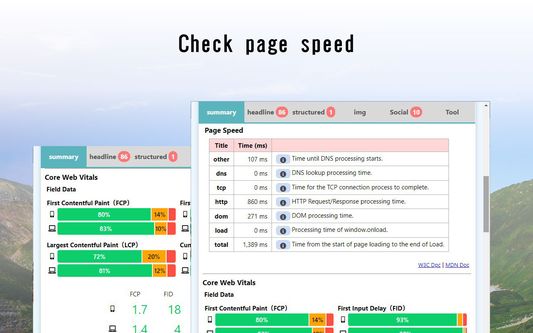
** If the CMS is WordPress, show it. If the CMS is WordPress, show it. If the theme is known, show it too. - Page Speed
** Obtained from Navigation Timing API. - All StyleSheets
** List of css files set in stylesheet tag. - ALL LINKS
** List of files set in the link tag. - ALL SCRIPTS
** List of JS files set in script tag - ALL METAS
** List of names and contents set in meta tags - Number of links in Hx tags and a tags
- External links List of links by rel setting
headings tab
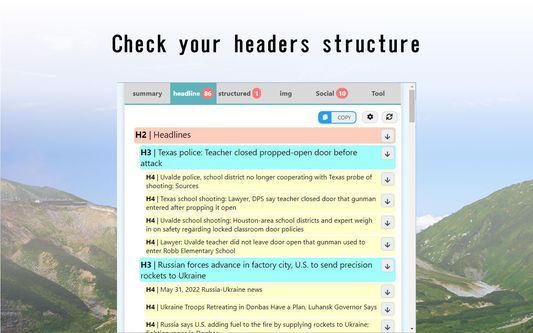
- H1 - H6 tags in the order of their appearance in the HTML.
- Each hierarchy has a different color and is indented for easy viewing.
- Use the arrow buttons on the right to scroll to where they appear.
- At the bottom is a list of the number of H1 - H6 uses and links.
JSON-LD tab
- This is a function to check the Google recommended structured data JSON-LD.
- You can also check the details of the settings.
- It does not check if the JSON-LD specification is correct.
- A link button to the Google Docs for each type of structured data has been provided. Please refer to the links for detailed specifications.
- We have also placed a link to Google's Rich Results Test at the bottom; please use Google's tool to check if the JSON-LD description is correct.
Microdata tab
- This is a function to check Microdata for structured data.
- You can also check the details.
- Red text notifies you if the no longer supported "data-vocabulary.org" is being used.
- Links to documentation, rich-results testing, and schema markup validation tools are also provided at the bottom.
RDFa tab
- This function verifies RDFa for structured data.
Image Tab
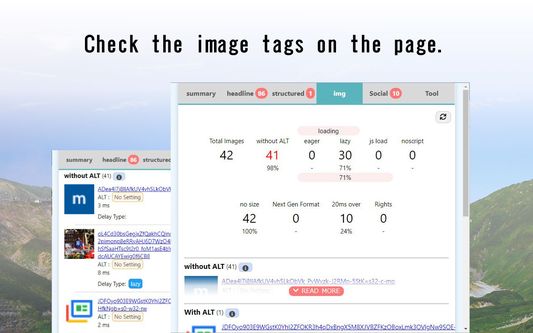
- The number of img tags at the top is summarized in a table by condition.
** Number of cases where ALT attribute is not set.
** Number of cases where loading="eager" is set
** Number of cases where loading="lazy" is set
** Number of images that are displayed by replacing the src attribute in JavasScript
*** Judged by whether data-src is set or not
** Number of noscript tags with img tags
** Number of img tags with no width and height set
** Number of webp, avif in next generation image format
** Number of img tags without width and height ** Number of webp and avif images in next generation image formats
** Number of images that took more than a certain number of milliseconds.
*** The number of images that took more than a specific number of milliseconds is counted using the Resource Timing API. - You can check this in the list of images that match each condition.
** Thumbnail images.
*** If data-src exists, the image in data-src will be displayed.
** File name
** Value of ALT attribute
** Image type (determined by content-type, not extension)
** file size of the image
** size of the image
** time it took to display
** value of data-src, if present
** lazy processing
리뷰어 10명이 5점으로 평가함
권한 및 데이터
추가 정보