
Show History Frequent Sites Button 제작자: jscher2000
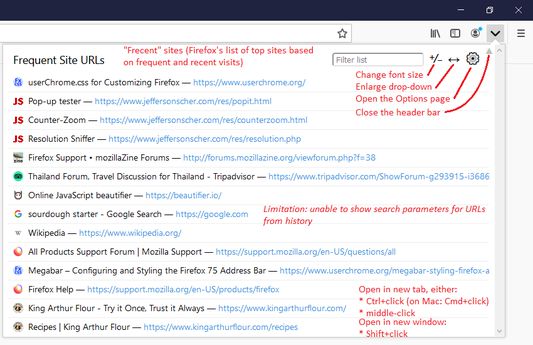
Add a "Show History" button to your toolbar to list your Top Sites. Uses the topSites API to get your frequently visited URLs with minimal permissions. Plentiful configuration options. Please read the Description before installing.
사용자 359명사용자 359명
확장 메타 데이터
스크린샷

정보
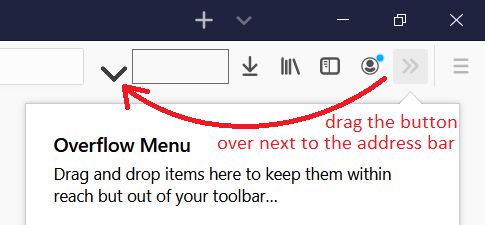
Missing the "Show History" (triangle) button from the address bar? This extension provides a very similar list through a toolbar button (you can use the Customize feature to move the button closer to the address bar). Before installing, please review the following information to make sure you need it.
== Firefox 78+ Address Bar Behavior ==
In Firefox 78+, when the cursor moves into the address bar, a list automatically opens showing the first 8-10 of your Top Sites from the Firefox Home / new tab page. Type a space in the address bar to show the classic frequently visited URLs list. In Firefox 83+ you can click the History search button on the bottom of the address bar drop-down to show your frequently visited URLs.
If your Top Sites list is not helpful you can make it better suit your needs:
If you don't want the drop-down to open automatically, you can disable that by clearing the checkbox on the Options/Preferences page, Privacy & Security panel, Address Bar settings (uncheck Top Sites). (Or in about:config, set browser.urlbar.suggest.topsites to false. See: Configuration Editor for Firefox.) You still can call up the classic frequently visited URLs list by typing a space in the address bar.
== About This Add-on ==
This button pulls your most frequently visited URLs in "frecent" order, meaning the list is weighted by the recency of your visit as well as the number of visits. It should mostly match the list the address bar shows if you type a ^ character in the bar.
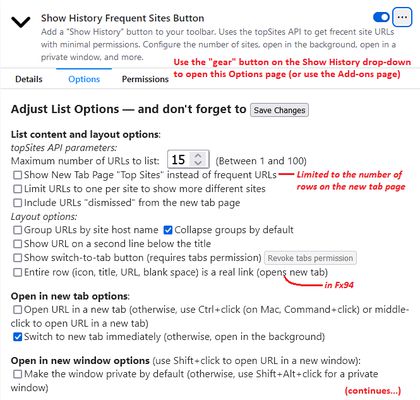
Note: You can switch the list shown by this extension to your Top Sites from the new tab page and include way more than 8 if you like the idea of controlling what is on the list.
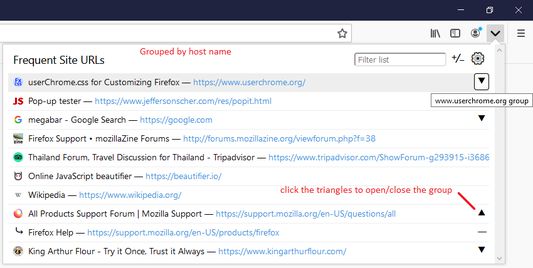
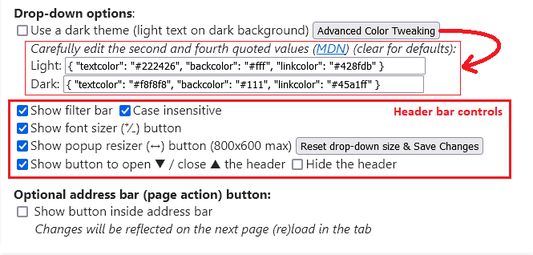
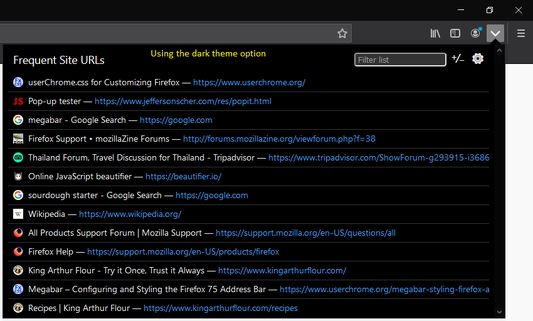
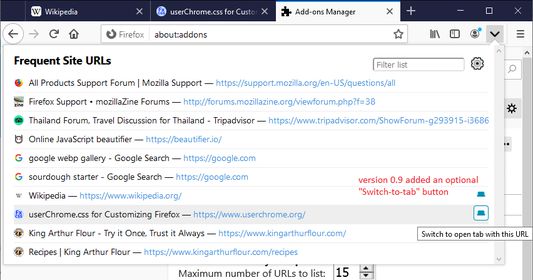
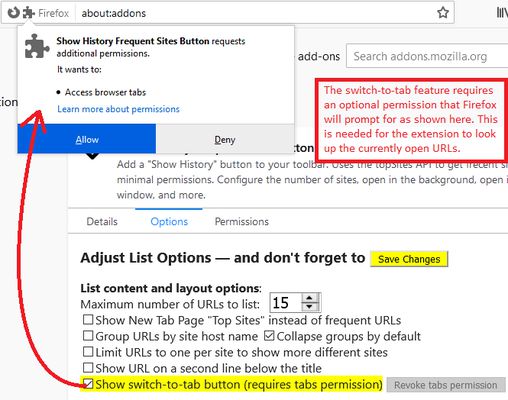
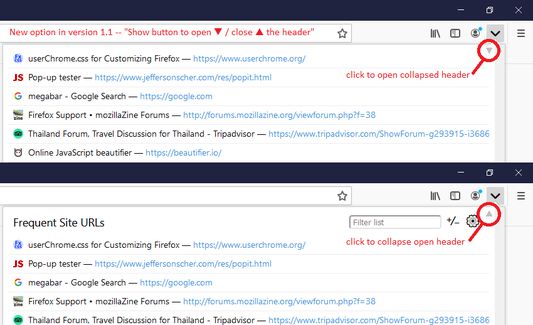
Please refer to the above screenshots for more information on layout and options.
Limitations:
Permissions (see manifest.json):
Why a separate list and not in the address bar drop-down?
Firefox doesn't allow add-ons to take over the address bar drop-down. Starting in version 1.4, you can show a button in the page actions area at the right end of the address bar to open the add-on drop-down. However, the button only appears when a regular page is loaded, and not for the new tab page (or some other internal pages), so it isn't as useful as you might hope.
== Firefox 78+ Address Bar Behavior ==
In Firefox 78+, when the cursor moves into the address bar, a list automatically opens showing the first 8-10 of your Top Sites from the Firefox Home / new tab page. Type a space in the address bar to show the classic frequently visited URLs list. In Firefox 83+ you can click the History search button on the bottom of the address bar drop-down to show your frequently visited URLs.
If your Top Sites list is not helpful you can make it better suit your needs:
- Cleaning up your Top Sites list: Customize the New Tab page
- Turning on the Top Sites section of the page: Hide or display content in New Tab
If you don't want the drop-down to open automatically, you can disable that by clearing the checkbox on the Options/Preferences page, Privacy & Security panel, Address Bar settings (uncheck Top Sites). (Or in about:config, set browser.urlbar.suggest.topsites to false. See: Configuration Editor for Firefox.) You still can call up the classic frequently visited URLs list by typing a space in the address bar.
== About This Add-on ==
This button pulls your most frequently visited URLs in "frecent" order, meaning the list is weighted by the recency of your visit as well as the number of visits. It should mostly match the list the address bar shows if you type a ^ character in the bar.
Note: You can switch the list shown by this extension to your Top Sites from the new tab page and include way more than 8 if you like the idea of controlling what is on the list.
Please refer to the above screenshots for more information on layout and options.
Limitations:
- Titles: the topSites list always shows the title from history, even for bookmarked sites.
- URLs: the topSites list drops parameters (for example, on searches, ?q=firefox) for history results, but they are included for bookmark results.
- Local files and internal pages: Firefox excludes these from the topSites list.
- Hidden URLs: Firefox excludes URLs that are marked as hidden in the Places database, which includes addresses that always redirect to a different URL.
Permissions (see manifest.json):
- topSites permission allows the extension read-only access to up to 100 frequently visited sites. The actual number retrieved is set in the extension options. The list is used only to show the drop-down and have Firefox open the indicated URL. (MDN)
- storage permission allows the extension to save and read options.
- [optional] tabs permission allows the extension to read the URLs of open tabs (for the switch-to-tab option)
Why a separate list and not in the address bar drop-down?
Firefox doesn't allow add-ons to take over the address bar drop-down. Starting in version 1.4, you can show a button in the page actions area at the right end of the address bar to open the add-on drop-down. However, the button only appears when a regular page is loaded, and not for the new tab page (or some other internal pages), so it isn't as useful as you might hope.
리뷰어 40명이 4.8점으로 평가함
권한 및 데이터
추가 정보