
Simple Currency Converter 제작자: CodeVerse
A personalized currency converter extension
사용자 19명사용자 19명
확장 메타 데이터
스크린샷
정보
**Currency Converter: Simplify Your Exchange Rates**
Currency Converter is a user-friendly browser extension designed to streamline your currency conversion needs. Whether you are a frequent traveler, an online shopper, or a global investor, this handy tool ensures you never miss a beat when dealing with foreign currencies.
**Key Features:**
1. **Real-time Exchange Rates:** Stay up-to-date with the latest currency exchange rates from around the world. Currency Converter fetches real-time data from reliable sources, providing accurate and instant conversions.
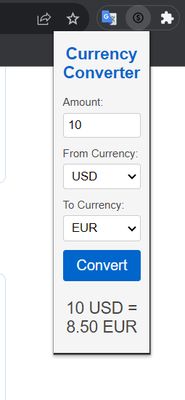
2. **Intuitive User Interface:** Our extension boasts a sleek and intuitive interface, making currency conversions a breeze. Simply enter the amount and select the currencies you wish to convert, and let the extension do the rest.
3. **Extensive Currency Support:** Currency Converter supports a wide range of currencies, including major ones like USD, EUR, GBP, JPY, CAD, and many others. No matter where you are or what currency you need, we've got you covered.
4. **Customizable Options:** Tailor the extension to fit your preferences. You can set default currencies for quick conversions, choose the number of decimal places displayed, and even customize the theme to match your browser.
5. **Offline Mode:** Worried about connectivity? Don't be! Currency Converter comes with an offline mode, ensuring you can access previously fetched exchange rates even without an internet connection.
6. **Conversion History:** Keep track of your past conversions with ease. The extension maintains a history log, allowing you to access and revisit previous exchange rates whenever needed.
7. **Privacy and Security:** At Currency Converter, we prioritize your privacy and data security. Your personal information is never collected or stored during the conversion process.
**How to Use:**
1. Install the Currency Converter extension from the Chrome Web Store (or your browser's respective extension store).
2. Once installed, you'll find the extension icon conveniently located in your browser toolbar.
3. Click on the icon to open the extension popup.
4. Enter the amount you want to convert and select the source and target currencies from the dropdown menus.
5. Instantly view the converted amount, along with the real-time exchange rate used for the conversion.
6. Customize the extension's settings according to your preferences for an optimal experience.
With Currency Converter, handling international transactions, managing travel expenses, or simply staying informed about currency fluctuations becomes effortless. Say goodbye to manual calculations and embrace the simplicity of Currency Converter for all your currency conversion needs.
Currency Converter is a user-friendly browser extension designed to streamline your currency conversion needs. Whether you are a frequent traveler, an online shopper, or a global investor, this handy tool ensures you never miss a beat when dealing with foreign currencies.
**Key Features:**
1. **Real-time Exchange Rates:** Stay up-to-date with the latest currency exchange rates from around the world. Currency Converter fetches real-time data from reliable sources, providing accurate and instant conversions.
2. **Intuitive User Interface:** Our extension boasts a sleek and intuitive interface, making currency conversions a breeze. Simply enter the amount and select the currencies you wish to convert, and let the extension do the rest.
3. **Extensive Currency Support:** Currency Converter supports a wide range of currencies, including major ones like USD, EUR, GBP, JPY, CAD, and many others. No matter where you are or what currency you need, we've got you covered.
4. **Customizable Options:** Tailor the extension to fit your preferences. You can set default currencies for quick conversions, choose the number of decimal places displayed, and even customize the theme to match your browser.
5. **Offline Mode:** Worried about connectivity? Don't be! Currency Converter comes with an offline mode, ensuring you can access previously fetched exchange rates even without an internet connection.
6. **Conversion History:** Keep track of your past conversions with ease. The extension maintains a history log, allowing you to access and revisit previous exchange rates whenever needed.
7. **Privacy and Security:** At Currency Converter, we prioritize your privacy and data security. Your personal information is never collected or stored during the conversion process.
**How to Use:**
1. Install the Currency Converter extension from the Chrome Web Store (or your browser's respective extension store).
2. Once installed, you'll find the extension icon conveniently located in your browser toolbar.
3. Click on the icon to open the extension popup.
4. Enter the amount you want to convert and select the source and target currencies from the dropdown menus.
5. Instantly view the converted amount, along with the real-time exchange rate used for the conversion.
6. Customize the extension's settings according to your preferences for an optimal experience.
With Currency Converter, handling international transactions, managing travel expenses, or simply staying informed about currency fluctuations becomes effortless. Say goodbye to manual calculations and embrace the simplicity of Currency Converter for all your currency conversion needs.
리뷰어 2명이 3점으로 평가함
추가 정보
- 부가 기능 링크
- 버전
- 1.0
- 크기
- 15.54 KB
- 최근 업데이트
- 3년 전 (2023년 8월 4일)
- 관련 카테고리
- 버전 목록
- 모음집에 추가