
Simple Proxy Toggle 제작자: Strega
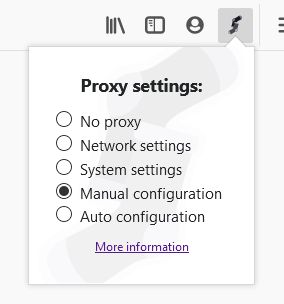
A convenient toolbar button to toggle Firefox's top-level proxy settings.
사용자 44명사용자 44명
확장 메타 데이터
스크린샷
정보
This add-on creates a toolbar button which, when clicked, allows you to quickly and easily switch between the five top-level proxy settings provided by Firefox, normally found under Options > Network Settings and described at https://support.mozilla.org/en-US/kb/connection-settings-firefox .
This add-on is useful to people who find themselves switching between proxies often, for example if you mostly browse with a proxy but sometimes need to disable it in order to access certain sites. It can also be useful as a reminder to re-enable a disabled proxy; when the "No proxy" option is selected, the toolbar button will display an exclamation point to remind you that your proxy is disabled.
This add-on requests the permission to modify your proxy settings, which requires you to grant the permission to run in private browsing windows, even if you only use the button in non-private windows (see https://bugzilla.mozilla.org/show_bug.cgi?id=1526299 for reference). If you don't grant the permission to run in private windows, you will see an error when attempting to switch between proxy settings.
This add-on respects your privacy; unlike many other proxy switchers, it does not request permission to access your browser tabs and it does not request permission to access data for all websites. It stores nothing locally and does not access the network.
This add-on is not an alternative interface for configuring the built-in proxy support; you will first want to use the Options > Network Settings interface to configure Firefox's proxy usage.
This add-on does not provide any sort of proxy capability on its own; it is only an interface to the built-in proxy support in Firefox.
This add-on is useful to people who find themselves switching between proxies often, for example if you mostly browse with a proxy but sometimes need to disable it in order to access certain sites. It can also be useful as a reminder to re-enable a disabled proxy; when the "No proxy" option is selected, the toolbar button will display an exclamation point to remind you that your proxy is disabled.
This add-on requests the permission to modify your proxy settings, which requires you to grant the permission to run in private browsing windows, even if you only use the button in non-private windows (see https://bugzilla.mozilla.org/show_bug.cgi?id=1526299 for reference). If you don't grant the permission to run in private windows, you will see an error when attempting to switch between proxy settings.
This add-on respects your privacy; unlike many other proxy switchers, it does not request permission to access your browser tabs and it does not request permission to access data for all websites. It stores nothing locally and does not access the network.
This add-on is not an alternative interface for configuring the built-in proxy support; you will first want to use the Options > Network Settings interface to configure Firefox's proxy usage.
This add-on does not provide any sort of proxy capability on its own; it is only an interface to the built-in proxy support in Firefox.
리뷰어 5명이 4.6점으로 평가함
권한 및 데이터
추가 정보
- 부가 기능 링크
- 버전
- 0.1
- 크기
- 14.01 KB
- 최근 업데이트
- 6년 전 (2020년 10월 3일)
- 관련 카테고리
- 라이선스
- MIT 라이선스
- 버전 목록
- 모음집에 추가