Firefox 브라우저 부가 기능
  • 확장 기능
  • 테마
    • Firefox용
    • 사전 및 언어 팩
    • 다른 브라우저 사이트
    • Android 부가 기능
로그인
Slack App-in-Tab Reborn 미리보기

Slack App-in-Tab Reborn 제작자: Axel Leroy

Open the Slack app with its multi-workspace sidebar in a simple browser tab, freeing you from using the Slack app!

0 (리뷰 0개)0 (리뷰 0개)
사용자 2명사용자 2명
Firefox를 다운로드하고 확장 기능을 받으세요
파일 다운로드

확장 메타 데이터

스크린샷
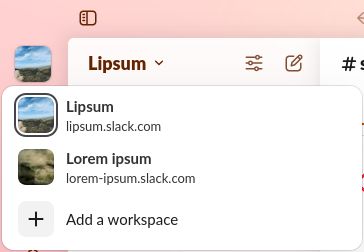
A workspace switcher is shown in the Slack UI as the user clicked on the current workspace's icon
정보
Slack App-in-Tab Reborn is a fork of "Slack App-in-Tab" which has unfortunately stopped working. This version keeps the same functionality as the original.

How to use
  1. Install the extension
  2. Visit https://app.slack.com and log into any of your workspaces
  3. That's it, all your workspaces appear in the sidebar, just like in the Slack App

How does it work?

Slack App-in-Tab Reborn changes how Firefox presents itself to Slack so it believes you are browsing from a Chromebook. Since Chromebooks can't run the Slack app, it then shows the workspace switcher as it does in the app.
개발자 의견
Access to slack.com is required in order to change the User-Agent (the way Firefox presents itself to Slack)
0명이 0점으로 평가함
로그인하여 이 확장 기능의 평점을 남겨주세요
아직 평점이 없습니다

별점 저장됨

5
0
4
0
3
0
2
0
1
0
아직 리뷰 없음
권한 및 데이터

필수 권한:

  • 브라우저 탭에 접근
  • slack.com 도메인의 사이트에서 사용자의 데이터에 접근

데이터 수집:

  • 개발자가 이 확장 기능은 데이터 수집이 필요하지 않다고 합니다.
더 알아보기
추가 정보
부가 기능 링크
  • 홈 페이지
  • 지원 사이트
  • Copy add-on ID
버전
2026.4.23
크기
24.25 KB
마지막 업데이트
한 달 전 (2026년 4월 23일)
관련 카테고리
  • 소셜 서비스
라이선스
Mozilla Public License 2.0
버전 목록
  • 모든 버전 보기
모음집에 추가
이 부가 기능 신고
Mozilla 홈페이지로 이동

부가 기능

  • 소개
  • Firefox 부가 기능 블로그
  • 확장 기능 워크샵
  • 개발자 허브
  • 개발자 정책
  • 커뮤니티 블로그
  • 포럼
  • 버그 신고
  • 리뷰 지침

브라우저

  • Desktop
  • Mobile
  • Enterprise

제품

  • Browsers
  • VPN
  • Relay
  • Monitor
  • Pocket
  • Bluesky (@firefox.com)
  • Instagram (Firefox)
  • YouTube (firefoxchannel)
  • 개인 정보
  • 쿠키
  • 법률

특별한 고지가 없는 한, 본 사이트의 콘텐츠는 Commons Attribution Share-Alike License v3.0 또는 그 이후 버전에 따라 사용이 허가됩니다.