
Smart Drawing 제작자: Hilward
Easy and fast drawing with smart drawing addon (uses Google AutoDraw)
사용자 115명사용자 115명
확장 메타 데이터
스크린샷


정보
Smart Drawing is a comprehensive drawing addon which uses Google AutoDraw to render the popup UI.
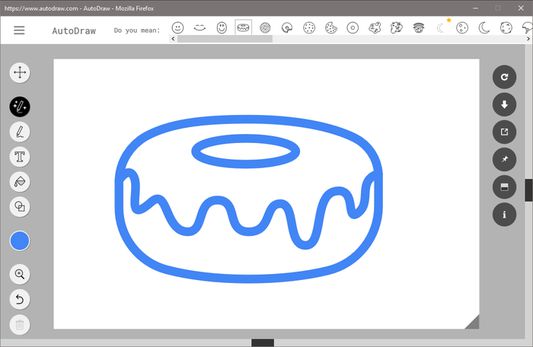
Note: AutoDraw is a new project supported by Google that aims to bring artificial intelligent (AI) in your drawings. Anything you draw with mouse or pen (for smart PCs) will be analyzed with the AI engine and few close suggestions to your drawing will be shown within the app (top section). The user can select a desired shape based on the suggestions. To get more info about AutoDraw project please visit (https://aiexperiments.withgoogle.com/autodraw) website.
Smart Drawing addon, as mentioned above, uses AutoDraw to render the popup UI. Within the app you will see two toolbars. The one on the left is the original toolbar for AutoDraw website. The one on the right is an extra toolbar designed specifically for this app. This extra toolbar at the right side is designed to enhance the usage of AutoDraw UI. All buttons are self explanatory with a title (if you hover over them).
Using the app is very easy, just click on the toolbar icon to open the UI. You can resize the window to your desired size, and this will be stored to the memory for next time usage. In order to report bugs, please fill the bug report form in the addon's Homepage.
Important note: Smart Drawing addon does NOT belong or related to Google at all. It is basically an unofficial addon that is developed and maintained independently. Smart Drawing extension is a wrapper for AutoDraw application and tries to make it usable as a browser extension. All credit goes to Google and AutoDraw website.
Note: AutoDraw is a new project supported by Google that aims to bring artificial intelligent (AI) in your drawings. Anything you draw with mouse or pen (for smart PCs) will be analyzed with the AI engine and few close suggestions to your drawing will be shown within the app (top section). The user can select a desired shape based on the suggestions. To get more info about AutoDraw project please visit (https://aiexperiments.withgoogle.com/autodraw) website.
Smart Drawing addon, as mentioned above, uses AutoDraw to render the popup UI. Within the app you will see two toolbars. The one on the left is the original toolbar for AutoDraw website. The one on the right is an extra toolbar designed specifically for this app. This extra toolbar at the right side is designed to enhance the usage of AutoDraw UI. All buttons are self explanatory with a title (if you hover over them).
Using the app is very easy, just click on the toolbar icon to open the UI. You can resize the window to your desired size, and this will be stored to the memory for next time usage. In order to report bugs, please fill the bug report form in the addon's Homepage.
Important note: Smart Drawing addon does NOT belong or related to Google at all. It is basically an unofficial addon that is developed and maintained independently. Smart Drawing extension is a wrapper for AutoDraw application and tries to make it usable as a browser extension. All credit goes to Google and AutoDraw website.
리뷰어 6명이 3.2점으로 평가함
권한 및 데이터
추가 정보
- 부가 기능 링크
- 버전
- 0.1.1resigned1
- 크기
- 59.15 KB
- 최근 업데이트
- 2년 전 (2024년 4월 25일)
- 관련 카테고리
- 버전 목록
- 모음집에 추가