
Sort By Review Count on Amazon 제작자: Griffiths Organization, LLC
Sort By Review Count for Amazon sorts product search results by most reviewed.
확장 메타 데이터
스크린샷
정보
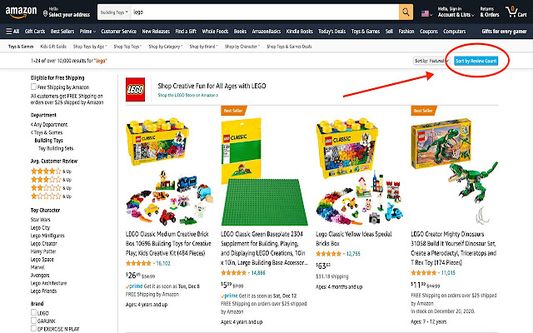
Sort By Review Count for Amazon allows you to sort product search results by most reviewed. It works best when you are in specific product department. After submitting a search on Amazon, a blue Sort By Review Count button appears in the right hand corner near the sort by drop down menu. Clicking that when in a product department (the column on the left of the search result images) will sort the results by review count.
Due to our company’s ongoing costs in development and responding to user requests, our Sort By Review Count app requires a small payment to use upon installation. Payment is provided through a Stripe payment popup, which is an industry standard payment method. Thank you for supporting developers! Many Firefox extensions do not work because we cannot afford to continually update the software for free. For those that have already paid, please use the login here option at the popup to enable the app. One nice feature -- payment on the Firefox extension can enable access on the Chrome and Edge versions -- just download on the respective extension store and login once installed.
Once the Sort By Review Count extension is installed, a blue arrow icon will appear in the extensions list. We recommend you pin Sort By Review Count (SBRC) and click it ahead of an Amazon product search, as it is a helpful tool to find trusted and well-reviewed products.
A few quick tips for use:
(1) Click the blue "Sort By Review Count" button that appears when you enter your search. We recommend you click the icon each time your search results show up to sort.
(2) We recommend users consider an adblock during web use. It makes all online web searches less clouded by ads and sponsored results.
(3) We recommend clicking a single "Department" (found on the left side column when you are on an Amazon search results page) to get a more accurate sort. For example, if you are searching for blenders, make sure you are in the "Household Blenders" Department.
The sort feature adds to the url in your current tab to sort the search results, and Firefox may provide a browsing data notice for that (probably because it adds to the url in the current tab you have open).
Due to our company’s ongoing costs in development and responding to user requests, our Sort By Review Count app requires a small payment to use upon installation. Payment is provided through a Stripe payment popup, which is an industry standard payment method. Thank you for supporting developers! Many Firefox extensions do not work because we cannot afford to continually update the software for free. For those that have already paid, please use the login here option at the popup to enable the app. One nice feature -- payment on the Firefox extension can enable access on the Chrome and Edge versions -- just download on the respective extension store and login once installed.
Once the Sort By Review Count extension is installed, a blue arrow icon will appear in the extensions list. We recommend you pin Sort By Review Count (SBRC) and click it ahead of an Amazon product search, as it is a helpful tool to find trusted and well-reviewed products.
A few quick tips for use:
(1) Click the blue "Sort By Review Count" button that appears when you enter your search. We recommend you click the icon each time your search results show up to sort.
(2) We recommend users consider an adblock during web use. It makes all online web searches less clouded by ads and sponsored results.
(3) We recommend clicking a single "Department" (found on the left side column when you are on an Amazon search results page) to get a more accurate sort. For example, if you are searching for blenders, make sure you are in the "Household Blenders" Department.
The sort feature adds to the url in your current tab to sort the search results, and Firefox may provide a browsing data notice for that (probably because it adds to the url in the current tab you have open).
리뷰어 13명이 2.2점으로 평가함
권한 및 데이터
필수 권한:
- amazon.ae 도메인의 사이트에서 사용자의 데이터에 접근
- amazon.at 도메인의 사이트에서 사용자의 데이터에 접근
- amazon.ca 도메인의 사이트에서 사용자의 데이터에 접근
- amazon.cn 도메인의 사이트에서 사용자의 데이터에 접근
- amazon.co.jp 도메인의 사이트에서 사용자의 데이터에 접근
- amazon.co.uk 도메인의 사이트에서 사용자의 데이터에 접근
- amazon.com.au 도메인의 사이트에서 사용자의 데이터에 접근
- amazon.com.br 도메인의 사이트에서 사용자의 데이터에 접근
- amazon.com.mx 도메인의 사이트에서 사용자의 데이터에 접근
- amazon.com.sg 도메인의 사이트에서 사용자의 데이터에 접근
- amazon.com.tr 도메인의 사이트에서 사용자의 데이터에 접근
- amazon.com 도메인의 사이트에서 사용자의 데이터에 접근
- amazon.de 도메인의 사이트에서 사용자의 데이터에 접근
- amazon.es 도메인의 사이트에서 사용자의 데이터에 접근
- amazon.fr 도메인의 사이트에서 사용자의 데이터에 접근
- amazon.ie 도메인의 사이트에서 사용자의 데이터에 접근
- amazon.in 도메인의 사이트에서 사용자의 데이터에 접근
- amazon.it 도메인의 사이트에서 사용자의 데이터에 접근
- amazon.nl 도메인의 사이트에서 사용자의 데이터에 접근
- amazon.eg 도메인의 사이트에서 사용자의 데이터에 접근
- amazon.sa 도메인의 사이트에서 사용자의 데이터에 접근
- extensionpay.com에서 사용자의 데이터에 접근
추가 정보
- 부가 기능 링크
- 버전
- 3.8292
- 크기
- 40.14 KB
- 최근 업데이트
- 3년 전 (2023년 8월 29일)
- 라이선스
- All Rights Reserved
- 버전 목록
- 모음집에 추가