
Spreadsheet Sheet Downloader 제작자: dwarjie
A browser extension that enables downloading individual and multiple sheets from Google Spreadsheets with enhanced functionality.
사용자 42명사용자 42명
확장 메타 데이터
스크린샷


정보
A browser extension that enables downloading individual sheets from Google Spreadsheets with enhanced functionality for combining multiple sheets into a single Excel file.
🚀 Functionalities
Core Functionality
- Single Sheet Download: Download individual sheets from Google Spreadsheets
- Multi-Sheet Download: Combine multiple sheets into a single Excel file
- Smart Sheet Detection: Automatically detects available sheets in the spreadsheet
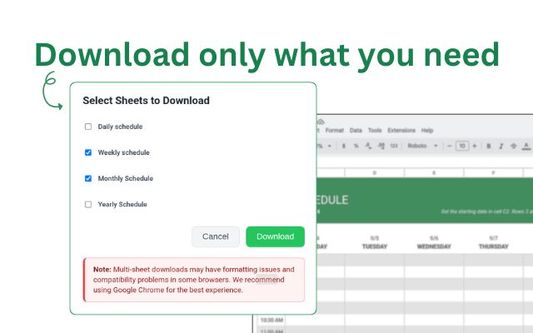
- Sheet Selection: Interactive modal for selecting which sheets to download
User Experience
- Seamless Integration: Appears as a download button next to Google Sheets' version history
- Modern UI: Clean, intuitive interface with smooth animations
- Loading Overlays: Prevents user interaction during processing
- Warning Notifications: Informs users about potential compatibility issues
Technical Features
- Client-Side Processing: No server required, all processing happens in the browser
- Cross-Browser Support: Works on Chrome and Firefox
- Manifest V3: Built with the latest browser extension standards
- Modular Architecture: Clean, maintainable codebase
🎯 Usage
Single Sheet Download
1. Open a Google Spreadsheet with multiple sheets
2. Navigate to the sheet you want to download
3. Click the green download button (appears next to version history)
4. Select "Single Sheet Download" in the modal
5. Click "Confirm" to download the current sheet
Multi-Sheet Download
1. Open a Google Spreadsheet with multiple sheets
2. Click the green download button
3. Select "Multi-Sheet Download" in the modal
4. Choose which sheets to include in the combined file
5. Click "Download" to generate and download the combined Excel file
⚠️ Known Limitations
Browser Compatibility
- Chrome: Full functionality with optimal performance
- Firefox: Basic functionality works, but multi-sheet downloads may have issues
Formatting Limitations
- Multi-sheet Downloads: May lose some formatting when combining sheets
- Complex Formatting: Advanced Google Sheets formatting might not be preserved
- Charts and Images: Not supported in combined downloads
📞 Support
If you encounter any issues or have questions:
🚀 Functionalities
Core Functionality
- Single Sheet Download: Download individual sheets from Google Spreadsheets
- Multi-Sheet Download: Combine multiple sheets into a single Excel file
- Smart Sheet Detection: Automatically detects available sheets in the spreadsheet
- Sheet Selection: Interactive modal for selecting which sheets to download
User Experience
- Seamless Integration: Appears as a download button next to Google Sheets' version history
- Modern UI: Clean, intuitive interface with smooth animations
- Loading Overlays: Prevents user interaction during processing
- Warning Notifications: Informs users about potential compatibility issues
Technical Features
- Client-Side Processing: No server required, all processing happens in the browser
- Cross-Browser Support: Works on Chrome and Firefox
- Manifest V3: Built with the latest browser extension standards
- Modular Architecture: Clean, maintainable codebase
🎯 Usage
Single Sheet Download
1. Open a Google Spreadsheet with multiple sheets
2. Navigate to the sheet you want to download
3. Click the green download button (appears next to version history)
4. Select "Single Sheet Download" in the modal
5. Click "Confirm" to download the current sheet
Multi-Sheet Download
1. Open a Google Spreadsheet with multiple sheets
2. Click the green download button
3. Select "Multi-Sheet Download" in the modal
4. Choose which sheets to include in the combined file
5. Click "Download" to generate and download the combined Excel file
⚠️ Known Limitations
Browser Compatibility
- Chrome: Full functionality with optimal performance
- Firefox: Basic functionality works, but multi-sheet downloads may have issues
Formatting Limitations
- Multi-sheet Downloads: May lose some formatting when combining sheets
- Complex Formatting: Advanced Google Sheets formatting might not be preserved
- Charts and Images: Not supported in combined downloads
📞 Support
If you encounter any issues or have questions:
- Check the https://github.com/dwarjie/spreadsheet-sheet-downloader page
- Search existing issues before creating a new one
- Provide detailed information about your environment and the issue
- Include browser console logs if applicable
리뷰어 0명이 0점으로 평가함
권한 및 데이터
추가 정보
- 부가 기능 링크
- 버전
- 1.0.0
- 크기
- 164.27 KB
- 최근 업데이트
- 일 년 전 (2025년 7월 22일)
- 관련 카테고리
- 버전 목록
- 태그
- 모음집에 추가