
Stealthy 제작자: Stealthy
Does your country/organization block you from facebook, youtube or others? Is the service you want unavailable in your country? Stealthy is the solution for you. Unlike other extensions we do the work of look for fast proxies for you.
사용자 3,851명사용자 3,851명
확장 메타 데이터
스크린샷


정보
Does your country/organization block you from facebook, youtube or others?
Is the service you want unavailable in your country?
Stealthy is the solution for you.
* Hide your IP address for privacy online.
* Access all content privately without censorship; bypass firewalls.
For your peace of mind here is a certificate from a prestigious 3rd party: http://www.softpedia.com/get/Internet/Internet-Applications-Addons/Mozilla-Extensions/Stealthy-for-Firefox.shtml#status "Softpedia guarantees that Stealthy for Firefox is 100% Clean, which means it does not contain any form of malware, including but not limited to: spyware, viruses, trojans and backdoors."
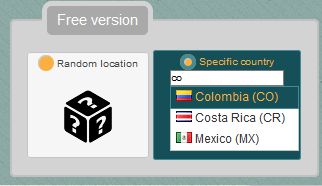
We provide the proxies, so you don't have to bother searching for lists that usually don't work. The extension automatically selects and sets up tested proxies from the cloud.
The term Stealthy refers to military aircraft that can penetrate into enemy territory undetected by radar. In a way, that’s what this browser extension does.
Some organizations and governments block access to web pages, and certain online services are not available in all countries. With Stealthy, users can make themselves undetectable, and thereby able to bypass the censorship.
This can be tremendously important in countries like China or Iran, where regimes censor the Internet. But even in countries like Germany, many people cannot watch music videos on YouTube because of a licensing dispute with GEMA. With Stealthy installed, this is not an issue, as you can get a foreign IP address and play the videos without issue.
Once installed, a small stealth aircraft icon will be appear in your navigation bar. The color is red by default, indicating Stealthy is off. After clicking on it, Stealthy automatically searches for an appropriate proxy, sets up your browser, and turns the icon green, meaning you are now in Stealth mode.
There is also a Chrome version that we recommend at http://www.stealthy.co/chrome/
For more information visit our web page www.stealthy.co/
Please report bugs an suggestions to info@stealthy.co
Is the service you want unavailable in your country?
Stealthy is the solution for you.
* Hide your IP address for privacy online.
* Access all content privately without censorship; bypass firewalls.
For your peace of mind here is a certificate from a prestigious 3rd party: http://www.softpedia.com/get/Internet/Internet-Applications-Addons/Mozilla-Extensions/Stealthy-for-Firefox.shtml#status "Softpedia guarantees that Stealthy for Firefox is 100% Clean, which means it does not contain any form of malware, including but not limited to: spyware, viruses, trojans and backdoors."
We provide the proxies, so you don't have to bother searching for lists that usually don't work. The extension automatically selects and sets up tested proxies from the cloud.
The term Stealthy refers to military aircraft that can penetrate into enemy territory undetected by radar. In a way, that’s what this browser extension does.
Some organizations and governments block access to web pages, and certain online services are not available in all countries. With Stealthy, users can make themselves undetectable, and thereby able to bypass the censorship.
This can be tremendously important in countries like China or Iran, where regimes censor the Internet. But even in countries like Germany, many people cannot watch music videos on YouTube because of a licensing dispute with GEMA. With Stealthy installed, this is not an issue, as you can get a foreign IP address and play the videos without issue.
Once installed, a small stealth aircraft icon will be appear in your navigation bar. The color is red by default, indicating Stealthy is off. After clicking on it, Stealthy automatically searches for an appropriate proxy, sets up your browser, and turns the icon green, meaning you are now in Stealth mode.
There is also a Chrome version that we recommend at http://www.stealthy.co/chrome/
For more information visit our web page www.stealthy.co/
Please report bugs an suggestions to info@stealthy.co
리뷰어 37명이 3.3점으로 평가함
권한 및 데이터
추가 정보
- 부가 기능 링크
- 버전
- 6.0
- 크기
- 425.29 KB
- 최근 업데이트
- 7년 전 (2019년 12월 10일)
- 관련 카테고리
- 버전 목록
- 모음집에 추가