
StopAskingGMU 제작자: Kellan Clark
A set of QoL automations to make life easier for GMU students.
사용자 14명사용자 14명
확장 메타 데이터
스크린샷


정보
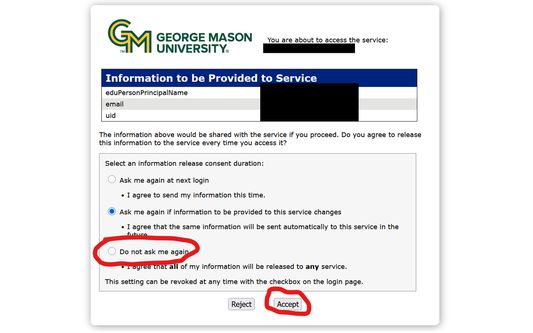
Hey, GMU students! Are you tired of constantly clicking buttons that never remember your choices? Well not any more! This little extension automates all the little things that annoy me, and I hope it can help you too. The code is open-source and doesn't send any data over the internet, so you can verify for yourself that it's completely safe.
Features:
- A settings UI that lets you enable, disable, and configure every feature
- Automatically select an option on the Information Release page
- Skip the Information Release page page entirely
- Skip the page with the big "Log Into Canvas" button
- Automatically re-login to Outlook when it's been too long and the red warning appears
- Skip the Duo "Is this your device?" prompt
Features:
- A settings UI that lets you enable, disable, and configure every feature
- Automatically select an option on the Information Release page
- Skip the Information Release page page entirely
- Skip the page with the big "Log Into Canvas" button
- Automatically re-login to Outlook when it's been too long and the red warning appears
- Skip the Duo "Is this your device?" prompt
리뷰어 0명이 0점으로 평가함
권한 및 데이터
필수 권한:
- shibboleth.gmu.edu에서 사용자의 데이터에 접근
- info.canvas.gmu.edu에서 사용자의 데이터에 접근
- outlook.office.com에서 사용자의 데이터에 접근
- api-eb2b2949.duosecurity.com에서 사용자의 데이터에 접근
추가 정보