
Switch Container Plus 제작자: stoically
Switch the current tab to a different container in multiple ways
사용자 117명사용자 117명
확장 메타 데이터
스크린샷

정보
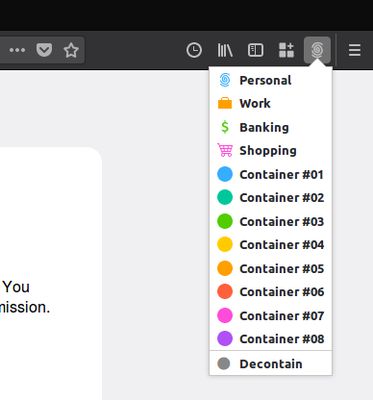
Switch Containers Plus lets you switch the current tab to a different container
Using the toolbar popup
As new background tab in the target container by
Reopen the currently active tab in a different container (Ability to navigate back in the current tab is lost)
Using the address bar
Type "co " followed by the target container name (or part of it) and select the target container from the omnibox list.
If the container name is a valid domin name and you switch from a new tab, it automatically navigates to the container name domain.
IMPORTANT: There are security concerns involved when changing a tab between containers. Before installing, please read this article on the matter: https://github.com/mozilla/testpilot-containers/wiki/Moving-between-containers
Note: This is a fork of Switch Container and Search and Switch Containers.
Using the toolbar popup
As new background tab in the target container by
- Middle Mouse Click on the Container
- Ctrl+Left Click on the Container
- Cmd+Click on the Container (MacOS)
Reopen the currently active tab in a different container (Ability to navigate back in the current tab is lost)
- Regular Left Click on the Container
Using the address bar
Type "co " followed by the target container name (or part of it) and select the target container from the omnibox list.
If the container name is a valid domin name and you switch from a new tab, it automatically navigates to the container name domain.
IMPORTANT: There are security concerns involved when changing a tab between containers. Before installing, please read this article on the matter: https://github.com/mozilla/testpilot-containers/wiki/Moving-between-containers
Note: This is a fork of Switch Container and Search and Switch Containers.
리뷰어 17명이 4.9점으로 평가함
권한 및 데이터
추가 정보
- 부가 기능 링크
- 버전
- 0.19
- 크기
- 83.61 KB
- 최근 업데이트
- 7년 전 (2019년 11월 22일)
- 개인정보처리방침
- 이 부가 기능에 대한 개인정보처리방침 읽기
- 버전 목록
- 모음집에 추가