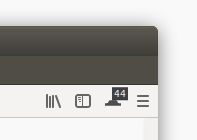
Tab Tally 제작자: Paul Morris
Displays how many tabs are open. The count includes tabs from all windows. Also indicates how many tabs actually have content loaded in them – for example, after restarting Firefox.
사용자 243명사용자 243명
확장 메타 데이터
스크린샷
정보
It is very easy to open more tabs than you close until you have lost all sense of how many you have open. This simple add-on displays how many tabs are open across all Firefox windows. The total is shown in a "badge" on a button that appears in the toolbar by default. (The button does not do anything when you click it.)
Click the button to see a panel that indicates how many tabs have content loaded in them. (If you quit and then re-open Firefox and have it set to show your tabs from last time, then each tab's content is only loaded when you first click on the tab and make it active. So if you have a lot of tabs open, most of them may not have any content loaded.)
Note that after installing this add-on the number of loaded tabs will not be accurate until you restart Firefox. The number of open tabs, however, is accurate immediately, without a restart.
(Also note that for obscure technical reasons some of Firefox's "about:" pages such as "about:newtab" are not always counted as loaded content.)
Click the button to see a panel that indicates how many tabs have content loaded in them. (If you quit and then re-open Firefox and have it set to show your tabs from last time, then each tab's content is only loaded when you first click on the tab and make it active. So if you have a lot of tabs open, most of them may not have any content loaded.)
Note that after installing this add-on the number of loaded tabs will not be accurate until you restart Firefox. The number of open tabs, however, is accurate immediately, without a restart.
(Also note that for obscure technical reasons some of Firefox's "about:" pages such as "about:newtab" are not always counted as loaded content.)
16명이 3.9점으로 평가함
추가 정보
- 부가 기능 링크
- 버전
- 1.4.1resigned1
- 크기
- 10.89 KB
- 마지막 업데이트
- 2년 전 (2024년 4월 25일)
- 관련 카테고리
- 버전 목록
- 모음집에 추가