Firefox 브라우저 부가 기능
  • 확장 기능
  • 테마
    • Firefox용
    • 사전 및 언어 팩
    • 다른 브라우저 사이트
    • Android 부가 기능
로그인
Tablet UI for Firefox 미리보기

Tablet UI for Firefox 제작자: Petr

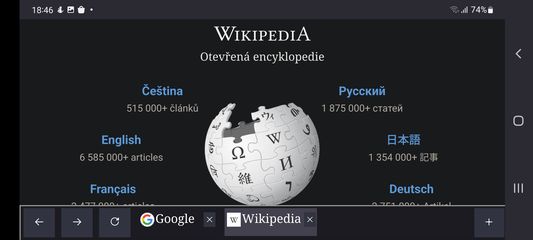
This add-on re-implements the tab bar from desktop we all love, on Android tablets, on Firefox. It has all the familiar buttons like back, forward, reload and new tab. You can scroll the list of your opened tabs, you can close or duplicate tabs

4.8 (리뷰 15개)4.8 (리뷰 15개)
사용자 97명사용자 97명
Firefox를 다운로드하고 확장 기능을 받으세요
파일 다운로드

확장 메타 데이터

스크린샷
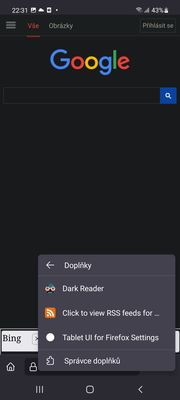
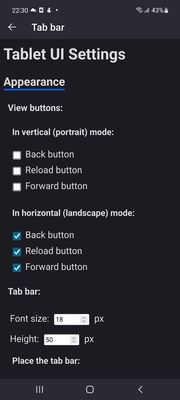
The tabs bar, reload, back and forward and new tab buttons, as they look while browsing WikipediaWikipedia with the tab bar position topThere are addon settings you can open. Press the three dots menu, select Addons and then you'll see this screen. Select Tablet UI for Firefox SettingsSelect which buttons you want to see, what font size, and where do you want to display the bar. Don't forgot to press Save options!The menu when you hold the new tab button: it allows you to shift the page up, so you can click the I agree button on cookie prompt on sites like this
정보
How to install:
Download Firefox Nightly or Firefox Beta from Google Play
Open Firefox Nightly or Firefox Beta settings, open About Firefox there
Tap the Firefox logo on that page 5 times, the advanced options appear
Go back to see all settings
Under Addons, select Your own Addon collection
Paste the following for user id: 15613358 and for collection name: Android-compatible-addons-by-J
Open the Addons menu in Firefox (three dots - Addons - Addons Manager)
There select the addon you'd like to install. There are currently two, this one and Get RSS Feed URL.

How to use: When you start the app, the tab bar will only see the tab which is loaded. To load more of your tabs, swipe right or left the adress bar or select them in the tab switcher: Due to Firefox restrictions, the addon only sees tabs loaded in memory.

There are also settings: you can set which buttons you want to see, the font size, show the bar on top or on bottom, the tab bar height, the search page used when you press the new tab button.

Sometimes when using the tab bar on top of the screen, cookies prompts may be pushed down: No worries, there is a menu for that (long press the new tab button, see screenshots)

There are some restrictions:
The new tab button can only open websites right now, it can't open the browser new tab: https://bugzilla.mozilla.org/show_bug.cgi?id=1782389
It will not work on protected pages like addons.mozilla.org

The project is open source: https://github.com/artisticfox8/Tablet-UI-For-Firefox-Android
15명이 4.8점으로 평가함
로그인하여 이 확장 기능의 평점을 남겨주세요
아직 평점이 없습니다

별점 저장됨

5
12
4
3
3
0
2
0
1
0
리뷰 15개 모두 읽기
권한 및 데이터

필수 권한:

  • 브라우저 탭에 접근
  • 탐색 중 브라우저 활동에 접근
  • 모든 웹사이트에서 사용자의 데이터에 접근
더 알아보기
추가 정보
부가 기능 링크
  • Copy add-on ID
버전
2.5
크기
37.63 KB
마지막 업데이트
3년 전 (2023년 8월 8일)
관련 카테고리
  • 외양
  • 기타
  • 탭
라이선스
Mozilla Public License 2.0
버전 목록
  • 모든 버전 보기
모음집에 추가
이 부가 기능 신고
Mozilla 홈페이지로 이동

부가 기능

  • 소개
  • Firefox 부가 기능 블로그
  • 확장 기능 워크샵
  • 개발자 허브
  • 개발자 정책
  • 커뮤니티 블로그
  • 포럼
  • 버그 신고
  • 리뷰 지침

브라우저

  • Desktop
  • Mobile
  • Enterprise

제품

  • Browsers
  • VPN
  • Relay
  • Monitor
  • Pocket
  • Bluesky (@firefox.com)
  • Instagram (Firefox)
  • YouTube (firefoxchannel)
  • 개인 정보
  • 쿠키
  • 법률

특별한 고지가 없는 한, 본 사이트의 콘텐츠는 Commons Attribution Share-Alike License v3.0 또는 그 이후 버전에 따라 사용이 허가됩니다.