Firefox 브라우저 부가 기능
  • 확장 기능
  • 테마
    • Firefox용
    • 사전 및 언어 팩
    • 다른 브라우저 사이트
    • Android 부가 기능
로그인
Tabs Backup & Restore 미리보기

Tabs Backup & Restore 제작자: Kevin Jones

Keep manual or automatic backups of all tabs*, and restore on demand. Can also export backup file to disk to restore later, or to another profile, even on another computer or OS, as long as it has Tabs Backup & Restore installed. *(See description)

3.6 (리뷰 19개)3.6 (리뷰 19개)
사용자 769명사용자 769명
Firefox를 다운로드하고 확장 기능을 받으세요
파일 다운로드

확장 메타 데이터

스크린샷
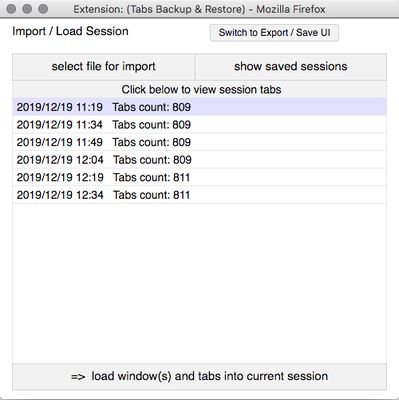
Select Export/Save or Import/Restore UI from icon drop-down.Import/Restore Session UI:  Auto-saved sessions list.  Click on a session to view windows and tabs of the session.  Or click on "select file for import" to import a session from disk.Import/Restore Session UI:   Windows and Tabs View of an auto-saved session, or a session you've chosen to import.
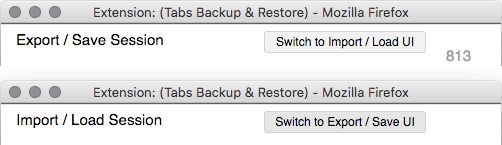
Click the "Load windows and tabs..." button to add to or replace the current session. Uncheck the tabs or windows you don't want to load.Import/Restore Session UI:  After clicking the "load.." button you will be prompted to choose between adding the restored session to existing windows and tabs, or replacing the current session and thus removing existing windows and tabs.Export/Save Session UI:  Displays a human-readable text description of all current windows and tabs.  This can then be copied, or saved to file in the same format using the "Export session as file" button.  Human-readable text allows a developer to easily manipulate for other purposes.Switch between UIs using the "Switch to..." button at upper right.Preferences: Here you can set the frequency and number of auto-saved sessions, and use lightweight icons for auto-saved sessions, which use significantly less storage.
정보
Allows manual or automatic backups of all tabs in all windows. Note that this will not save the entire navigation history for each tab, but only the URL currently loaded in each tab. (Most tab hoarders use only one url per tab however.)

Auto-backups can be enabled in Preferences, allowing the user to set the frequency of backups, and the number of backups saved. The user can then select one of the saved backups and restore the listed windows.

Sessions can also be manually saved to disk, and then later imported to restore a session. A session saved to disk can be restored to any profile on any computer or OS which also has Tabs Backup & Restore installed. Note that manually saving a session to disk offers extra insurance, as in the extreme case of a profile becoming corrupted, auto backed up sessions may not be accessible.

Sessions are saved to disk as a text file and are in human-readable form. This allows developers easy manipulation for other purposes.

Note that due to Firefox restriction, internal urls (eg, about: pages) and file:// urls (ie, local files) cannot be loaded, and while the data for those will still be exported, those tabs will be skipped when restoring.

See screenshot slide show for an instructional walkthrough of the UI. (Click on a screenshot to open the slide show.)

Reason for permissions:

Access browser tabs : required to list the tabs.
Store unlimited amount of client-side data : Required to store backup data.

Export Tabs URLs Addon by AL was used as an initial template for this addon, and some of its original code is used.
19명이 3.6점으로 평가함
로그인하여 이 확장 기능의 평점을 남겨주세요
아직 평점이 없습니다

별점 저장됨

5
9
4
4
3
0
2
1
1
5
리뷰 19개 모두 읽기
권한 및 데이터

필수 권한:

  • 브라우저 탭에 접근
더 알아보기
추가 정보
부가 기능 링크
  • 지원 이메일
  • Copy add-on ID
버전
0.0.11
크기
54.75 KB
마지막 업데이트
6년 전 (2019년 12월 20일)
관련 카테고리
  • 웹 개발 도구
  • 탭
라이선스
GNU General Public License v3.0 전용
버전 목록
  • 모든 버전 보기
모음집에 추가
이 부가 기능 신고
Mozilla 홈페이지로 이동

부가 기능

  • 소개
  • Firefox 부가 기능 블로그
  • 확장 기능 워크샵
  • 개발자 허브
  • 개발자 정책
  • 커뮤니티 블로그
  • 포럼
  • 버그 신고
  • 리뷰 지침

브라우저

  • Desktop
  • Mobile
  • Enterprise

제품

  • Browsers
  • VPN
  • Relay
  • Monitor
  • Pocket
  • Bluesky (@firefox.com)
  • Instagram (Firefox)
  • YouTube (firefoxchannel)
  • 개인 정보
  • 쿠키
  • 법률

특별한 고지가 없는 한, 본 사이트의 콘텐츠는 Commons Attribution Share-Alike License v3.0 또는 그 이후 버전에 따라 사용이 허가됩니다.