
Tabs Tray 제작자: Dylan Ulster
Display all browser tabs in a full-screen grid. Make it effortless to navigate, create, close, or reorder them.
사용자 8명사용자 8명
확장 메타 데이터
스크린샷

정보
<b>Tired of endlessly scrolling through the cramped tab bar?</b>
<b>Make the most of your spacious desktop monitor!</b>
<b>Tabs Tray</b> transforms your browsing experience by laying out all your tabs on the screen, neatly and orderly.
With titles and thumbnails presented, you can effortlessly spot and switch to the tab you need, at a glance.
<b>Features:</b>
<ul>
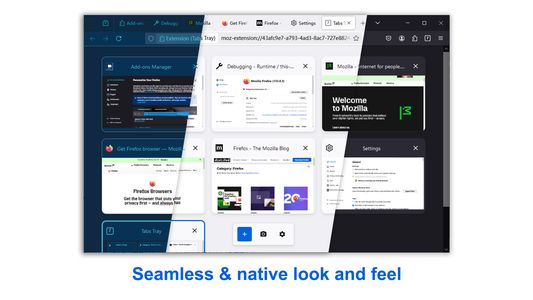
<li><b>Seamless Integration:</b> Adapts to your browser theme for a native look and feel.</li>
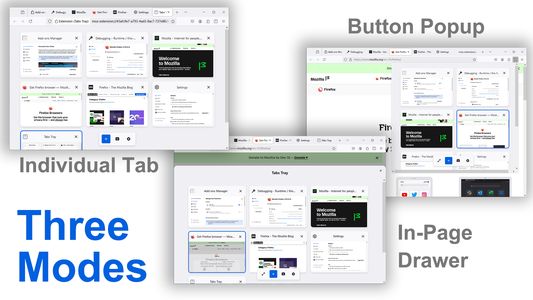
<li><b>Versatile Display Options:</b> Choose from Tab, Popup, or Drawer modes to suit your workflow.</li>
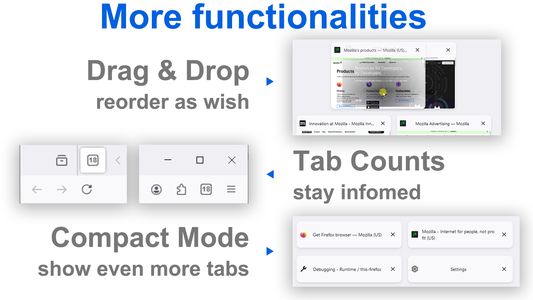
<li><b>Real-Time Tab Count:</b> Stay informed with tab counts displayed on the extension button and tab mode icon.</li>
<li><b>Intuitive Tab Management:</b> Easily create, close, or reorder tabs with drag-and-drop functionality.</li>
<li><b>Compact Mode:</b> Collapse thumbnails to fit even more tabs on one screen.</li>
</ul>
<b>Usage:</b>
Once installed, click the extension button or use the shortcut (Alt+A by default) to launch Tabs Tray. You can easily view and manage your tabs or click on one to switch to it.
Three modes are available:
<ul>
<li><b>Individual Tab:</b> Utilizes the full content area.</li>
<li><b>Extension Popup:</b> A flexible popup window launched from the extension button.</li>
<li><b>In-Page Drawer:</b> Opens a drawer within the current active tab for quick access. (Note: This mode is unavailable on some restricted sites, such as <i>addons.mozilla.org</i>.)</li>
</ul>
<b>Make the most of your spacious desktop monitor!</b>
<b>Tabs Tray</b> transforms your browsing experience by laying out all your tabs on the screen, neatly and orderly.
With titles and thumbnails presented, you can effortlessly spot and switch to the tab you need, at a glance.
<b>Features:</b>
<ul>
<li><b>Seamless Integration:</b> Adapts to your browser theme for a native look and feel.</li>
<li><b>Versatile Display Options:</b> Choose from Tab, Popup, or Drawer modes to suit your workflow.</li>
<li><b>Real-Time Tab Count:</b> Stay informed with tab counts displayed on the extension button and tab mode icon.</li>
<li><b>Intuitive Tab Management:</b> Easily create, close, or reorder tabs with drag-and-drop functionality.</li>
<li><b>Compact Mode:</b> Collapse thumbnails to fit even more tabs on one screen.</li>
</ul>
<b>Usage:</b>
Once installed, click the extension button or use the shortcut (Alt+A by default) to launch Tabs Tray. You can easily view and manage your tabs or click on one to switch to it.
Three modes are available:
<ul>
<li><b>Individual Tab:</b> Utilizes the full content area.</li>
<li><b>Extension Popup:</b> A flexible popup window launched from the extension button.</li>
<li><b>In-Page Drawer:</b> Opens a drawer within the current active tab for quick access. (Note: This mode is unavailable on some restricted sites, such as <i>addons.mozilla.org</i>.)</li>
</ul>
리뷰어 1명이 2점으로 평가함
권한 및 데이터
추가 정보
- 부가 기능 링크
- 버전
- 0.2.4
- 크기
- 2.81 MB
- 최근 업데이트
- 3달 전 (2026년 7월 9일)
- 관련 카테고리
- 라이선스
- All Rights Reserved
- 개인정보처리방침
- 이 부가 기능에 대한 개인정보처리방침 읽기
- 버전 목록
- 모음집에 추가