
TagHound - Analytics/GTM/Pixel 제작자: ONBET
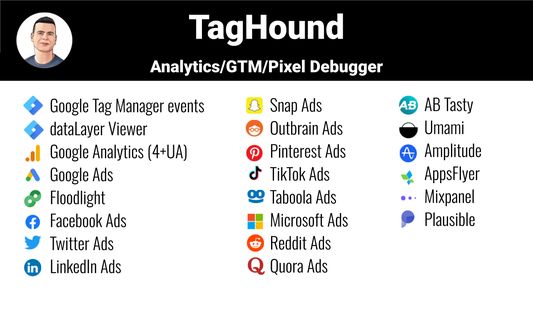
Debug Google Analytics, Google Tag Manager dataLayer, Google Ads, Facebook Ads & +18 ad platforms pixels: Twitter, TikTok and more
사용자 196명사용자 196명
확장 메타 데이터
스크린샷
정보
Debug Google Analytics, Google Tag Manager dataLayer, Google Ads, Facebook Ads & +18 ad platforms pixels: Twitter, TikTok and more
==TagHound: Analytics/GTM/Pixel Debugger==
TagHound Analytics/GTM/Pixel Debugger by Assaf Trafikant helps you validate your analytics tools implementation as well as ad platforms pixels and Google Tag Manager dataLayer events - all in one tool. It works all the time for all the supported platforms at once.
In total, TagHound Analytics/GTM/Pixel Debugger supports 22 analytics and ad platforms, including Google Analytics 4 (and older versions) & Google Tag Manager (events and dataLayer viewer), to give you a holistic tracking and pixel analysis experience.
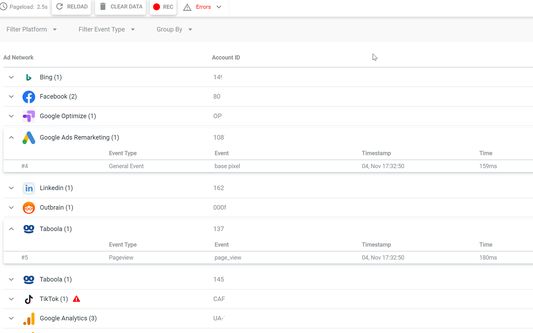
Just navigate to any page, open your DevTools panel (F12), or click the extension icon (less information) and it will show you all your pixels and events, with a never-seen-before error validation (over 1200 validation rules). Just click the event to see all the data in a clear format, grouped by attributes.
TagHound Analytics/GTM/Pixel Debugger allows you to group events by type, performance and attributes. You can RECORD your debugging activity while navigating through any website and even export the results.
TagHound Analytics/GTM/Pixel Debugger his all-in-one tool, giving you a clear high-level overview as well as detailed data harmonization between all platforms .
Three ways to see and debug the events
🟩 Clicking the extension icon
🟩 Using DevTools
🟩 On-screen toast messages
TagHound Analytics debugger & Ad platforms pixel helper features
🟥 Read all supported pixels at once
🟥 Clear view of each pixel parameters, grouped into categories with over 1200 validation rules
🟥 Filter pixels by type
🟥 Record activity across page and export the results
🟥 Group tags by type/ad platforms
🟥 Sort tags by execution time, platforms, etc.
🟥 Exclude domains from being tracked by the extension to optimize performance
Google Tag Manager features
🟨 dataLayer viewer
🟨 You can change the dataLayer name (the default dataLayer will always be tracked)
🟨 In the "Options" screen (the gear icon) you can add enhancements to Google Tag Manager Assistant (see pictures above):
🟪 Sort tags alphabetically
🟪 Highlight tags fired multiple times
🟪 Highlight tags with errors
🟪 Hide paused tags
==TagHound: Analytics/GTM/Pixel Debugger==
TagHound Analytics/GTM/Pixel Debugger by Assaf Trafikant helps you validate your analytics tools implementation as well as ad platforms pixels and Google Tag Manager dataLayer events - all in one tool. It works all the time for all the supported platforms at once.
In total, TagHound Analytics/GTM/Pixel Debugger supports 22 analytics and ad platforms, including Google Analytics 4 (and older versions) & Google Tag Manager (events and dataLayer viewer), to give you a holistic tracking and pixel analysis experience.
Just navigate to any page, open your DevTools panel (F12), or click the extension icon (less information) and it will show you all your pixels and events, with a never-seen-before error validation (over 1200 validation rules). Just click the event to see all the data in a clear format, grouped by attributes.
TagHound Analytics/GTM/Pixel Debugger allows you to group events by type, performance and attributes. You can RECORD your debugging activity while navigating through any website and even export the results.
TagHound Analytics/GTM/Pixel Debugger his all-in-one tool, giving you a clear high-level overview as well as detailed data harmonization between all platforms .
Three ways to see and debug the events
🟩 Clicking the extension icon
🟩 Using DevTools
🟩 On-screen toast messages
TagHound Analytics debugger & Ad platforms pixel helper features
🟥 Read all supported pixels at once
🟥 Clear view of each pixel parameters, grouped into categories with over 1200 validation rules
🟥 Filter pixels by type
🟥 Record activity across page and export the results
🟥 Group tags by type/ad platforms
🟥 Sort tags by execution time, platforms, etc.
🟥 Exclude domains from being tracked by the extension to optimize performance
Google Tag Manager features
🟨 dataLayer viewer
🟨 You can change the dataLayer name (the default dataLayer will always be tracked)
🟨 In the "Options" screen (the gear icon) you can add enhancements to Google Tag Manager Assistant (see pictures above):
🟪 Sort tags alphabetically
🟪 Highlight tags fired multiple times
🟪 Highlight tags with errors
🟪 Hide paused tags
0명이 0점으로 평가함
권한 및 데이터
추가 정보
- 부가 기능 링크
- 버전
- 1.3.4
- 크기
- 2.04 MB
- 마지막 업데이트
- 일 년 전 (2025년 3월 7일)
- 관련 카테고리
- 라이선스
- All Rights Reserved
- 버전 목록
- 모음집에 추가