
Tel Linker 제작자: Michael
Locates telephone numbers on a page and converts them into clickable links.
사용자 49명사용자 49명
확장 메타 데이터
스크린샷


정보
Locates telephone numbers on a page and converts them into clickable links.
This extension came about because of a desire to be able to click the telephone numbers on my company's intranet website in order to make phone calls. The problem is, in order to make outgoing calls, we have to dial +8 at the start. There simply weren't any existing (not that I could easily find at least) extensions that allowed that level of customization. Given I quite enjoy proving XKCD's automation cartoon correct, the 'Tel Linker' was born!
Keep in mind that in order to use this extension you must have software which can bind on your protocol of choice (see windows default programs, default programs by protocol)! Applications like Cisco Jabber, Skype, VerticalWave Dialer, etc. Either that or you have to have a phone system that supports some kind of http/https dialing, ie: http://callsystem.mycompany/call?number={1}{2}{3}
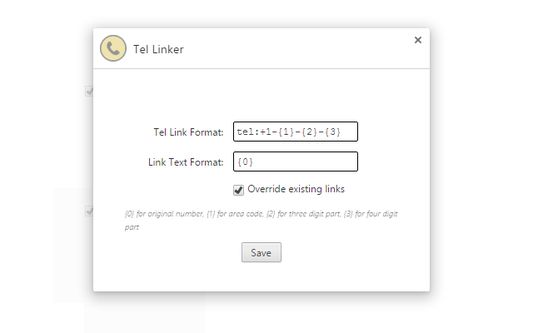
When matching phone numbers, it will provides 4 replacement variables for you to work with. {0} translates to the original number, in its a original state. {1} is the area code, {2} is the 3 digit part, and {3} is the four digit part.
EG: (555)-666 7777
{0} = (555)-666 7777
{1} = 555
{2} = 666
{3} = 7777
The default settings create a tel link, formatted as +1-555-666-7777, without changing the actual displayed text. If you need to use something other than tel, would like a different format, or need another dial out code, just change it in options! I would recommend that you not use the {0} replacement for the actual Tel Link portion, simply because some websites have decided to use 'pretty' formatting on their phone numbers, ie: 555.666.7777. Using periods in a phone number, for most phone clients, is not valid. The standard is to use either dashes to separate the numbers ({1}-{2}-{3}) or to simply have no separation ({1}{2}{3}).
If for some reason the extension misses a phone number, you can also try selecting the phone number and right clicking to use the context menu option. It will still try and apply the matching standards on the number just in case the issue was related to some odd DOM circumstance; if it can't match a phone number, it will simply parse out whatever protocol you've set and stick it in front of whatever you have highlighted.
You can also choose to mark either a single page or an entire domain as 'filtered', meaning Tel Linker will not find and replace phone numbers for that page/domain. To do so, just click the phone icon to the right of your address bar, and choose the option you prefer. To re-enable Tel Linker for the domain/page, just repeat the process, or go to the extension options and remove the domain/page from the filtered list.
If you run into any glitches, or have any suggestions, feel free to comment about it; I like to tinker with things in my spare time!
Update: Added ability to set formatting rules specific to domains. Click tel-linker icon in toolbar while on the domain you'd like to set the rule for.
This extension came about because of a desire to be able to click the telephone numbers on my company's intranet website in order to make phone calls. The problem is, in order to make outgoing calls, we have to dial +8 at the start. There simply weren't any existing (not that I could easily find at least) extensions that allowed that level of customization. Given I quite enjoy proving XKCD's automation cartoon correct, the 'Tel Linker' was born!
Keep in mind that in order to use this extension you must have software which can bind on your protocol of choice (see windows default programs, default programs by protocol)! Applications like Cisco Jabber, Skype, VerticalWave Dialer, etc. Either that or you have to have a phone system that supports some kind of http/https dialing, ie: http://callsystem.mycompany/call?number={1}{2}{3}
When matching phone numbers, it will provides 4 replacement variables for you to work with. {0} translates to the original number, in its a original state. {1} is the area code, {2} is the 3 digit part, and {3} is the four digit part.
EG: (555)-666 7777
{0} = (555)-666 7777
{1} = 555
{2} = 666
{3} = 7777
The default settings create a tel link, formatted as +1-555-666-7777, without changing the actual displayed text. If you need to use something other than tel, would like a different format, or need another dial out code, just change it in options! I would recommend that you not use the {0} replacement for the actual Tel Link portion, simply because some websites have decided to use 'pretty' formatting on their phone numbers, ie: 555.666.7777. Using periods in a phone number, for most phone clients, is not valid. The standard is to use either dashes to separate the numbers ({1}-{2}-{3}) or to simply have no separation ({1}{2}{3}).
If for some reason the extension misses a phone number, you can also try selecting the phone number and right clicking to use the context menu option. It will still try and apply the matching standards on the number just in case the issue was related to some odd DOM circumstance; if it can't match a phone number, it will simply parse out whatever protocol you've set and stick it in front of whatever you have highlighted.
You can also choose to mark either a single page or an entire domain as 'filtered', meaning Tel Linker will not find and replace phone numbers for that page/domain. To do so, just click the phone icon to the right of your address bar, and choose the option you prefer. To re-enable Tel Linker for the domain/page, just repeat the process, or go to the extension options and remove the domain/page from the filtered list.
If you run into any glitches, or have any suggestions, feel free to comment about it; I like to tinker with things in my spare time!
Update: Added ability to set formatting rules specific to domains. Click tel-linker icon in toolbar while on the domain you'd like to set the rule for.
9명이 3.6점으로 평가함
권한 및 데이터
추가 정보
- 부가 기능 링크
- 버전
- 0.5.4resigned1
- 크기
- 22.21 KB
- 마지막 업데이트
- 2년 전 (2024년 4월 25일)
- 버전 목록
- 모음집에 추가