
Test & Feedback 제작자: Microsoft Corporation
Now everyone on the team can own quality. Capture findings, create issues, and collaborate with the team, directly from the browser.
사용자 1,306명사용자 1,306명
확장 메타 데이터
스크린샷



정보
The Firefox Test & Feedback Extension will be retired on November 30, 2026.
Visit our documentation for detailed information on recommended alternatives.
Everyone in the team, be it product owners, developers, testers, UX designers etc., can now test their web-apps and give feedback, all directly from the browser on any platform: Windows, Mac, or Linux.
All kinds of teams will now be able to drive quality in 3 easy steps – capture, create & collaborate.
1. Capture
Take notes and screenshots with annotations. Automatically include rich data like user actions (as an image action log), and page load data.
2. Create
Create bugs, tasks, and feedback response work items to send feedback or report problems. Create test cases quickly based on the image action log while you explore your app. Automatically attach all your captured information.
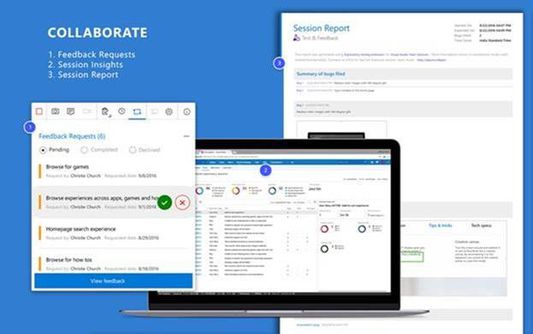
3. Collaborate
Work offline in standalone mode, then export your session to share findings with your team. Connect to Azure DevOps Services or to Team Foundation Server 2015 or later for more integrated experiences like explore user stories directly from the board, manage all feedback requests received, and easily track bugs, tasks and other work-items. Additionally, go to exploratory testing session insights page to view completed exploratory sessions and get insights across all completed sessions, for example, details about sessions and work items that are created, explored, and weren’t explored.
You can use the extension for FREE in these modes: Standalone and Connected
Standalone Mode:
Available to everyone. Any team, large or small, can use standalone mode to capture issues using screenshots with inline annotations and notes and then share the results using a session report. No connection to Azure DevOps Services or Team Foundation Server required.
Connected Mode:
Connect to Azure DevOps Services/Team Foundation Server to drive your exploratory testing and feedback flows.
1. Users with Basic access: Full capture and create capabilities to submit bugs, tasks and test cases. Includes collaboration capabilities like end-to-end traceability, rich insights across completed exploratory sessions, simplified bug/task tracking & triaging, and so on.
2. Users with Stakeholder access: Full capture and create capabilities, except for test cases, to submit feedback and respond to feedback requests from your team. Feedback experiences are available in Team Services and TFS "15" or later only.
Learn more
Visit our documentation for detailed information on recommended alternatives.
Everyone in the team, be it product owners, developers, testers, UX designers etc., can now test their web-apps and give feedback, all directly from the browser on any platform: Windows, Mac, or Linux.
All kinds of teams will now be able to drive quality in 3 easy steps – capture, create & collaborate.
1. Capture
Take notes and screenshots with annotations. Automatically include rich data like user actions (as an image action log), and page load data.
2. Create
Create bugs, tasks, and feedback response work items to send feedback or report problems. Create test cases quickly based on the image action log while you explore your app. Automatically attach all your captured information.
3. Collaborate
Work offline in standalone mode, then export your session to share findings with your team. Connect to Azure DevOps Services or to Team Foundation Server 2015 or later for more integrated experiences like explore user stories directly from the board, manage all feedback requests received, and easily track bugs, tasks and other work-items. Additionally, go to exploratory testing session insights page to view completed exploratory sessions and get insights across all completed sessions, for example, details about sessions and work items that are created, explored, and weren’t explored.
You can use the extension for FREE in these modes: Standalone and Connected
Standalone Mode:
Available to everyone. Any team, large or small, can use standalone mode to capture issues using screenshots with inline annotations and notes and then share the results using a session report. No connection to Azure DevOps Services or Team Foundation Server required.
Connected Mode:
Connect to Azure DevOps Services/Team Foundation Server to drive your exploratory testing and feedback flows.
1. Users with Basic access: Full capture and create capabilities to submit bugs, tasks and test cases. Includes collaboration capabilities like end-to-end traceability, rich insights across completed exploratory sessions, simplified bug/task tracking & triaging, and so on.
2. Users with Stakeholder access: Full capture and create capabilities, except for test cases, to submit feedback and respond to feedback requests from your team. Feedback experiences are available in Team Services and TFS "15" or later only.
Learn more
리뷰어 19명이 3.9점으로 평가함
권한 및 데이터
추가 정보
- 부가 기능 링크
- 버전
- 1.0.239.0
- 크기
- 1.93 MB
- 마지막 업데이트
- 2년 전 (2024년 4월 26일)
- 라이선스
- Custom License
- 개인정보처리방침
- 이 부가 기능에 대한 개인정보처리방침 읽기
- 버전 목록
- 모음집에 추가