
Text Legibility 제작자: Clear Solutions Software
Makes illegible webpages legible by adjusting text size, contrast, and links.
사용자 22명사용자 22명
확장 메타 데이터
스크린샷
정보
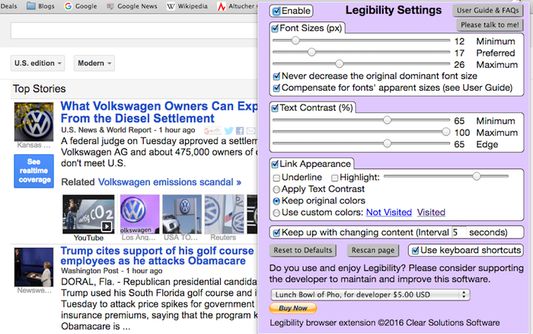
Are you fed up straining to read web pages with tiny, gray text? Legibility makes web pages easy to read by automatically adjusting font sizes, text contrast, and link visibility. In short, it makes any web page legible. Imagine that, easy to read and no more fiddling with the zoom setting! Once you set a preferred text size and contrast, Legibility adjusts every web page to your personal parameters for legibility.
While adjusting text sizes and contrasts, Legibility preserves the size and color design elements of the web page. Font size relationships are maintained, along with hue relationships. And, unlike using zoom, only text is affected. Photos and graphic elements keep their sizes and positions.
Text legibility is improved in three ways. First, the dominant visible text is scaled to your preferred size. This allows you to read the bulk of the page without strain. You also set minimum and maximum font sizes. Any text that falls outside this range is brought into range, while other sizes are scaled to retain their original size relationships.
Second, text contrast is adjusted to fall within the range you specify. Have you noticed the proliferation of websites designed with gray-on-white text, or worse, dark-gray on light-gray? Such sites are a struggle for anyone with a visual impairment or older than middle age. Legibility will automatically fix the contrast, while keeping the hues of text and background. Contrast can be further increased by a setting that darkens the edge of each character.
Third, link visibility and discoverability can be enhanced with contrasting colors, underlines, and highlights.
Other features:
• Shortcuts to quickly increase/decrease text size, or see the unaltered page
• Instant response to any adjustment made in the Settings window or with keyboard
• The current preferred text size shows in the toolbar
Thanks for checking out Legibility. I hope you enjoy a better web experience.
----------------------------------------------------------------------
Version 2.0.2 (14-November-2016)
- Shortcuts were broken after a Chrome update. Fixed.
Version 2.0.1 (24-October-2016)
- Google Analytics tracking removed.
- Edge contrast enhancement slider.
- When uninstalled, a web page asks for feedback.
Version 1.0.13 (10-July-2016)
- Shift and Control double click now work correctly on Windows.
(A Windows design error causes modifier keys to auto-repeat.)
- A new checkbox in Settings turns off or on all keyboard shortcuts.
This is a convenience for web pages that use Shift and Control for other functions.
While adjusting text sizes and contrasts, Legibility preserves the size and color design elements of the web page. Font size relationships are maintained, along with hue relationships. And, unlike using zoom, only text is affected. Photos and graphic elements keep their sizes and positions.
Text legibility is improved in three ways. First, the dominant visible text is scaled to your preferred size. This allows you to read the bulk of the page without strain. You also set minimum and maximum font sizes. Any text that falls outside this range is brought into range, while other sizes are scaled to retain their original size relationships.
Second, text contrast is adjusted to fall within the range you specify. Have you noticed the proliferation of websites designed with gray-on-white text, or worse, dark-gray on light-gray? Such sites are a struggle for anyone with a visual impairment or older than middle age. Legibility will automatically fix the contrast, while keeping the hues of text and background. Contrast can be further increased by a setting that darkens the edge of each character.
Third, link visibility and discoverability can be enhanced with contrasting colors, underlines, and highlights.
Other features:
• Shortcuts to quickly increase/decrease text size, or see the unaltered page
• Instant response to any adjustment made in the Settings window or with keyboard
• The current preferred text size shows in the toolbar
Thanks for checking out Legibility. I hope you enjoy a better web experience.
----------------------------------------------------------------------
Version 2.0.2 (14-November-2016)
- Shortcuts were broken after a Chrome update. Fixed.
Version 2.0.1 (24-October-2016)
- Google Analytics tracking removed.
- Edge contrast enhancement slider.
- When uninstalled, a web page asks for feedback.
Version 1.0.13 (10-July-2016)
- Shift and Control double click now work correctly on Windows.
(A Windows design error causes modifier keys to auto-repeat.)
- A new checkbox in Settings turns off or on all keyboard shortcuts.
This is a convenience for web pages that use Shift and Control for other functions.
리뷰어 45명이 3.8점으로 평가함
권한 및 데이터
추가 정보
- 부가 기능 링크
- 버전
- 2.0.5resigned1
- 크기
- 32.9 KB
- 최근 업데이트
- 2년 전 (2024년 5월 2일)
- 관련 카테고리
- 라이선스
- Custom License
- 개인정보처리방침
- 이 부가 기능에 대한 개인정보처리방침 읽기
- 버전 목록
- 모음집에 추가