WebExtension for TouchpadGestures Advanced 제작자: kamektx
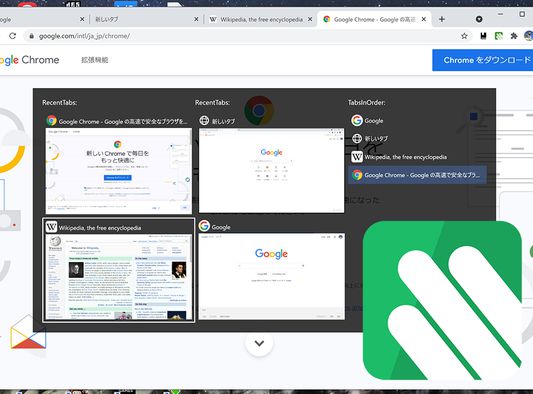
This Application was created to work with TouchpadGestures Advanced. You can switch tabs in a popup window by stroking the touchpad down with 3 fingers. https://github.com/kamektx/TouchpadGestures_Advanced
사용자 2명사용자 2명
확장 메타 데이터
스크린샷
정보
This Application was created to work with TouchpadGestures Advanced. To use this extension, you have to install TouchpadGestures Advanced software to your PC locally.
https://github.com/kamektx/TouchpadGestures_Advanced
What is TouchpadGestures Advanced?
This Application was created to extend the multi-fingered gesture experience of your Precision Touchpad.
The standard feature of Windows 10 allows users to switch foreground windows by sliding your touchpad with three-fingers to the right. This application also allows users to switch tabs within a window with similar touchpad gestures.
What can this application do?
- You can type Ctrl (+ Shift) + Tab by stroking the touchpad up and down with 3 fingers.
- With WebExtension(https://github.com/kamektx/WebExtensions_for_TGA), you can switch tabs by pop-up windows.
How to Use?
- This application is for **Windows 10** only.
- Download the installer in Releases page.
- Unzip the installer's zip.
- Run "setup.exe".
- Change your default touchpad gesture settings on Windows; Press start button, Go to Settings, Open "Devices", Select "Touchpad" tab, Click "Advanced gesture configuration" button, In "Configure your three finger gestures" paragraph, Set "Up" and "Down" to "Nothing". To set "Right" to "Switch apps" is recommended.
- Install WebExtension for TGA.
https://github.com/kamektx/TouchpadGestures_Advanced
What is TouchpadGestures Advanced?
This Application was created to extend the multi-fingered gesture experience of your Precision Touchpad.
The standard feature of Windows 10 allows users to switch foreground windows by sliding your touchpad with three-fingers to the right. This application also allows users to switch tabs within a window with similar touchpad gestures.
What can this application do?
- You can type Ctrl (+ Shift) + Tab by stroking the touchpad up and down with 3 fingers.
- With WebExtension(https://github.com/kamektx/WebExtensions_for_TGA), you can switch tabs by pop-up windows.
How to Use?
- This application is for **Windows 10** only.
- Download the installer in Releases page.
- Unzip the installer's zip.
- Run "setup.exe".
- Change your default touchpad gesture settings on Windows; Press start button, Go to Settings, Open "Devices", Select "Touchpad" tab, Click "Advanced gesture configuration" button, In "Configure your three finger gestures" paragraph, Set "Up" and "Down" to "Nothing". To set "Right" to "Switch apps" is recommended.
- Install WebExtension for TGA.
0명이 0점으로 평가함
권한 및 데이터
추가 정보