
Tranquility for eReader 제작자: Yuhe Wang
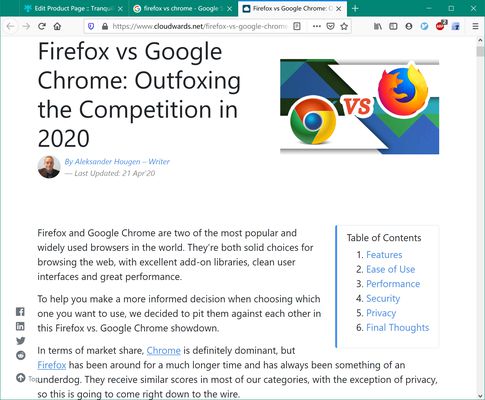
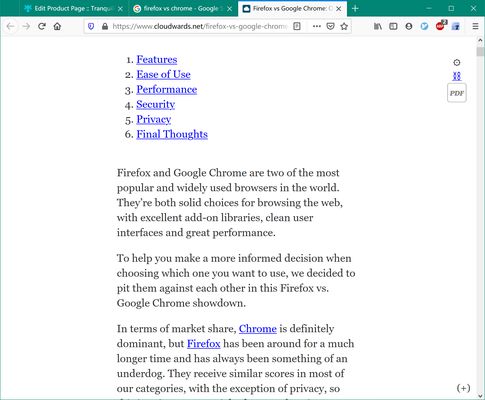
This is a cloned Tranquility Reader v3.0.17 with tapping page up/down support for eReader device. What's Tranquility Reader? It improves the readability of web articles by removing unnecessary elements like ads, images, social sharing widgets.
확장 메타 데이터
스크린샷
정보
This is a cloned Tranquility Reader with the following optimization for eReader device:
(1) Page up/down by tapping the left/right page margin (5% page width)
The following description is quoted from original "Tranquility Reader" v3.0.17 extension (https://github.com/ushnisha/tranquility-reader-webextensions). Great thanks to the Tranquility Reader author Arunk!
Tranquility Reader
Tranquility Reader improves the readability of web articles by removing unnecessary elements like ads, images, social share widgets, and more.
Functionality
Click the navigation-bar icon to transform the page on Desktop
Select the "Tranquility!" option from the toolbar menu on Android
Features
Compatible with NoScript
Save content offline for reading later (the tranquility view is saved locally on your computer)
Ability to export/import the offline content.
Ability to customize default font, font-size, font color, background color, and width of the reading area (you can use https://www.w3schools.com/colors/colors_picker.asp to pick a suitable color code—thanks to user JA for feedback on this!)
Create and manage your own preset configuration of the various options/preferences
Add/edit notes/annotations to portions of the offline content; collate annotations with context for a summary of all your notes and annotations.
Unobtrusive menu at the bottom of the screen (displayed by clicking the (+) symbol on the bottom right corner of the screen) provides additional features
Additional links are available through a "More Links" button in the menu at the bottom of the screen
Left-clicking a link in Tranquility View will open the link in Tranquility View in the current tab
Firefox for AndroidOS is supported from version 3.0.5 — please check the release notes for this version for limitations on AndroidOS.
Transform only a portion of the web page by highlighting the text and then running Tranquility (right-click context menu option - "Tranquilize Selection")
(1) Page up/down by tapping the left/right page margin (5% page width)
The following description is quoted from original "Tranquility Reader" v3.0.17 extension (https://github.com/ushnisha/tranquility-reader-webextensions). Great thanks to the Tranquility Reader author Arunk!
Tranquility Reader
Tranquility Reader improves the readability of web articles by removing unnecessary elements like ads, images, social share widgets, and more.
Functionality
Click the navigation-bar icon to transform the page on Desktop
Select the "Tranquility!" option from the toolbar menu on Android
Features
Compatible with NoScript
Save content offline for reading later (the tranquility view is saved locally on your computer)
Ability to export/import the offline content.
Ability to customize default font, font-size, font color, background color, and width of the reading area (you can use https://www.w3schools.com/colors/colors_picker.asp to pick a suitable color code—thanks to user JA for feedback on this!)
Create and manage your own preset configuration of the various options/preferences
Add/edit notes/annotations to portions of the offline content; collate annotations with context for a summary of all your notes and annotations.
Unobtrusive menu at the bottom of the screen (displayed by clicking the (+) symbol on the bottom right corner of the screen) provides additional features
Additional links are available through a "More Links" button in the menu at the bottom of the screen
Left-clicking a link in Tranquility View will open the link in Tranquility View in the current tab
Firefox for AndroidOS is supported from version 3.0.5 — please check the release notes for this version for limitations on AndroidOS.
Transform only a portion of the web page by highlighting the text and then running Tranquility (right-click context menu option - "Tranquilize Selection")
리뷰어 1명이 5점으로 평가함
권한 및 데이터
추가 정보
- 부가 기능 링크
- 버전
- 3.0.17
- 크기
- 86.45 KB
- 최근 업데이트
- 6년 전 (2020년 5월 17일)
- 버전 목록
- 모음집에 추가