Unescape as HTML 제작자: Fabio Pesari
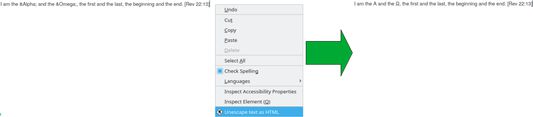
Unescape text in any editable input field as HTML, turning character references (like `π`) to Unicode characters (like `π`), by right-clicking on editable fields and selecting "Unescape text as HTML".
확장 메타 데이터
스크린샷
정보
Very simple extension for Mozilla Firefox (and compatible browsers) which unescapes text in any editable input field as HTML, turning character references (like `π`) to Unicode characters (like `π`).
Usage
Right-click on any input field you have filled, select `Unescape text as HTML` and the entered text should be replaced with an unescaped version of it.
Acknowledgements
Thanks to Rob Wu for this essential JS trick: exactly what this extension needed!
And thanks to the MDN of course! Free knowledge is as important as free software.
For a list of HTML character references, see this Wikipedia entry.
Usage
Right-click on any input field you have filled, select `Unescape text as HTML` and the entered text should be replaced with an unescaped version of it.
Acknowledgements
Thanks to Rob Wu for this essential JS trick: exactly what this extension needed!
And thanks to the MDN of course! Free knowledge is as important as free software.
For a list of HTML character references, see this Wikipedia entry.
0명이 0점으로 평가함
추가 정보
- 부가 기능 링크
- 버전
- 0.1.0
- 크기
- 24.25 KB
- 마지막 업데이트
- 6년 전 (2020년 11월 7일)
- 관련 카테고리
- 버전 목록
- 모음집에 추가