
UniquePasswordBuilder Addon 제작자: Grégory Paul, Philippe
That addon allows you to build strong and different password for each site you visit.
사용자 3명사용자 3명
확장 메타 데이터
스크린샷

정보
A good security practice is to use a different and strong passwords for each site you visit.
Memorizing that in your head is a pain.
The UniquePasswordBuilder addon allows you to construct strong and different passwords based from a single master password (the only you have to know).
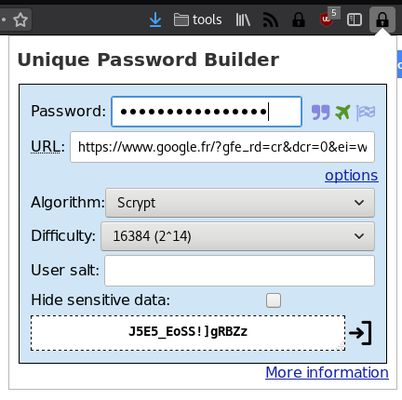
When you’re on a login page, click on the lock icon, then type your master password. When finished, a password for that login page has been generated. You can then click on the icon on the right or press enter to paste it into clipboard, then just paste it in the login form. For each website, the generated password is different.
The master password is hashed a large number of time with the domain’s site generating an unique password for that site. Hashing algorithm is scrypt (which is memory resistant).
Note that your master password should be strong (more than 10 characters in lower and upper case, numbers and special characters). Using simple password makes brute force attack easier.
Other password tools (LastPass, KeyPass, etc) usually stores websites passwords into a encrypted database.
The drawback of that approach is that the database needs to be synced between all of your devices.
UniquePasswordBuilder doesn’t uses a central database because it recomputes your password each time.
For increased security, you can set a `user salt`, which make it even more resilient against rainbow table attacks.
You can use CTRL + SHIFT + L to open the addon.
That addon is free software and you can study the source code here : https://github.com/paulgreg/UniquePasswordBuilder
You’ll find further information on the project home page : https://paulgreg.me/UniquePasswordBuilder/
Memorizing that in your head is a pain.
The UniquePasswordBuilder addon allows you to construct strong and different passwords based from a single master password (the only you have to know).
When you’re on a login page, click on the lock icon, then type your master password. When finished, a password for that login page has been generated. You can then click on the icon on the right or press enter to paste it into clipboard, then just paste it in the login form. For each website, the generated password is different.
The master password is hashed a large number of time with the domain’s site generating an unique password for that site. Hashing algorithm is scrypt (which is memory resistant).
Note that your master password should be strong (more than 10 characters in lower and upper case, numbers and special characters). Using simple password makes brute force attack easier.
Other password tools (LastPass, KeyPass, etc) usually stores websites passwords into a encrypted database.
The drawback of that approach is that the database needs to be synced between all of your devices.
UniquePasswordBuilder doesn’t uses a central database because it recomputes your password each time.
For increased security, you can set a `user salt`, which make it even more resilient against rainbow table attacks.
You can use CTRL + SHIFT + L to open the addon.
That addon is free software and you can study the source code here : https://github.com/paulgreg/UniquePasswordBuilder
You’ll find further information on the project home page : https://paulgreg.me/UniquePasswordBuilder/
1명이 5점으로 평가함
권한 및 데이터
추가 정보
- 부가 기능 링크
- 버전
- 1.1.5
- 크기
- 691.22 KB
- 마지막 업데이트
- 7년 전 (2019년 6월 4일)
- 관련 카테고리
- 라이선스
- MIT 라이선스
- 개인정보처리방침
- 이 부가 기능에 대한 개인정보처리방침 읽기
- 버전 목록
- 모음집에 추가
It depends on scrypt-async, a JavaScript library compatible with scrypt.
Scrypt is a Password-Based Key Derivation Function from Colin Percival.