
Pinterest downloader for entire boards | Unpinned 제작자: Uninspired Studio
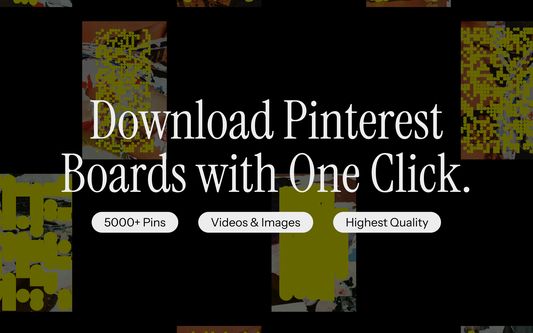
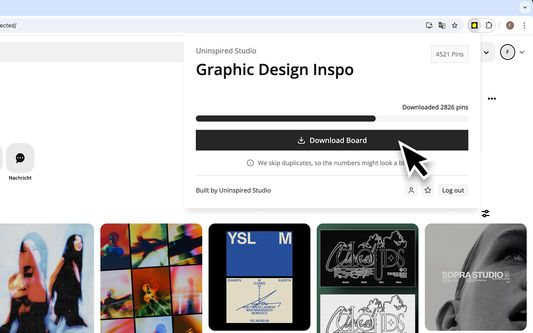
Download Pinterest videos and images in bulk with Unpinned. Save entire boards, even those with over 5,000 pins — in top quality.
확장 메타 데이터
스크린샷



정보
How It Works
1. Install Unpinned from the browser store.
2. Open Unpinned and create your free account.
3. Open any Pinterest board.
4. Launch Unpinned and start downloading Pinterest boards.
How to Access Unpinned After Installation
After installing, look for the Unpinned icon in the Firefox toolbar at the top-right corner. Not there? Click the Extensions (puzzle piece) button, find Unpinned, click the gear icon, and select Pin to Toolbar for quicker access.
Troubleshooting
🔹 Extension not working? Restart your browser and try again.
🔹 Still stuck? Reach out to us — we actually reply!
Features
- Bulk Download Images & Videos – Download entire Pinterest boards in seconds — whether it's 50 pins or 5,000. Save time with effortless, one-click downloads.
- Quality – Say goodbye to blurry, compressed images. Unpinned saves Pinterest images and videos in their highest original resolution.
Choose Your Plan
- Free Plan – Enjoy essential features at no cost. Download boards with up to 50 pins in the highest possible quality — no commitments.
- Yearly Plan €50/year – Save big with an annual subscription. Unlock unlimited bulk downloads (up to 5,000+ images per board) at full quality.
- Monthly Plan €6/month Prefer flexibility? Get unlimited access on a month-to-month basis with full-quality downloads.
Having trouble affording it? Send us an email — we're happy to work something out.
> Support Us! – As a small studio, every review means the world to us. If you enjoy using Unpinned, please consider leaving a review — it really helps!
Legal Notice
By using Unpinned, you agree to our Privacy Policy. Unpinned is not affiliated with Pinterest. It is an independent tool and is neither endorsed nor certified by Pinterest. All trademarks are the property of their respective owners.
Built with 🪄💫🐇🖤 by Uninspired Studio
1. Install Unpinned from the browser store.
2. Open Unpinned and create your free account.
3. Open any Pinterest board.
4. Launch Unpinned and start downloading Pinterest boards.
How to Access Unpinned After Installation
After installing, look for the Unpinned icon in the Firefox toolbar at the top-right corner. Not there? Click the Extensions (puzzle piece) button, find Unpinned, click the gear icon, and select Pin to Toolbar for quicker access.
Troubleshooting
🔹 Extension not working? Restart your browser and try again.
🔹 Still stuck? Reach out to us — we actually reply!
Features
- Bulk Download Images & Videos – Download entire Pinterest boards in seconds — whether it's 50 pins or 5,000. Save time with effortless, one-click downloads.
- Quality – Say goodbye to blurry, compressed images. Unpinned saves Pinterest images and videos in their highest original resolution.
Choose Your Plan
- Free Plan – Enjoy essential features at no cost. Download boards with up to 50 pins in the highest possible quality — no commitments.
- Yearly Plan €50/year – Save big with an annual subscription. Unlock unlimited bulk downloads (up to 5,000+ images per board) at full quality.
- Monthly Plan €6/month Prefer flexibility? Get unlimited access on a month-to-month basis with full-quality downloads.
Having trouble affording it? Send us an email — we're happy to work something out.
> Support Us! – As a small studio, every review means the world to us. If you enjoy using Unpinned, please consider leaving a review — it really helps!
Legal Notice
By using Unpinned, you agree to our Privacy Policy. Unpinned is not affiliated with Pinterest. It is an independent tool and is neither endorsed nor certified by Pinterest. All trademarks are the property of their respective owners.
Built with 🪄💫🐇🖤 by Uninspired Studio
리뷰어 8명이 4.5점으로 평가함
권한 및 데이터
필수 권한:
- 파일을 다운로드하고 브라우저의 다운로드 기록을 읽고 수정
- 브라우저 탭에 접근
- pinterest.com 도메인의 사이트에서 사용자의 데이터에 접근
- pinterest.info 도메인의 사이트에서 사용자의 데이터에 접근
- pinterest.at 도메인의 사이트에서 사용자의 데이터에 접근
- pinterest.com.au 도메인의 사이트에서 사용자의 데이터에 접근
- pinterest.ca 도메인의 사이트에서 사용자의 데이터에 접근
- pinterest.ch 도메인의 사이트에서 사용자의 데이터에 접근
- pinterest.cl 도메인의 사이트에서 사용자의 데이터에 접근
- pinterest.de 도메인의 사이트에서 사용자의 데이터에 접근
- pinterest.dk 도메인의 사이트에서 사용자의 데이터에 접근
- pinterest.es 도메인의 사이트에서 사용자의 데이터에 접근
- pinterest.fr 도메인의 사이트에서 사용자의 데이터에 접근
- pinterest.co.uk 도메인의 사이트에서 사용자의 데이터에 접근
- pinterest.ie 도메인의 사이트에서 사용자의 데이터에 접근
- pinterest.jp 도메인의 사이트에서 사용자의 데이터에 접근
- pinterest.co.kr 도메인의 사이트에서 사용자의 데이터에 접근
- pinterest.com.mx 도메인의 사이트에서 사용자의 데이터에 접근
- pinterest.nz 도메인의 사이트에서 사용자의 데이터에 접근
- pinterest.se 도메인의 사이트에서 사용자의 데이터에 접근
- pinterest.ph 도메인의 사이트에서 사용자의 데이터에 접근
- pinterest.pt 도메인의 사이트에서 사용자의 데이터에 접근
- pinterest.ru 도메인의 사이트에서 사용자의 데이터에 접근
- auth.uninspired.app에서 사용자의 데이터에 접근
- uninspired.app에서 사용자의 데이터에 접근
- ph.uninspired.work에서 사용자의 데이터에 접근
- i.pinimg.com에서 사용자의 데이터에 접근
- v1.pinimg.com에서 사용자의 데이터에 접근
추가 정보
- 부가 기능 링크
- 버전
- 1.0.18
- 크기
- 2.27 MB
- 최근 업데이트
- 2달 전 (2026년 7월 15일)
- 라이선스
- All Rights Reserved
- 개인정보처리방침
- 이 부가 기능에 대한 개인정보처리방침 읽기
- 버전 목록
- 모음집에 추가