
UsableHomeButton 제작자: Marat Tanalin
Button for opening home page of any current site, with menu with parent URLs, items for opening in private window, copying titles and URLs, forgetting site or page, etc.
사용자 363명사용자 363명
확장 메타 데이터
스크린샷

정보
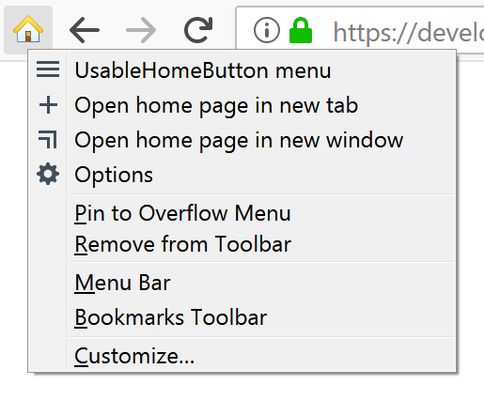
Pressing the extension’s toolbar button or
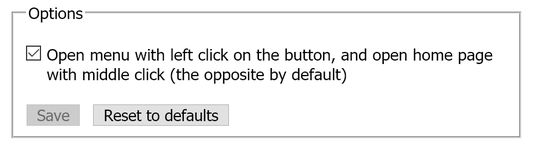
The extension’s options allow to rebind pressing the button to opening the extension’s menu instead of opening the home page of the site.
In Firefox 72+, pressing the button while holding down the Ctrl key opens the site’s home page in a new tab, and while holding down Shift — in a new window. Pressing the button while holding down Alt opens the current page in a private window.
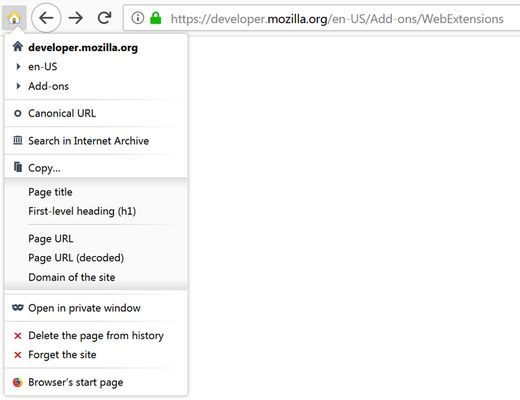
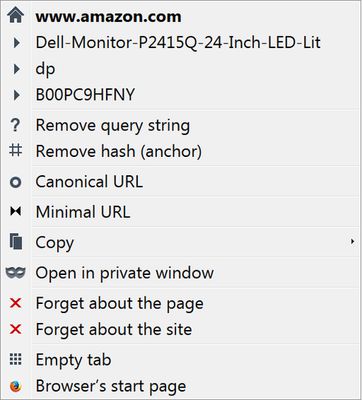
The extension button’s menu contains a list of hierarchical parts of the current page’s URL with ability to go to any of the corresponding parent pages, and other useful items:
“Remove query string”, “Remove hash (anchor)”, “Canonical URL”, “Minimal URL”, “Search in Internet Archive”, “Copy” submenu, “Open in private window”, “Delete the page from history”, “Forget the site”, “Browser’s start page” (Firefox 58+).
For details, see the project page on the author’s website.
Note for ANDROID users: availability of all features of the extension in Firefox for Android is not tested and not guaranteed.
Alt+H keyboard shortcut (hotkey) opens home page (domain root) of the site opened in currently active tab. For example, it’s easy to go from the page http://example.com/some/page/ directly to http://example.com/.The extension’s options allow to rebind pressing the button to opening the extension’s menu instead of opening the home page of the site.
In Firefox 72+, pressing the button while holding down the Ctrl key opens the site’s home page in a new tab, and while holding down Shift — in a new window. Pressing the button while holding down Alt opens the current page in a private window.
The extension button’s menu contains a list of hierarchical parts of the current page’s URL with ability to go to any of the corresponding parent pages, and other useful items:
“Remove query string”, “Remove hash (anchor)”, “Canonical URL”, “Minimal URL”, “Search in Internet Archive”, “Copy” submenu, “Open in private window”, “Delete the page from history”, “Forget the site”, “Browser’s start page” (Firefox 58+).
For details, see the project page on the author’s website.
Note for ANDROID users: availability of all features of the extension in Firefox for Android is not tested and not guaranteed.
리뷰어 22명이 4.8점으로 평가함
권한 및 데이터
필수 권한:
- 브라우저 설정 읽기 및 수정
- 최근 브라우징 기록, 쿠키, 관련 데이터 삭제
- 클립보드에 데이터 넣기
- 방문 기록에 접근
- 알림 표시
- 브라우저 탭에 접근
- 모든 웹사이트에서 사용자의 데이터에 접근
추가 정보
- 부가 기능 링크
- 버전
- 2.6
- 크기
- 57.96 KB
- 최근 업데이트
- 6년 전 (2021년 3월 7일)
- 관련 카테고리
- 라이선스
- Custom License
- 사용자 라이선스 동의서
- 이 부가 기능에 대한 사용권 계약 읽기
- 버전 목록
- 모음집에 추가