
Vaadin Theme Assistant 제작자: Sascha Ißbrücker
A utility for theming Vaadin components
사용자 1명사용자 1명
확장 메타 데이터
스크린샷
정보
A browser extension that allows to visually identify elements of Vaadin components that can be themed, and gives instructions on how to set up the correct CSS in a Vaadin Flow or Fusion application.
The application needs to use a custom theme in order to make use of the instructions provided by the extension.
Features:
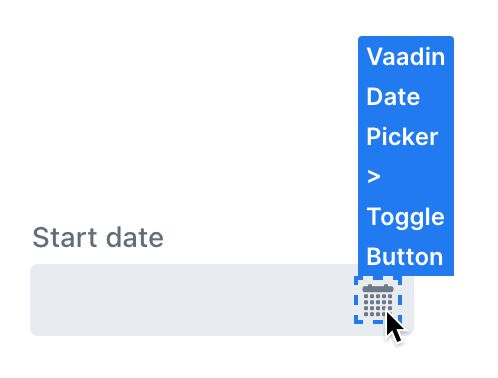
- Custom element picker / inspector that is optimized for Vaadin components and their internal parts
- Provides instructions and code snippets that can be copied / pasted into your application
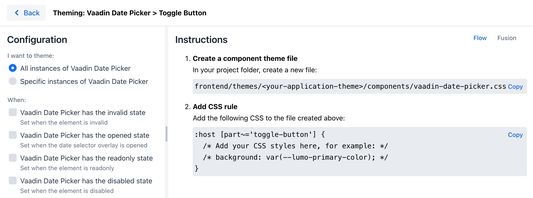
- Configure whether you want to theme all, or only specific instances of a component
- Configure whether the styles should only be applied when the component is in a specific state (opened, closed, invalid, ...)
- Optimized for Vaadin 22
Usage:
- First, install the extension
- Open the application that you want to theme in your browser
- Open the developer tools
- Open the "Vaadin Theme Assistant" panel
- Click on "Pick element"
- Hover the cursor over a Vaadin component that you want to theme, notice how individual elements get highlighted
- Click on a highlighted element
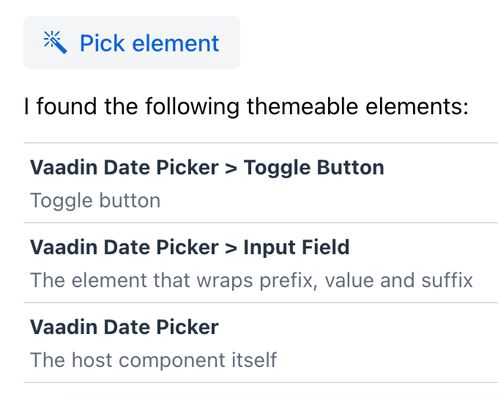
- The dev tools panel will now list a number of suggestions for elements that can be themed
- Click on one of the suggested elements to start theming it
- Configure the scope for the styles that you want to apply to the element on the left side. You can choose to either style all instances of the component, or only specific ones. You can also choose to apply the styles only when the component is in a specific state.
- Follow the instructions on the right side to apply the styles in your application
NOTE: This is not an official Vaadin product. No support will be provided by Vaadin employees.
The application needs to use a custom theme in order to make use of the instructions provided by the extension.
Features:
- Custom element picker / inspector that is optimized for Vaadin components and their internal parts
- Provides instructions and code snippets that can be copied / pasted into your application
- Configure whether you want to theme all, or only specific instances of a component
- Configure whether the styles should only be applied when the component is in a specific state (opened, closed, invalid, ...)
- Optimized for Vaadin 22
Usage:
- First, install the extension
- Open the application that you want to theme in your browser
- Open the developer tools
- Open the "Vaadin Theme Assistant" panel
- Click on "Pick element"
- Hover the cursor over a Vaadin component that you want to theme, notice how individual elements get highlighted
- Click on a highlighted element
- The dev tools panel will now list a number of suggestions for elements that can be themed
- Click on one of the suggested elements to start theming it
- Configure the scope for the styles that you want to apply to the element on the left side. You can choose to either style all instances of the component, or only specific ones. You can also choose to apply the styles only when the component is in a specific state.
- Follow the instructions on the right side to apply the styles in your application
NOTE: This is not an official Vaadin product. No support will be provided by Vaadin employees.
리뷰어 0명이 0점으로 평가함
권한 및 데이터
추가 정보