
Video Plus 제작자: NiklasG
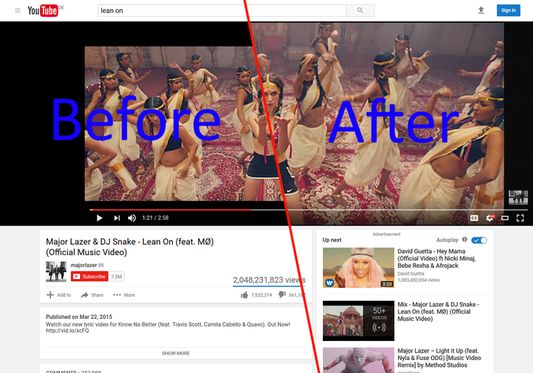
This add-on increases the display size of videos by removing unnecessary padding bars.
사용자 83명사용자 83명
확장 메타 데이터
스크린샷
정보
So you want to watch that wide screen video on the entire surface of your 21:9 screen? No such luck if the uploader of the video for some reason decided to add black padding bars, which are not noticed on 16:9 screens. On a wider screen, you are stuck with black bars on all 4 sides of the video. For example a 21:9 video padded to 16:9 on a 21:9 "ultrawide" screen wastes mode than 40% of the screen on black bars — and this is very common for example for music videos on YouTube or older movies.
This extension changes that. While a video is played, it keeps scanning it for padding bars and zooms the video to crop of the edges as far as it is possible without stretching it or pushing content out to the sides. All black bars are effectively removed.
Technical note:
To do its magic, this extension needs to know the actual dimensions of the video without padding, and the maximum area the video can cover without colliding with other page elements. Both can change without explicit notice, and for the former there isn't even a direct way to get it.
This extension therefore takes considerable shortcuts to keep the CUP usage low:
- The actual video dimensions (ignoring any added padding) have to be read from video frames:
- Check whether the color is uniform along each edge, and if it is, probe how far inward that solid color goes.
- This is probed at three places along each edge and the minimum of these probes is seen as padding in that frame and is cropped off.
- That check has to be performed on individual frames and, due to the way video streaming works in browsers, cant be done ahead of time (without considerable overhead and complications).
- As to not rely on a single frame that may not represent the entire video, the check is repeated every 0.3 to 2.5 seconds, depending on the previous rate of changes.
- To prevent stuttering due to frequently changing video zoom levels and positions, a delay of 5 seconds (configurable) is added before fully updating the video size.
- In addition to that, the screen area that is available for the video may change. This is re-evaluated after a number of user <--> page interactions.
Permissions used:
- "Access your data for all websites", "Access browser tabs" and "Access browser activity during navigation": This extension can be configured (see its options page) to work on every website, so it needs to know when they are loaded and be allowed to access them. It only does that for the pages you chose (youtube.com by default) and will never send data anywhere.
- "Display notifications to you": Tell you when something goes wrong, (so you should never see this ;) ).
This extension changes that. While a video is played, it keeps scanning it for padding bars and zooms the video to crop of the edges as far as it is possible without stretching it or pushing content out to the sides. All black bars are effectively removed.
Technical note:
To do its magic, this extension needs to know the actual dimensions of the video without padding, and the maximum area the video can cover without colliding with other page elements. Both can change without explicit notice, and for the former there isn't even a direct way to get it.
This extension therefore takes considerable shortcuts to keep the CUP usage low:
- The actual video dimensions (ignoring any added padding) have to be read from video frames:
- Check whether the color is uniform along each edge, and if it is, probe how far inward that solid color goes.
- This is probed at three places along each edge and the minimum of these probes is seen as padding in that frame and is cropped off.
- That check has to be performed on individual frames and, due to the way video streaming works in browsers, cant be done ahead of time (without considerable overhead and complications).
- As to not rely on a single frame that may not represent the entire video, the check is repeated every 0.3 to 2.5 seconds, depending on the previous rate of changes.
- To prevent stuttering due to frequently changing video zoom levels and positions, a delay of 5 seconds (configurable) is added before fully updating the video size.
- In addition to that, the screen area that is available for the video may change. This is re-evaluated after a number of user <--> page interactions.
Permissions used:
- "Access your data for all websites", "Access browser tabs" and "Access browser activity during navigation": This extension can be configured (see its options page) to work on every website, so it needs to know when they are loaded and be allowed to access them. It only does that for the pages you chose (youtube.com by default) and will never send data anywhere.
- "Display notifications to you": Tell you when something goes wrong, (so you should never see this ;) ).
10명이 3.9점으로 평가함
권한 및 데이터
추가 정보
- 부가 기능 링크
- 버전
- 0.1.7resigned1
- 크기
- 105.83 KB
- 마지막 업데이트
- 2년 전 (2024년 4월 25일)
- 관련 카테고리
- 버전 목록
- 모음집에 추가