
View Image Context Menu Item 제작자: Anton G
Adds View Image to the image context menu.
사용자 3,852명사용자 3,852명
확장 메타 데이터
스크린샷



정보
!! In an attempt to be compatible with image sites that block hot-linking, this add-on requires additional permissions to be able to intercept image requests and set the Referer and Accept headers.
Description
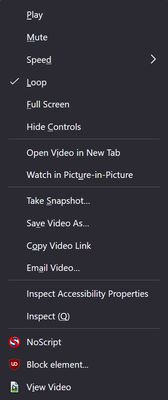
Adds "View Image" context menu item for images, restoring old functionality replaced by the "Open Image in New Tab" official context menu item. Also adds "View Video" and "View Audio", functioning in a similar fashion.
Add-on contains an Options page allowing for configuration of what the various user actions can do. Default actions are:
- Left click opens selected image in the same tab.
- Shift left click opens selected image in a new window.
- Ctrl left click opens selected image in new foreground tab.
- Ctrl+shift left click opens selected image in new background tab.
- Middle click opens selected image in a new background tab.
userChrome.css
!! Here be dragons. userChrome allows a lot of customization of the UI, but is subject to unannounced changes by Mozilla over the course of Firefox releases.
If you want to hide the default "Open Image in New Tab" context menu item and move this add-on's context menu items to a more logical place, the following addition to userChrome.css should do the trick. The provided CSS hides some additional less-than-useful menu items - edit/remove those sections as desired.
Quick step-by-step explanation of how to apply userChrome.css here: https://imgur.com/a/eXnuFci
Note: The way the CSS works is by setting the visual "order" of the menu items in the context menu which is a using display: flex, flex-direction: column. The order is set in groups to -40/-30/-20/-10 - the groups are rendered in ascending order. Any omitted element is rendered after the given groups with a default order of 0. While items are rendered in ascending order, this does not change their actual order in the html, so arrow key navigation through the menu becomes wierd.
Description
Adds "View Image" context menu item for images, restoring old functionality replaced by the "Open Image in New Tab" official context menu item. Also adds "View Video" and "View Audio", functioning in a similar fashion.
Add-on contains an Options page allowing for configuration of what the various user actions can do. Default actions are:
- Left click opens selected image in the same tab.
- Shift left click opens selected image in a new window.
- Ctrl left click opens selected image in new foreground tab.
- Ctrl+shift left click opens selected image in new background tab.
- Middle click opens selected image in a new background tab.
userChrome.css
!! Here be dragons. userChrome allows a lot of customization of the UI, but is subject to unannounced changes by Mozilla over the course of Firefox releases.
If you want to hide the default "Open Image in New Tab" context menu item and move this add-on's context menu items to a more logical place, the following addition to userChrome.css should do the trick. The provided CSS hides some additional less-than-useful menu items - edit/remove those sections as desired.
/*
  Based on context menu elements parsed from Firefox 124.
  Menu items change between Firefox releases. This CSS may be out of date.

  This CSS attempts to impose a visual sort order using the "order" style attribute.
  Elements are rendered in ascending order. It also styles the add-ons menu elements
  to look like the default ones by hiding the icon.

  Order:
  - All menu items fore "View Video" set as order: -40
  - "View Video" set as order: -30
  - All menu items after "View Video" but before "View Image" set as order: -20
  - "View Image" and "View Audio" set as order: -10
  - Everything after "View Image" and "Video Audio" is omitted and defaults to order: 0

  Styling:
  - View Image has its icon hidden
  - View Audio/Video has its icon made invisible (the padding needs to be a bit different)

  Hiding: OMIT OR EDIT THESE SECTIONS AS DESIRED
  - The original "Open .. in New Tab" menu elements are hidden
  - Optionally other elements, like "Email Image..." can be hidden if not need

*/


/* Style the add-on's menu elements to hide the icons */
menuitem[id*="view-video-context-menu-item"] > .menu-iconic-left { opacity: 0 !important; }
menuitem[id*="view-audio-context-menu-item"] > .menu-iconic-left { opacity: 0 !important; }
menuitem[id*="view-image-context-menu-item"] > .menu-iconic-left { display: none !important; }


/* All the menu elements below should be rendered before the add-on's "View Video" menu element */
menugroup#context-navigation,
menuseparator#context-sep-navigation,
menuitem#context-viewsource-goToLine,
menuitem#context-viewsource-wrapLongLines,
menuitem#context-viewsource-highlightSyntax,
menuseparator#context-sep-viewsource-commands,
menuitem#spell-no-suggestions, /* No Spelling Suggestions */
menuitem#spell-add-to-dictionary, /* Add to Dictionary */
menuitem#spell-undo-add-to-dictionary, /* Undo Add To Dictionary */
menuseparator#spell-suggestions-separator,
menuitem#context-openlinkincurrent, /* Open Link */
menuitem#context-openlinkincontainertab, /* Open Link in New  Tab */
menuitem#context-openlinkintab, /* Open Link in New Tab */
menu#context-openlinkinusercontext-menu, /* Open Link in New Container Tab */
menuitem#context-openlink, /* Open Link in New Window */
menuitem#context-openlinkprivate, /* Open Link in New Private Window */
menuseparator#context-sep-open,
menuitem#context-bookmarklink, /* Bookmark Link… */
menuitem#context-savelink, /* Save Link As… */
menuitem#context-savelinktopocket, /* Save Link to Pocket */
menuitem#context-copyemail, /* Copy Email Address */
menuitem#context-copyphone, /* Copy Phone Number */
menuitem#context-copylink, /* Copy Link */
menuitem#context-stripOnShareLink, /* Copy Link Without Site Tracking */
menu#context-sendlinktodevice, /* Send Link to Device */
menuseparator#context-sep-sendlinktodevice,
menuseparator#context-sep-copylink,
menuitem#context-media-play, /* Play */
menuitem#context-media-pause, /* Pause */
menuitem#context-media-mute, /* Mute */
menuitem#context-media-unmute, /* Unmute */
menu#context-media-playbackrate, /* Speed */
menuitem#context-media-loop, /* Loop */
menuitem#context-leave-dom-fullscreen, /* Exit Full Screen */
menuitem#context-video-fullscreen, /* Full Screen */
menuitem#context-media-hidecontrols, /* Hide Controls */
menuitem#context-media-showcontrols, /* Show Controls */
menuseparator#context-media-sep-video-commands
{ order: -40 !important; }


/* The add-on's "View Video" is rendered next */
menuitem[id*="view-video-context-menu-item"]
{ order: -30 !important; }


/* All the menu elements below should be rendered after the "View Video" but before "View Image" and "View Audio" */
menuitem#context-viewvideo, /* Open Video in New Tab */
menuitem#context-video-pictureinpicture, /* Watch in Picture-in-Picture */
menuseparator#context-media-sep-commands,
menuitem#context-reloadimage /* Reload Image */
{ order: -20 !important; }


/* The menu elements below are from the add-on and are rendered after the elements above */
menuitem[id*="view-image-context-menu-item"],
menuitem[id*="view-audio-context-menu-item"]
{ order: -10 !important; }


/* Rest of elements ommited; any menu element not in the above two selections will render below "View Image" */


/* Hide the original "View .. in New Tab" menu elements. Omit this section if want to keep old menu items too */
menuitem#context-viewvideo, /* Open Video in New Tab */
menuitem#context-viewimage /* Open Image in New Tab */
{ display: none; }


/* Optionally hide other menu items. Omit or edit this section as desired. */
menugroup#context-navigation,
menuseparator#context-sep-navigation,
menuitem#context-openlinkincurrent, /* Open Link */
menuitem#context-openlinkincontainertab, /* Open Link in New  Tab */
menuitem#context-openlinkintab, /* Open Link in New Tab */
menuitem#context-openlink, /* Open Link in New Window */
menuitem#context-openlinkprivate, /* Open Link in New Private Window */
menuseparator#context-sep-open,
menuitem#context-bookmarklink, /* Bookmark Link… */
menuitem#context-savelinktopocket, /* Save Link to Pocket */
menuitem#context-sendimage, /* Email Image… */
menuitem#context-sendvideo, /* Email Video… */
menuitem#context-sendaudio, /* Email Audio… */
menuseparator#context-sep-setbackground,
menuitem#context-setDesktopBackground /* Set Image as Desktop Background… */
{ display: none; }
Quick step-by-step explanation of how to apply userChrome.css here: https://imgur.com/a/eXnuFci
Note: The way the CSS works is by setting the visual "order" of the menu items in the context menu which is a using display: flex, flex-direction: column. The order is set in groups to -40/-30/-20/-10 - the groups are rendered in ascending order. Any omitted element is rendered after the given groups with a default order of 0. While items are rendered in ascending order, this does not change their actual order in the html, so arrow key navigation through the menu becomes wierd.
리뷰어 65명이 4.8점으로 평가함
권한 및 데이터
추가 정보
- 부가 기능 링크
- 버전
- 3.4
- 크기
- 73.18 KB
- 최근 업데이트
- 2년 전 (2024년 10월 15일)
- 관련 카테고리
- 라이선스
- MIT 라이선스
- 버전 목록
- 모음집에 추가
Menu
The context menu items are bound to image and video contexts, and use the menus permission. The menu item implementation is mundane: a listener is bound to the click event handling the menu click and a listener is bound to the on-show event to show or hide the menu items based on options and if the image/video is already opened in the tab. Uses i18n message translation to get menu text. Hotkey is baked into the message text and changes based on browser language ('i' in English)
Normal Actions
For the actions of opening the image/video this extension relies on using:
- tabs.update() - open image/video in same tab
- tabs.create() - open image/video in new tab (background/foreground)
- windows.create() - open image/video in new window
None of those methods require special permission, but there is no way to set the Referer directly in those calls.
Referer
To support setting the Referer header, host access to all domains, along with blocking webrequest permissions is required. What the add-on does is before calling the aforementioned methods is bind a listener on web requests (blocking, request header, filtered to the destination URL) that alters the request header by adding a Referer entry based on the domain extracted from the context menu event page URL.
Accept
The Accept header can also be overriden. It follow the logic of the Referer header. If enabled it requests a more suitable MIME type, depending on the menu item used (image mime types vs video mime types and such). Some websites are sensitive to the Accept header and will serve an HTML page if served Firefox's default Accept header.
Note on loading
I'm not sure how Firefox chooses to use cached images vs fetching them, but I don't see a good way to force to use cached image when viewing the image, instead it always appears to refetch the image. After the initial load for an image by this add-on, Firefox does appear to start using the cached version - not sure why it can't do that right away.
Local images, data: and blob: Urls
Firefox has hefty restrictions on file:// URLs (and data: and blob:), including forbidding setting the current page or opening new pages with such URLs using the standard API. If this add-on detects that the image and the page are both local, it has a separate code path: it will create an anchor tag in the document and click it to navigate to the privileged URL. If it needs to create a new tab/window, it uses tabs.duplicate to create such a new tab/window that is still within the file:// scheme. Sadly that cause a brief reload of the parent page in the new tab/window.