Vue.js find components 제작자: lukaw3d
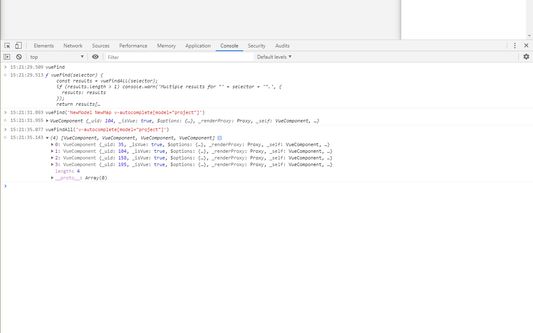
Intended for Vue.js developers, this only adds a helper function "vueFind" for accessing components when debugging Vue applications. It is added to every page after load, but it will only work on pages with development build of Vue
확장 메타 데이터
스크린샷
정보
Extension for automating/debugging of Vue.js applications. For most debugging purposes Vue.js devtools are best. This extension supplements them by adding a global "vueFind" function for accessing components by selector, instead of clicking through devtools to get $vm0.
Usage:
Instead of manually searching for a component in devtools every time, run
$vm0 = window.vueFind('Card CardDialog[model=isCardDialogVisible]')
(and maybe even make a bookmarklet out of it)
Supported selectors
- Simple selectors:
window.vueFind('missing') prints a warning with a tree of supported selectors
- Attribute selectors:
only [attr=fullvalue] and [attr="full value"] operators are supported
- Combinators:
simple selectors can only be combined with a descendant combinator (a space)
Usage:
Instead of manually searching for a component in devtools every time, run
$vm0 = window.vueFind('Card CardDialog[model=isCardDialogVisible]')
(and maybe even make a bookmarklet out of it)
Supported selectors
- Simple selectors:
window.vueFind('missing') prints a warning with a tree of supported selectors
- Attribute selectors:
only [attr=fullvalue] and [attr="full value"] operators are supported
- Combinators:
simple selectors can only be combined with a descendant combinator (a space)
0명이 0점으로 평가함
권한 및 데이터
추가 정보
- 부가 기능 링크
- 버전
- 0.1.0
- 크기
- 21.17 KB
- 마지막 업데이트
- 4년 전 (2021년 12월 6일)
- 관련 카테고리
- 라이선스
- MIT 라이선스
- 버전 목록
- 모음집에 추가