
Walmart Favorites 제작자: Scripting Dude
Identify your favorite items on Walmart.com
확장 메타 데이터
스크린샷
정보
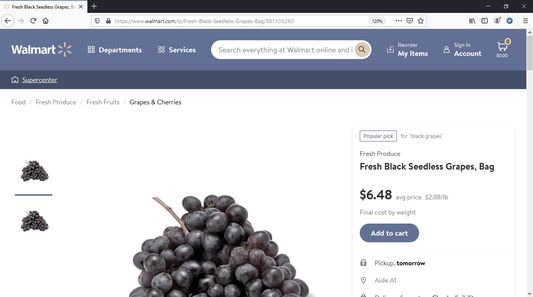
After Walmart's recent site redesign for Grocery Pickup, favorites are no longer available on the site. This extension adds this capability back to Walmart.com.
Usage instructions:
A new extension icon will appear at the top-right of the browser window. When you navigate to a product page on Walmart.com, the icon will become a colorful blue circle with a yellow star.
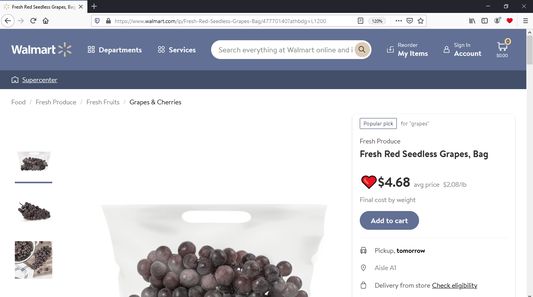
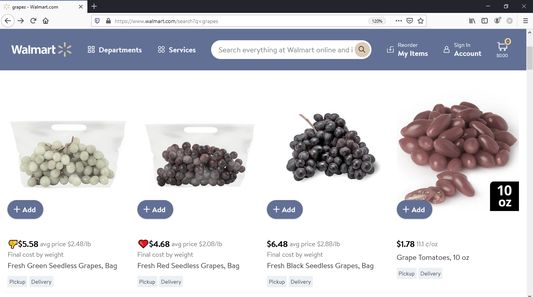
Clicking on the icon will change it to a heart, and a heart badge will appear next to the price of the item throughout Walmart.com.
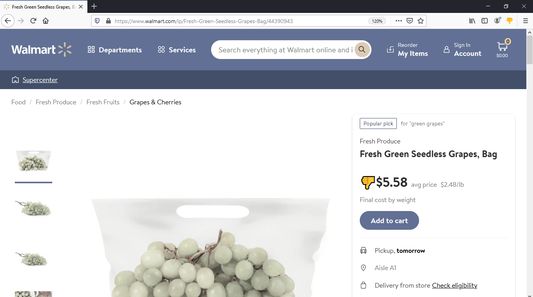
If you don't like an item on Walmart.com, clicking the icon again will change it to a thumbs down. Items showing a thumbs down badge may serve as a reminder to avoid purchasing that item in the future.
Finally, if you wish to clear the badge from an item, clicking the extension icon again will change it back to the blue circle with a yellow star, indicating that the product is "neutral" and is not liked or disliked.
Settings:
You may access the extension's settings by right-clicking the extension's icon and choosing Settings, where you will have the option to backup and restore your favorites, as well as clearing all favorites and resetting the extension.
Usage instructions:
A new extension icon will appear at the top-right of the browser window. When you navigate to a product page on Walmart.com, the icon will become a colorful blue circle with a yellow star.
Clicking on the icon will change it to a heart, and a heart badge will appear next to the price of the item throughout Walmart.com.
If you don't like an item on Walmart.com, clicking the icon again will change it to a thumbs down. Items showing a thumbs down badge may serve as a reminder to avoid purchasing that item in the future.
Finally, if you wish to clear the badge from an item, clicking the extension icon again will change it back to the blue circle with a yellow star, indicating that the product is "neutral" and is not liked or disliked.
Settings:
You may access the extension's settings by right-clicking the extension's icon and choosing Settings, where you will have the option to backup and restore your favorites, as well as clearing all favorites and resetting the extension.
리뷰어 0명이 0점으로 평가함
권한 및 데이터
추가 정보
- 부가 기능 링크
- 버전
- 0.0.4
- 크기
- 115.28 KB
- 최근 업데이트
- 5년 전 (2022년 2월 23일)
- 관련 카테고리
- 라이선스
- All Rights Reserved
- 버전 목록
- 모음집에 추가