WarpDrive-ff 제작자: Krithik Rao
This extension allows jumping to custom urls using specified keywords, all through the omnibar! Based on the zsh extension `wd`.
사용자 1명사용자 1명
확장 메타 데이터
스크린샷
정보
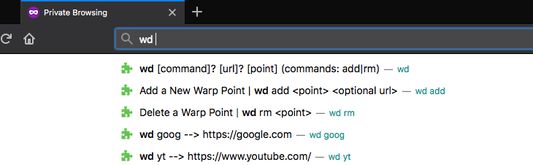
This add on is interacted with in the omnibar with the three following commands.
Example usage is as follows.
- Typing `wd add news cnn.org` or just `wd add news` on the cnn.org page, adds a custom shortcut to cnn.
- You can later come back to it by typing `wd news`.
- If you ever want to remove this shortcut, `wd rm news` does the trick.
All your warp points are synced across your devices if you're logged into a firefox account.
- `wd add <point> <url>` To specify a keyword for the current page or specified url.
- `wd remove <point>` To remove a keyword linked to a url.
- `wd <point>` To go to the url associated with a keyword
- `wd list` To get a popup or window with all saved shortcuts
Example usage is as follows.
- Typing `wd add news cnn.org` or just `wd add news` on the cnn.org page, adds a custom shortcut to cnn.
- You can later come back to it by typing `wd news`.
- If you ever want to remove this shortcut, `wd rm news` does the trick.
All your warp points are synced across your devices if you're logged into a firefox account.
0명이 0점으로 평가함
권한 및 데이터
추가 정보
- 부가 기능 링크
- 버전
- 1.5resigned1
- 크기
- 60.27 KB
- 마지막 업데이트
- 2년 전 (2024년 4월 25일)
- 라이선스
- MIT 라이선스
- 버전 목록
- 모음집에 추가