
Web Video Speed Controller 제작자: aynor
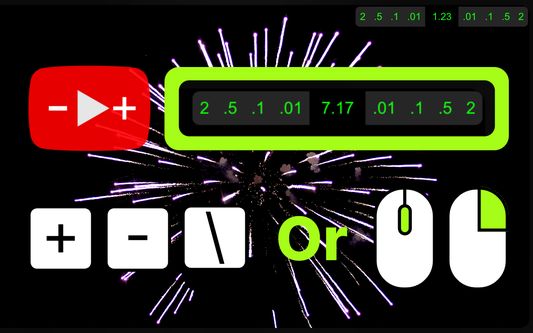
Effortlessly control any online video speed. Easily operable via a floating interface, or keyboard shortcuts, or mouse actions only.
사용자 536명사용자 536명
확장 메타 데이터
스크린샷


정보
**Web Video Speed Controller Extension**
Easily control the speed of any online video. (Accurate to 0.01x speed, up to 16x speed!)
Easily operable via:
a) clicking on floating UI/interface to control speed
b) or using keyboard shortcuts only,
c) or by mouse only (hover mouse over video and scroll for speed control) (double right click to reset speed).
**User's Guide:**
1) Download extension.
2) PIN the ICON for easy access. [you can ALSO TURN OFF THE MOUSE CONTROL FUNCTION from here]
3) Click on the Icon for initial personalization.
4) Visit video streaming websites and enjoy.
**Overview:**
**Universal Compatibility:** Whether it's YouTube, Vimeo, Bilibili, Youku, or any other platform that uses a standard video player, this extension has you covered.
**Precise Adjustment:** Modify playback speed with unparalleled accuracy - accurate to 0.01x, supporting up to 16x speed!
**Completely Free:** Experience ultimate playback control without paying, and if you benefit from the fine-tuning speed plugin, feel free to donate to support the developers!
**Key Features:**
1. Adjust video playback speed: increase, decrease, or reset to standard rate.
2. Customizable keyboard shortcuts supported.
3. Convenient mouse control: hover the mouse over the video to fine-tune the speed.
4. Support customizing your own speed increment.
5. Double-click the right button to quickly return to the original speed.
6. Supports remembering your selected playback speed and applying it to all videos.
7. The on-screen control panel displays real-time playback speed.
8. Four theme colors are available.
9. The on-screen control panel has five different display styles, including hiding the entire control panel.
Easily control the speed of any online video. (Accurate to 0.01x speed, up to 16x speed!)
Easily operable via:
a) clicking on floating UI/interface to control speed
b) or using keyboard shortcuts only,
c) or by mouse only (hover mouse over video and scroll for speed control) (double right click to reset speed).
**User's Guide:**
1) Download extension.
2) PIN the ICON for easy access. [you can ALSO TURN OFF THE MOUSE CONTROL FUNCTION from here]
3) Click on the Icon for initial personalization.
4) Visit video streaming websites and enjoy.
**Overview:**
**Universal Compatibility:** Whether it's YouTube, Vimeo, Bilibili, Youku, or any other platform that uses a standard video player, this extension has you covered.
**Precise Adjustment:** Modify playback speed with unparalleled accuracy - accurate to 0.01x, supporting up to 16x speed!
**Completely Free:** Experience ultimate playback control without paying, and if you benefit from the fine-tuning speed plugin, feel free to donate to support the developers!
**Key Features:**
1. Adjust video playback speed: increase, decrease, or reset to standard rate.
2. Customizable keyboard shortcuts supported.
3. Convenient mouse control: hover the mouse over the video to fine-tune the speed.
4. Support customizing your own speed increment.
5. Double-click the right button to quickly return to the original speed.
6. Supports remembering your selected playback speed and applying it to all videos.
7. The on-screen control panel displays real-time playback speed.
8. Four theme colors are available.
9. The on-screen control panel has five different display styles, including hiding the entire control panel.
리뷰어 11명이 4.2점으로 평가함
권한 및 데이터
추가 정보
- 부가 기능 링크
- 버전
- 3.1.1
- 크기
- 1.95 MB
- 최근 업데이트
- 3년 전 (2023년 12월 30일)
- 관련 카테고리
- 라이선스
- All Rights Reserved
- 버전 목록
- 모음집에 추가