
WebPage Editor 제작자: PANKAJ ASWAL
Edit any Webpage with ease Temporarily
확장 메타 데이터
스크린샷

정보
Overview
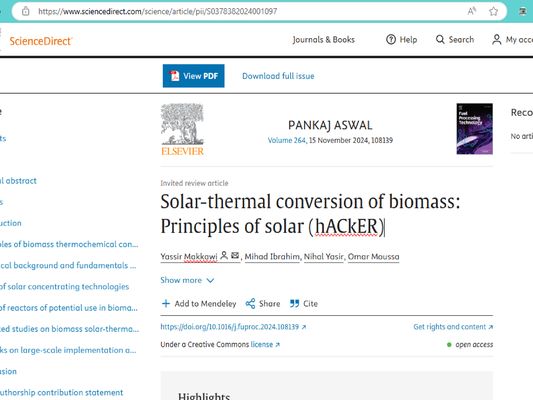
The Webpage Editor extension is a browser tool that allows users to create temporary editable versions of any webpage. It injects editing functionality directly into the page, making it perfect for quick prototypes, mockups, or testing design changes. The edits made using this extension are temporary, meaning they only persist until the page is refreshed.
Key Features
Instant Edit Mode: Easily toggle between view-only and edit mode on any webpage.
Temporary Edits: All changes are client-side and do not affect the actual content or code of the webpage.
Word Count Comparison: Track original and edited word counts dynamically.
Simple Toggle Button: An intuitive button embedded with an SVG icon for enabling/disabling the edit mode.
Installation
From the Chrome Web Store (or relevant browser store)
Go to the [Chrome Web Store link] or relevant extension marketplace.
Click "Add to Chrome" (or your browser's equivalent) to install the Webpage Editor.
Once installed, you’ll see the Webpage Editor icon in your browser's extension toolbar.
Manual Installation
Clone or download the repository.
Open your browser’s extension settings (e.g., in Chrome, navigate to chrome://extensions/).
Enable Developer Mode.
Click Load Unpacked and select the folder containing the extension files.
The Webpage Editor icon will appear in your extension toolbar.
How to Use
Click the Webpage Editor icon in your browser toolbar.
The "Edit Mode" button will be injected into the current webpage.
Click the button labeled editGPT to enable edit mode:
Editable areas will appear, allowing you to modify the content.
Word counts for the original and revised text are displayed dynamically.
Once you're done, click editGPT again to toggle off edit mode and revert the page to its original state.
Refresh the page to discard all edits.
Functions
toggleEditorMode(isEnabled): Switches between editable and non-editable modes.
insertMarkupElement(markup, element, index): Adds new elements, such as word count stats, for better tracking.
getCleanText(array): Extracts clean text from the page for edits.
Development Setup
To modify or contribute to the project:
Clone the repository:
bash
git clone https://github.com/PankPanther/Webpage-Editor
Open the folder in your code editor.
Make changes to the source code (JavaScript, HTML, CSS).
Reload the extension in your browser by going to the extensions settings and clicking Reload after editing.
Contribution Guidelines
Fork the repository.
Make your changes in a new branch.
Submit a pull request for review.
Ensure your code follows the project's coding standards.
Known Issues
Temporary Changes: All changes are discarded upon refreshing the page or navigating away.
Limited Editing Areas: Certain dynamically loaded content or elements may not be editable, depending on page structure.
The Webpage Editor extension is a browser tool that allows users to create temporary editable versions of any webpage. It injects editing functionality directly into the page, making it perfect for quick prototypes, mockups, or testing design changes. The edits made using this extension are temporary, meaning they only persist until the page is refreshed.
Key Features
Instant Edit Mode: Easily toggle between view-only and edit mode on any webpage.
Temporary Edits: All changes are client-side and do not affect the actual content or code of the webpage.
Word Count Comparison: Track original and edited word counts dynamically.
Simple Toggle Button: An intuitive button embedded with an SVG icon for enabling/disabling the edit mode.
Installation
From the Chrome Web Store (or relevant browser store)
Go to the [Chrome Web Store link] or relevant extension marketplace.
Click "Add to Chrome" (or your browser's equivalent) to install the Webpage Editor.
Once installed, you’ll see the Webpage Editor icon in your browser's extension toolbar.
Manual Installation
Clone or download the repository.
Open your browser’s extension settings (e.g., in Chrome, navigate to chrome://extensions/).
Enable Developer Mode.
Click Load Unpacked and select the folder containing the extension files.
The Webpage Editor icon will appear in your extension toolbar.
How to Use
Click the Webpage Editor icon in your browser toolbar.
The "Edit Mode" button will be injected into the current webpage.
Click the button labeled editGPT to enable edit mode:
Editable areas will appear, allowing you to modify the content.
Word counts for the original and revised text are displayed dynamically.
Once you're done, click editGPT again to toggle off edit mode and revert the page to its original state.
Refresh the page to discard all edits.
Functions
toggleEditorMode(isEnabled): Switches between editable and non-editable modes.
insertMarkupElement(markup, element, index): Adds new elements, such as word count stats, for better tracking.
getCleanText(array): Extracts clean text from the page for edits.
Development Setup
To modify or contribute to the project:
Clone the repository:
bash
git clone https://github.com/PankPanther/Webpage-Editor
Open the folder in your code editor.
Make changes to the source code (JavaScript, HTML, CSS).
Reload the extension in your browser by going to the extensions settings and clicking Reload after editing.
Contribution Guidelines
Fork the repository.
Make your changes in a new branch.
Submit a pull request for review.
Ensure your code follows the project's coding standards.
Known Issues
Temporary Changes: All changes are discarded upon refreshing the page or navigating away.
Limited Editing Areas: Certain dynamically loaded content or elements may not be editable, depending on page structure.
리뷰어 0명이 0점으로 평가함
권한 및 데이터
추가 정보