
WebScrapBook 제작자: Danny Lin
Capture web pages to local device or backend server for future retrieval, organization, annotation, and edit.
Android용 Firefox에서 이 확장 기능을 열려면 QR 코드를 스캔하세요

확장 메타 데이터
스크린샷


정보
WebScrapBook is a browser extension that captures the web page faithfully with various archive formats and customizable configurations, for future retrieval, organization, annotation, and editing. This project inherits from legacy Firefox add-on ScrapBook X.
Features:
1. Capture faithfully: A web page shown in the browser can be captured without losing any subtle detail. Metadata such as source URL and timestamp are also recorded.
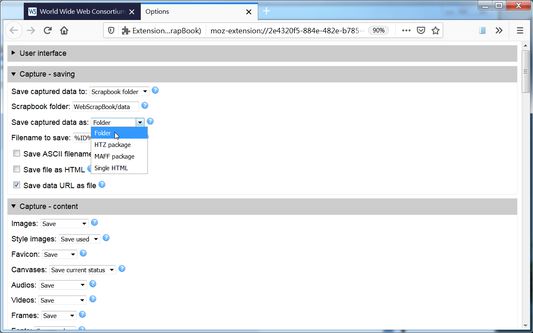
2. Customizable capture: WebScrapBook can save selected area in a page, save source page (before processed by scripts), or save page as a bookmark. How to capture images, audio, video, fonts, frames, styles, scripts, etc. are also customizable. A web page can be saved as a folder, a ZIP-based archive file (HTZ or MAFF), or a single HTML file.
3. Page editing: A web page can be highlighted, annotated, or edited before or after a capture.
4. Organizable collections: Captured pages can be organized in the browser sidebar using one or more scrapbooks, and each scrapbooks holds a hierarchical tree structure to organize data items. Notes using HTML or markdown format can also be created and managed. (*)
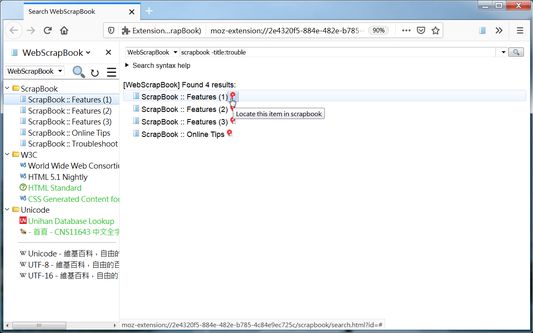
5. Fulltext searching: Each scrapbook can be further indexed for a rich-feature search (using title, fulltext, comment, source URL, create time, modify time, etc.). (*)
6. Remote access: Captured data can be hosted with a central backend server and be read or edited from other devices. Alternatively, a scrapbook can generate a static site index and be distributed as a static web site. (*)
7. Mobile support: WebScrapBook supports mobile browsers such as Firefox for Android and Kiwi browser. You can capture and edit the web page from a mobile phone or tablet.
8. Legacy ScrapBook support: Scrapbooks created from legacy ScrapBook or ScrapBook X can be converted into WebScrapBook-compliant format for usage. (*)
* All or partial functionality of a starred feature above requires a running collaborating backend server, which can be easily set up using PyWebScrapBook.
* An HTZ or MAFF archive file can be viewed using the built-in archive page viewer, using PyWebScrapBook or other assistant tools, or by opening the index page after unzipping.
See Also:
* For further information and frequently asked questions, visit the documentation wiki.
* For better discussion, please report an issue to the source repository.
Features:
1. Capture faithfully: A web page shown in the browser can be captured without losing any subtle detail. Metadata such as source URL and timestamp are also recorded.
2. Customizable capture: WebScrapBook can save selected area in a page, save source page (before processed by scripts), or save page as a bookmark. How to capture images, audio, video, fonts, frames, styles, scripts, etc. are also customizable. A web page can be saved as a folder, a ZIP-based archive file (HTZ or MAFF), or a single HTML file.
3. Page editing: A web page can be highlighted, annotated, or edited before or after a capture.
4. Organizable collections: Captured pages can be organized in the browser sidebar using one or more scrapbooks, and each scrapbooks holds a hierarchical tree structure to organize data items. Notes using HTML or markdown format can also be created and managed. (*)
5. Fulltext searching: Each scrapbook can be further indexed for a rich-feature search (using title, fulltext, comment, source URL, create time, modify time, etc.). (*)
6. Remote access: Captured data can be hosted with a central backend server and be read or edited from other devices. Alternatively, a scrapbook can generate a static site index and be distributed as a static web site. (*)
7. Mobile support: WebScrapBook supports mobile browsers such as Firefox for Android and Kiwi browser. You can capture and edit the web page from a mobile phone or tablet.
8. Legacy ScrapBook support: Scrapbooks created from legacy ScrapBook or ScrapBook X can be converted into WebScrapBook-compliant format for usage. (*)
* All or partial functionality of a starred feature above requires a running collaborating backend server, which can be easily set up using PyWebScrapBook.
* An HTZ or MAFF archive file can be viewed using the built-in archive page viewer, using PyWebScrapBook or other assistant tools, or by opening the index page after unzipping.
See Also:
* For further information and frequently asked questions, visit the documentation wiki.
* For better discussion, please report an issue to the source repository.
리뷰어 145명이 4점으로 평가함
권한 및 데이터
필수 권한:
- 파일을 다운로드하고 브라우저의 다운로드 기록을 읽고 수정
- 브라우저 탭에 접근
- 탐색 중 브라우저 활동에 접근
- 모든 웹사이트에서 사용자의 데이터에 접근
선택적 권한:
- 현재 위치에 접근
추가 정보
- 부가 기능 링크
- 버전
- 2.27.3
- 크기
- 643.01 KB
- 최근 업데이트
- 9일 전 (2026년 9월 18일)
- 관련 카테고리
- 버전 목록
- 태그
- 모음집에 추가