
What3words translator 제작자: Cabbache
This is an easy interface that communicates with https://what3words.com/ and allows the user to convert from the traditional latitude and longitude coordinate system to the 3 word address system.
사용자 47명사용자 47명
확장 메타 데이터
스크린샷
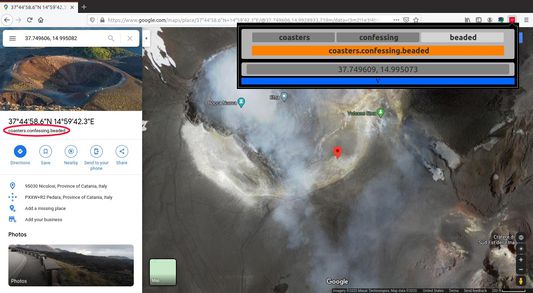
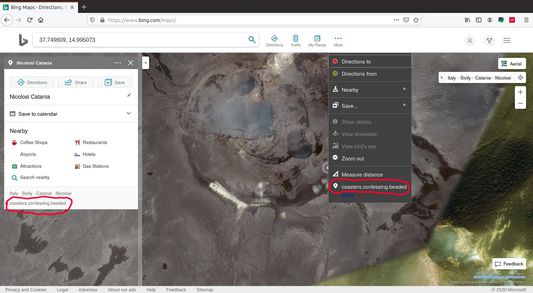
정보
Popup features:
When converting from a 3 word address to coordinates, write the words separately in the 3 textboxes at the top, or the address (e.g "///beeline.scandalous.bruisers") in the orange textbox underneath. Tab or space bar can be used to select the next textbox. Press the enter key to translate. By default, a new tab on maps will open showing the location.
Translation from coordinates to a 3 word address is performed similarly. Write the latitude and longitude in the bottom textbox (e.g "37.743413, 15.031307") and press enter.
The add-on settings can be accessed by clicking the arrow at the very bottom of the popup. Uncheck the first two check boxes if you do not want a new tab to open with the location on a map when you use the popup to make a translation.
Leave the last checkbox checked if you would like the add-on to automatically replace most instances of latitude, longitude in your tabs with a 3 word address. For example on google maps you will see "///beeline.scandalous.bruisers" instead of "37.743413, 15.031307"
- Takes 3 word address input and converts to latitude, longitude
- Takes latitude and longitude input and converts to 3 word address
- Automatically opens tab showing location on maps when translating
- Configure add-on behaviour
- Automatic replacement of latitude, longitude to 3 word address in tabs - tested with google maps, and bing
- Caches translation results, making it is faster since there is no need to ask API again
When converting from a 3 word address to coordinates, write the words separately in the 3 textboxes at the top, or the address (e.g "///beeline.scandalous.bruisers") in the orange textbox underneath. Tab or space bar can be used to select the next textbox. Press the enter key to translate. By default, a new tab on maps will open showing the location.
Translation from coordinates to a 3 word address is performed similarly. Write the latitude and longitude in the bottom textbox (e.g "37.743413, 15.031307") and press enter.
The add-on settings can be accessed by clicking the arrow at the very bottom of the popup. Uncheck the first two check boxes if you do not want a new tab to open with the location on a map when you use the popup to make a translation.
Leave the last checkbox checked if you would like the add-on to automatically replace most instances of latitude, longitude in your tabs with a 3 word address. For example on google maps you will see "///beeline.scandalous.bruisers" instead of "37.743413, 15.031307"
리뷰어 1명이 4점으로 평가함
권한 및 데이터
추가 정보
- 부가 기능 링크
- 버전
- 1.1
- 크기
- 21.7 KB
- 최근 업데이트
- 7년 전 (2020년 3월 21일)
- 버전 목록
- 모음집에 추가