
WiDa 제작자: Marek Boháč
The dictionary definition for a selected, mouse pointed or manually input word
사용자 1명사용자 1명
확장 메타 데이터
스크린샷
정보
Usage:
1. Input a search term. There are two ways to do so:
- select (highlight) a word (or a part of it) on a web page, or just point at a word. Then press both Ctrl keys.
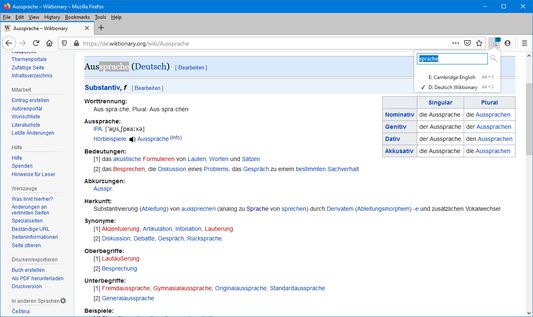
- press this extension's toolbar button or use the Ctrl + Space combo to pop up the extension toolbar menu. Then simply put the search term to the input box and press the search button (or the Enter key).
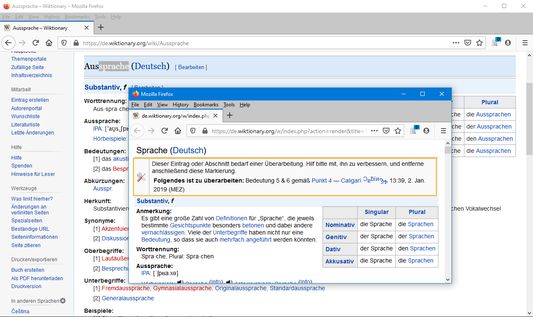
2. The dictionary definition for the word opens in a new window. All subsequent searches will open in the same window.
Press Alt + 0-9 (the number of a desired dictionary) to switch between dictionaries. Or, click the add-on's icon and select the dictionary from the menu. Use the add-on's options page to edit the dictionaries.
You can use the left Ctrl + right Shift or left Shift + right Ctrl combo to change the case of the first letter of the selected word - e.g. when the selected text is "land", the searched term will be changed to "Land" (with capital "L"), and vice versa.
The dictionary window will remember its size and position and restore them upon reopening. This can be turned off on the options page.
1. Input a search term. There are two ways to do so:
- select (highlight) a word (or a part of it) on a web page, or just point at a word. Then press both Ctrl keys.
- press this extension's toolbar button or use the Ctrl + Space combo to pop up the extension toolbar menu. Then simply put the search term to the input box and press the search button (or the Enter key).
2. The dictionary definition for the word opens in a new window. All subsequent searches will open in the same window.
Press Alt + 0-9 (the number of a desired dictionary) to switch between dictionaries. Or, click the add-on's icon and select the dictionary from the menu. Use the add-on's options page to edit the dictionaries.
You can use the left Ctrl + right Shift or left Shift + right Ctrl combo to change the case of the first letter of the selected word - e.g. when the selected text is "land", the searched term will be changed to "Land" (with capital "L"), and vice versa.
The dictionary window will remember its size and position and restore them upon reopening. This can be turned off on the options page.
0명이 0점으로 평가함
권한 및 데이터
추가 정보
- 부가 기능 링크
- 버전
- 1.0
- 크기
- 89.41 KB
- 마지막 업데이트
- 5년 전 (2021년 8월 8일)
- 관련 카테고리
- 라이선스
- 사용자 지정 라이선스
- 버전 목록
- 모음집에 추가