
Wikipedia-References-Creator 제작자: rjh
Create wikipedia references from websites with configurable output. Automatic detection from Google-Books, Amazon, and each other website (as simple refeference).
사용자 63명사용자 63명
확장 메타 데이터
스크린샷
정보
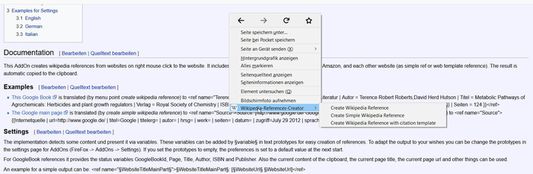
This AddOn creates wikipedia references from websites by right click with mouse. It includes an automatic detection of Google-Books, Amazon, and each other website (as simple ref or web template reference). The result is automatic copied to the clipboard. Additionally an selected Digital Object Identifier (DOI) or PubMed ID could directly translated in an wikipedia reference by jump to a special website which knows all of DOI and PubMed ID with title, author, ... and provides a valid wikipedia reference.
The implementation detects some content und present it via variables. These variables can be added by §variable§ in text prototypes for easy creation of references. To adapt the output to your wishes you can be change the prototypes in the settings page. If you set the prototypes to empty, the preferences is set to a default value at the next start.
For GoogleBook references it provides the status variables GoogleBookId, Page, Title, Author, ISBN and Publisher. Also the current content of the clipboard, the current page title, the current page url and other things can be used.
An example for a simple output can be: <ref>[§WebsiteUrl§ §WebsiteUrl§]</ref>
For example for a correct german reference string you can use the output prototype:
<ref name="§Author§">{{Literatur| Autor=§Author§ | Titel=§Title§ | Verlag=§Publisher§ | ISBN=§ISBN§ | Jahr=§PublicationYear§ | Online={{Google Buch | BuchID=§GoogleBookId§ | Seite=§Page§ }} | Seiten=§Page§ }}</ref>
For example for a correct english reference string for web citation you can use the output prototype:
<ref name="">{{cite web |url=§WebsiteUrl§ |title=§WebsiteTitle§ |author=§Selection§ |date= |work= |publisher= |accessdate=§CurrentDate§}}</ref>
Overall the following tags can be used:
* GoogleBookId: Google Book Id (only on Google Book)
* Page: Current Page in Google Book
* Clipboard: current content of the clipboard
* WebsiteTitle: Title of the current website
* WebsiteTitleMainPart: Detected headline (owner, site info) of the website. If not found the WebsiteTitle is used. (experimental)
* WebsiteUrl: URL of the current website
* WebsiteUrlMainPart: main part of the URL of the current website (for example wikipedia.org)
* Title: detected Title of the book or page (depending from current website)
* Author: detected Autor of the book (depending from current website)
* CurrentDate: the current date in localized format
* CurrentYear: the current year
* CurrentMonth: the current month
* CurrentDay: the current day
* ISBN: detected ISBN book number of the book (depending from current website)
* Publisher: detected Publisher of the book (depending from current website)
* PublicationYear: detected publication year of the book (depending from current website)
* DOI: detected DOI number of an article (depending from current website)
* Selection: currently selected text on the website
The implementation detects some content und present it via variables. These variables can be added by §variable§ in text prototypes for easy creation of references. To adapt the output to your wishes you can be change the prototypes in the settings page. If you set the prototypes to empty, the preferences is set to a default value at the next start.
For GoogleBook references it provides the status variables GoogleBookId, Page, Title, Author, ISBN and Publisher. Also the current content of the clipboard, the current page title, the current page url and other things can be used.
An example for a simple output can be: <ref>[§WebsiteUrl§ §WebsiteUrl§]</ref>
For example for a correct german reference string you can use the output prototype:
<ref name="§Author§">{{Literatur| Autor=§Author§ | Titel=§Title§ | Verlag=§Publisher§ | ISBN=§ISBN§ | Jahr=§PublicationYear§ | Online={{Google Buch | BuchID=§GoogleBookId§ | Seite=§Page§ }} | Seiten=§Page§ }}</ref>
For example for a correct english reference string for web citation you can use the output prototype:
<ref name="">{{cite web |url=§WebsiteUrl§ |title=§WebsiteTitle§ |author=§Selection§ |date= |work= |publisher= |accessdate=§CurrentDate§}}</ref>
Overall the following tags can be used:
* GoogleBookId: Google Book Id (only on Google Book)
* Page: Current Page in Google Book
* Clipboard: current content of the clipboard
* WebsiteTitle: Title of the current website
* WebsiteTitleMainPart: Detected headline (owner, site info) of the website. If not found the WebsiteTitle is used. (experimental)
* WebsiteUrl: URL of the current website
* WebsiteUrlMainPart: main part of the URL of the current website (for example wikipedia.org)
* Title: detected Title of the book or page (depending from current website)
* Author: detected Autor of the book (depending from current website)
* CurrentDate: the current date in localized format
* CurrentYear: the current year
* CurrentMonth: the current month
* CurrentDay: the current day
* ISBN: detected ISBN book number of the book (depending from current website)
* Publisher: detected Publisher of the book (depending from current website)
* PublicationYear: detected publication year of the book (depending from current website)
* DOI: detected DOI number of an article (depending from current website)
* Selection: currently selected text on the website
리뷰어 3명이 3.3점으로 평가함
권한 및 데이터
추가 정보
- 부가 기능 링크
- 버전
- 8.6
- 크기
- 34.01 KB
- 마지막 업데이트
- 3년 전 (2023년 12월 26일)
- 관련 카테고리
- 버전 목록
- 모음집에 추가