
Wordzzz — Translate words & subtitles 제작자: Aleksandr Konovalov
Boost your language learning with Wordzzz ★ TRANSLATE TEXT WHILE BROWSING ★ SAVE NEW WORDS ★ PRACTICE YOUR VOCABULARY ★ EASILY SWITCH LANGUAGES ★ DARK MODE FOR READABILITY
사용자 39명사용자 39명
확장 메타 데이터
스크린샷



정보
Wordzzz — Translate words & subtitles
Unlock Your Language Potential with Wordzzz
The Wordzzz extension is your ultimate language learning companion. It seamlessly analyzes subtitles within your YouTube and Netflix videos, allowing you to effortlessly enhance your language skills. Simply hover over any word, and the video pauses, giving you the opportunity to click on the word and view its translation instantly. You can also translate words while browsing by double-clicking them.
All translated words sync between all your devices, so you can expand your vocabulary wherever you are. Learn new words with our effective card system. When you start practicing, hover over a card to see the translation of the new word. This effective method helps you remember new words and check their translations on the go.
Sign in to our web platform to see your saved words and explore new learning possibilities.
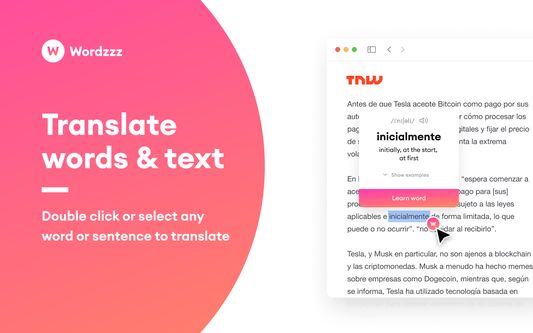
★ TRANSLATE WORDS & TEXT WHILE BROWSING
Double click or select any word or sentence to translate it instantly
★ SAVE NEW WORDS TO YOUR VOCABULARY
Save words while browsing or watching your favourite videos
★ PRACTICE YOUR VOCABULARY
Learn new words with the most effective card system
★ SYNC BETWEEN ALL YOUR DEVICES
Easily sync words between all your accounts & devices
★ EASILY SWITCH LANGUAGES
Switch between the most popular language pairs
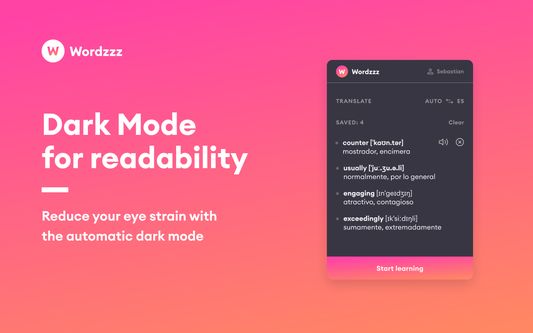
★ DARK MODE FOR READABILITY
Reduce your eye strain with the automatic dark mode
★ HOW TO USE WORDZZZ
- Download Wordzzz extension from Chrome store
- Whenever you see a new word or phrase, click on it to get its meaning
- Add it to your vocabulary to practice later
- Go to the main extension window and start practising
★ QUESTIONS, FEEDBACK: Having problems with this extension? If the suggestions above didn't work, please fill out a problem report: https://chrome.google.com/webstore/support/
Unlock Your Language Potential with Wordzzz
The Wordzzz extension is your ultimate language learning companion. It seamlessly analyzes subtitles within your YouTube and Netflix videos, allowing you to effortlessly enhance your language skills. Simply hover over any word, and the video pauses, giving you the opportunity to click on the word and view its translation instantly. You can also translate words while browsing by double-clicking them.
All translated words sync between all your devices, so you can expand your vocabulary wherever you are. Learn new words with our effective card system. When you start practicing, hover over a card to see the translation of the new word. This effective method helps you remember new words and check their translations on the go.
Sign in to our web platform to see your saved words and explore new learning possibilities.
★ TRANSLATE WORDS & TEXT WHILE BROWSING
Double click or select any word or sentence to translate it instantly
★ SAVE NEW WORDS TO YOUR VOCABULARY
Save words while browsing or watching your favourite videos
★ PRACTICE YOUR VOCABULARY
Learn new words with the most effective card system
★ SYNC BETWEEN ALL YOUR DEVICES
Easily sync words between all your accounts & devices
★ EASILY SWITCH LANGUAGES
Switch between the most popular language pairs
★ DARK MODE FOR READABILITY
Reduce your eye strain with the automatic dark mode
★ HOW TO USE WORDZZZ
- Download Wordzzz extension from Chrome store
- Whenever you see a new word or phrase, click on it to get its meaning
- Add it to your vocabulary to practice later
- Go to the main extension window and start practising
★ QUESTIONS, FEEDBACK: Having problems with this extension? If the suggestions above didn't work, please fill out a problem report: https://chrome.google.com/webstore/support/
리뷰어 4명이 3점으로 평가함
권한 및 데이터
추가 정보
- 부가 기능 링크
- 버전
- 2.0.3
- 크기
- 2.17 MB
- 최근 업데이트
- 4년 전 (2022년 10월 12일)
- 관련 카테고리
- 라이선스
- All Rights Reserved
- 개인정보처리방침
- 이 부가 기능에 대한 개인정보처리방침 읽기
- 버전 목록
- 모음집에 추가