
xIFr 제작자: Stig Nygaard
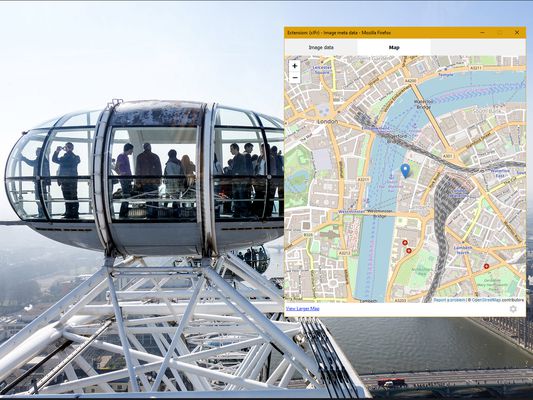
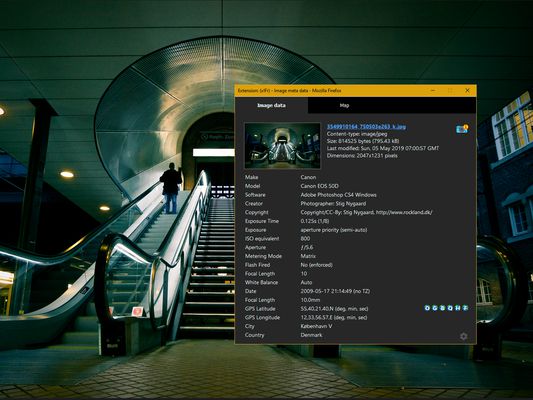
EXIF viewer. Powerful tool to see EXIF, IPTC and XMP metadata in images. Including geo-coordinates ("GPS location"), and map-view of location. xIFr uses "deep search" to find images that normally can't be selected just by rightclicking.
사용자 2,316명사용자 2,316명
확장 메타 데이터
스크린샷


정보
xIFr is a viewer for EXIF, IPTC and XMP metadata in image files. Launch it from the browser's right-click context menu.
Note: If you ain't using a recent version of Firefox supported by latest version of xIFr, there's probably an older version of xIFr supporting your browser.
Why another Exif viewer?
Because I felt other Exif readers annoyed me or I felt they were missing something. It is probably a matter of personal preferences, but you should really check the "deep search" feature. It works sooo well - in my own very humble opinion :-)
"Deep Search" feature?
Most other Exif viewers for Firefox only works if you can right-click directly on an html img element. But with "Deep Search" xIFr finds the image you want to see details about, no matter if it is below a layer or is defined as a background-image of another element. In 95% of the times, it just works as you expect. You won't even know if you actually were right-clicking directly on an img element or not. This is in my opinion the most important feature distinguishing xIFr from other Exif-viewers.
"Access your data for all web sites"?
This permission is required for xIFr to be able to read meta-data in images, no matter which domain they are embedded from. But don't worry, there's no hidden agendas. See the Privacy Policy.
Getting started...
I have created a little introduction page to quickly get started with xIFr and see what the "Deep Search" is all about: www.rockland.dk/xIFr/start/.
But if you choose to skip this introduction, let me at least give you a quick little browser tip:
A handy browser tip!
Some websites overrides the browser's default right-click context menu. But you can usually just hold down the shift key while right-clicking, to get Firefox's native context menu back - and thus launch xIFr...
Open source
xIFr is open source, the repository is on GitHub.
xIFr is a fork of wxIF which again is a WebExtension fork/port of the older "legacy type extension" FxIF.
Flickr Fixr
Love photos? Flickr user? Also try my Flickr Fixr !
/Stig Nygaard
Note: If you ain't using a recent version of Firefox supported by latest version of xIFr, there's probably an older version of xIFr supporting your browser.
Why another Exif viewer?
Because I felt other Exif readers annoyed me or I felt they were missing something. It is probably a matter of personal preferences, but you should really check the "deep search" feature. It works sooo well - in my own very humble opinion :-)
"Deep Search" feature?
Most other Exif viewers for Firefox only works if you can right-click directly on an html img element. But with "Deep Search" xIFr finds the image you want to see details about, no matter if it is below a layer or is defined as a background-image of another element. In 95% of the times, it just works as you expect. You won't even know if you actually were right-clicking directly on an img element or not. This is in my opinion the most important feature distinguishing xIFr from other Exif-viewers.
"Access your data for all web sites"?
This permission is required for xIFr to be able to read meta-data in images, no matter which domain they are embedded from. But don't worry, there's no hidden agendas. See the Privacy Policy.
Getting started...
I have created a little introduction page to quickly get started with xIFr and see what the "Deep Search" is all about: www.rockland.dk/xIFr/start/.
But if you choose to skip this introduction, let me at least give you a quick little browser tip:
A handy browser tip!
Some websites overrides the browser's default right-click context menu. But you can usually just hold down the shift key while right-clicking, to get Firefox's native context menu back - and thus launch xIFr...
Open source
xIFr is open source, the repository is on GitHub.
xIFr is a fork of wxIF which again is a WebExtension fork/port of the older "legacy type extension" FxIF.
Flickr Fixr
Love photos? Flickr user? Also try my Flickr Fixr !
/Stig Nygaard
리뷰어 31명이 4.8점으로 평가함
권한 및 데이터
추가 정보
- 부가 기능 링크
- 버전
- 3.2.1
- 크기
- 281.13 KB
- 최근 업데이트
- 5달 전 (2026년 5월 3일)
- 개인정보처리방침
- 이 부가 기능에 대한 개인정보처리방침 읽기
- 버전 목록
- 모음집에 추가