xPath Finder 제작자: Tomasz Rembacz
Plugin to get the elements xPath.
사용자 3,609명사용자 3,609명
확장 메타 데이터
스크린샷
정보
Usage
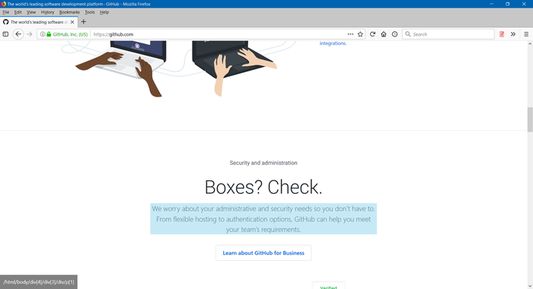
1. Click on the plugin icon, cursor will be changed to the crosshair
2. Hover over the desired element (elements are highlighted on hover)
3. Click on the element and his xPath will display in the panel at the bottom of the page
Options:
- turn on/off inspector,
- turn on/off auto copy to clipboard,
- choose between short ID's or normal path,
- change xpath box position
1. Click on the plugin icon, cursor will be changed to the crosshair
2. Hover over the desired element (elements are highlighted on hover)
3. Click on the element and his xPath will display in the panel at the bottom of the page
Options:
- turn on/off inspector,
- turn on/off auto copy to clipboard,
- choose between short ID's or normal path,
- change xpath box position
46명이 4.2점으로 평가함
권한 및 데이터
추가 정보
- 부가 기능 링크
- 버전
- 1.0.2
- 크기
- 20.47 KB
- 마지막 업데이트
- 6년 전 (2020년 6월 11일)
- 라이선스
- MIT 라이선스
- 버전 목록
- 모음집에 추가