YouTube Blur (so you stay focused) 제작자: Omar V
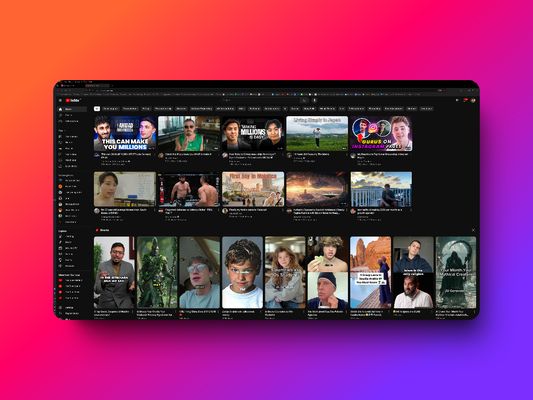
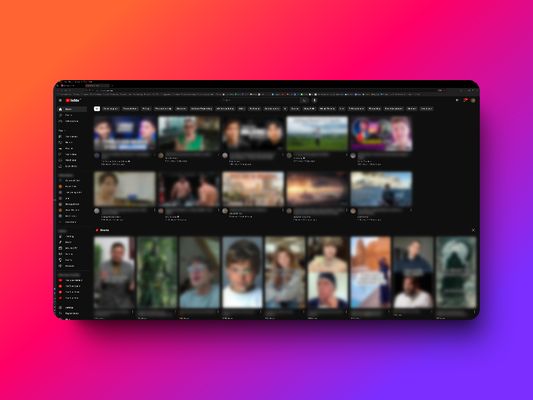
Blur YouTube thumbnails & titles so you stay focused and avoid distractions when you need YouTube.
사용자 40명사용자 40명
확장 메타 데이터
스크린샷
정보
This will help you stay focused.
A lot of us need YouTube to learn, research, follow tutorials, and more. But it's SOOO easy to get distracted. So I built a free tool to help you out and that's very simple to use.
Features:
- Blur Thumbnails: Automatically blur all video thumbnails on YouTube to prevent visual distractions.
- Blur Titles: Blur video titles to maintain focus on your tasks.
- Toggle On/Off: Quickly enable or disable the blur effect with a single click from the extension popup.
- Simple and Lightweight: The extension is easy to use and won't slow down your browsing experience.
How It Works:
- Install the YouTube Blur extension.
- Click on the extension icon to access the popup.
- Use the toggle button to turn the blur effect on or off.
- Enjoy a distraction-free YouTube browsing experience!
A lot of us need YouTube to learn, research, follow tutorials, and more. But it's SOOO easy to get distracted. So I built a free tool to help you out and that's very simple to use.
Features:
- Blur Thumbnails: Automatically blur all video thumbnails on YouTube to prevent visual distractions.
- Blur Titles: Blur video titles to maintain focus on your tasks.
- Toggle On/Off: Quickly enable or disable the blur effect with a single click from the extension popup.
- Simple and Lightweight: The extension is easy to use and won't slow down your browsing experience.
How It Works:
- Install the YouTube Blur extension.
- Click on the extension icon to access the popup.
- Use the toggle button to turn the blur effect on or off.
- Enjoy a distraction-free YouTube browsing experience!
2명이 4.5점으로 평가함
권한 및 데이터
추가 정보
- 부가 기능 링크
- 버전
- 1.0
- 크기
- 29.8 KB
- 마지막 업데이트
- 2년 전 (2024년 7월 9일)
- 라이선스
- All Rights Reserved
- 버전 목록
- 모음집에 추가