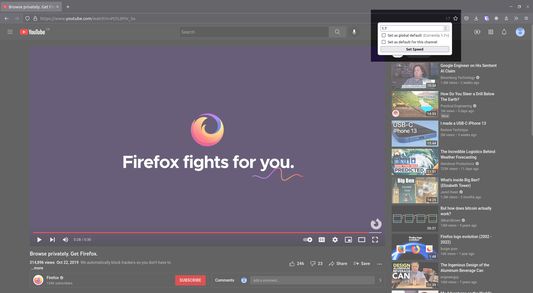
With this extension, an icon showing the current playback speed appears in the URL bar when viewing any YouTube video. Clicking on this icon allows any (non-negative) speed to be entered.
Quick Tip: After clicking in the entry box, use the scroll wheel for fast adjustment!
To change the minimum step size: Right click icon > Manage Extension > Preferences
개발자 의견
Feel free to contact me if you find any bugs or have any suggestions.
Icon is a modification of an icon from the "Ballicons 2" icon set, which is published under the Creative Commons Attribution 3.0 Unported License.
Changelog for Version 1.3: - By user request, added optional per-channel default speeds. When setting the speed, there are now checkboxes to update a global default speed, and/or the default speed for the current YouTube channel.
Changelog for Version 1.1: - By user request, added a setting to change the minimum step size. (Right click icon > Manage Extension > Preferences)
Changelog for Version 1.0 (mainly implemented user suggestions): - Icon updates to reflect current playback speed - Added ability to set a persistent default speed - Keyboard input accessibility was improved - Visual tweaks and minor bugfixes

Icon is a modification of an icon from the "Ballicons 2" icon set, which is published under the Creative Commons Attribution 3.0 Unported License.
Changelog for Version 1.3:
- By user request, added optional per-channel default speeds. When setting the speed, there are now checkboxes to update a global default speed, and/or the default speed for the current YouTube channel.
Changelog for Version 1.1:
- By user request, added a setting to change the minimum step size.
(Right click icon > Manage Extension > Preferences)
Changelog for Version 1.0 (mainly implemented user suggestions):
- Icon updates to reflect current playback speed
- Added ability to set a persistent default speed
- Keyboard input accessibility was improved
- Visual tweaks and minor bugfixes