YouTube toggle Flash and HTML 제작자: James Fray
Adds a toolbar button to toggle between Flash and the default HTML players
사용자 66명사용자 66명
확장 메타 데이터
스크린샷
정보
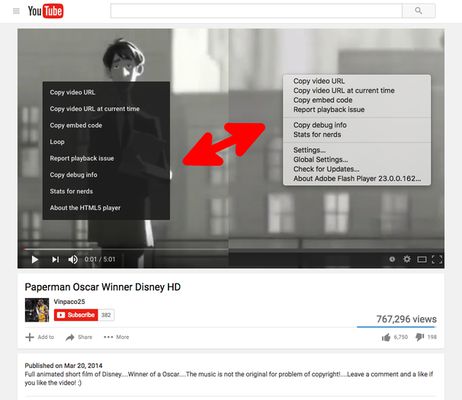
YouTube™ toggle Flash and HTML Players adds a toolbar button to your Firefox toolbar to allow you toggle between two different player types that YouTube supports.
For short videos it is recommended to use the default HTML5 player. For long videos however, Flash player usually performs better and is lighter on resources.
For FAQs and bug reports please visit:
http://add0n.com/youtube-tools.html?from=flash-toggle
--- My YouTube Enhancer Tools---
For short videos it is recommended to use the default HTML5 player. For long videos however, Flash player usually performs better and is lighter on resources.
For FAQs and bug reports please visit:
http://add0n.com/youtube-tools.html?from=flash-toggle
--- My YouTube Enhancer Tools---
- YouTube use Flash Player
- YouTube in HD (720p, 1080p, 1440p, 2160p)
- YouTube no Annotations
- YouTube no Buffer (no autoplay)
- YouTube Stop AutoPlay Next
- YouTube toggle Flash and HTML
- YouTube Player AdBlocker
- YouTube auto Pause and Resume
- YouTube™ Stop Button
- Theater Mode for YouTube (YouTube Wide Screen)
- ---
Please note that the FAQs page of this extension contains Google Analytics; Terms can be found https://www.google.com/analytics/terms/us.html
10명이 4.3점으로 평가함
권한 및 데이터
추가 정보
- 부가 기능 링크
- 버전
- 0.1.1resigned1
- 크기
- 94.7 KB
- 마지막 업데이트
- 2년 전 (2024년 4월 25일)
- 개인정보처리방침
- 이 부가 기능에 대한 개인정보처리방침 읽기
- 버전 목록
- 모음집에 추가