
Youtube Video Scheduler 제작자: Nishu Murmu
A browser extension to schedule videos on youtube, incase you want to watch something later
사용자 1명사용자 1명
확장 메타 데이터
스크린샷

정보
🎥 YouTube Video Scheduler – Youtube Watch Later, but much better🧠⏰
Never miss a video again with YouTube Video Scheduler — a powerful yet lightweight Chrome extension that lets you schedule, manage, and watch YouTube videos at your preferred time , all from within your browser!
✨ Key Features:
✅ Schedule Any YouTube Video
Add videos to your watchlist and open them automatically at the exact time you set — even if you're offline or restart your browser.
🕒 Update or Remove Schedules Instantly
Easily edit or delete scheduled videos directly from the intuitive dashboard.
📊 User-Friendly Dashboard
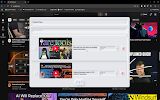
Manage all your scheduled videos in one place with a clean and responsive UI. Toggle it anytime using the keyboard shortcut Ctrl + Shift + S.
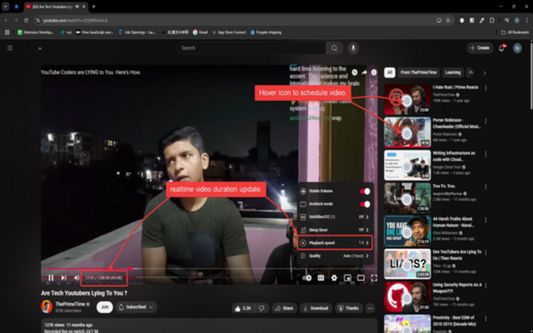
⏱️ Real-Time Duration Calculator
See how long a video will take to watch based on your playback speed (e.g., 1.5x or 2x). Perfect for time management and learning efficiently!
🔔 Desktop Notifications
Get timely reminders when it’s time to watch your scheduled videos. Click the notification and jump straight into the content.
🔒 Privacy First
No data is sent to external servers. All schedules and settings are stored locally in your browser.
1️⃣ Scheduling a Video
While browsing YouTube, simply hover over any video card .
Click the “+” icon that appears to add it to your schedule.
Set your desired date and time in the popup window.
Done! The video will open automatically at the scheduled time.
2️⃣ Managing Your Schedule
Open the dashboard via the extension popup or by pressing Ctrl + Shift + S.
View, edit, or delete scheduled videos with a single click.
Filter scheduled videos easily.
3️⃣ Getting Notified
When it's time for a scheduled video, a desktop notification pops up.
Clicking it opens the video in a new tab — no need to manually search for it.
4️⃣ Playback Speed Duration Preview
On YouTube video pages, the adjusted duration updates in real-time as you change playback speed.
Helps you better plan your watching time — ideal for students, learners, and busy professionals.
The Project is open-source: https://github.com/nishu-murmu/youtube-video-scheduler.
Would love any feedback on this.
Never miss a video again with YouTube Video Scheduler — a powerful yet lightweight Chrome extension that lets you schedule, manage, and watch YouTube videos at your preferred time , all from within your browser!
✨ Key Features:
✅ Schedule Any YouTube Video
Add videos to your watchlist and open them automatically at the exact time you set — even if you're offline or restart your browser.
🕒 Update or Remove Schedules Instantly
Easily edit or delete scheduled videos directly from the intuitive dashboard.
📊 User-Friendly Dashboard
Manage all your scheduled videos in one place with a clean and responsive UI. Toggle it anytime using the keyboard shortcut Ctrl + Shift + S.
⏱️ Real-Time Duration Calculator
See how long a video will take to watch based on your playback speed (e.g., 1.5x or 2x). Perfect for time management and learning efficiently!
🔔 Desktop Notifications
Get timely reminders when it’s time to watch your scheduled videos. Click the notification and jump straight into the content.
🔒 Privacy First
No data is sent to external servers. All schedules and settings are stored locally in your browser.
1️⃣ Scheduling a Video
While browsing YouTube, simply hover over any video card .
Click the “+” icon that appears to add it to your schedule.
Set your desired date and time in the popup window.
Done! The video will open automatically at the scheduled time.
2️⃣ Managing Your Schedule
Open the dashboard via the extension popup or by pressing Ctrl + Shift + S.
View, edit, or delete scheduled videos with a single click.
Filter scheduled videos easily.
3️⃣ Getting Notified
When it's time for a scheduled video, a desktop notification pops up.
Clicking it opens the video in a new tab — no need to manually search for it.
4️⃣ Playback Speed Duration Preview
On YouTube video pages, the adjusted duration updates in real-time as you change playback speed.
Helps you better plan your watching time — ideal for students, learners, and busy professionals.
The Project is open-source: https://github.com/nishu-murmu/youtube-video-scheduler.
Would love any feedback on this.
리뷰어 0명이 0점으로 평가함
권한 및 데이터
추가 정보
- 부가 기능 링크
- 버전
- 0.1.2
- 크기
- 240.17 KB
- 최근 업데이트
- 일 년 전 (2025년 6월 16일)
- 라이선스
- MIT 라이선스
- 버전 목록
- 모음집에 추가