
Youtube Playback speed controller 제작자: EaseDeveloper
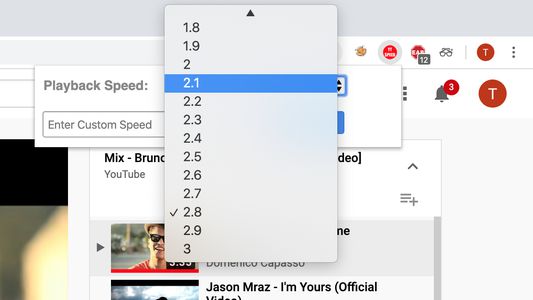
Control the speed of youtube videos, with no limits.
사용자 246명사용자 246명
확장 메타 데이터
스크린샷

정보
Youtube Speed Controller is an extension allowing users to quickly change the speed of youtube videos. You can increase the speed as high as 10x and decrease speed till 0.1x. It works the same as a youtube inbuilt speed controller: the speed gets reset when the page is reloaded; and when you open a new video the speed remains the same. You can have different speeds for different tabs of youtube. Thus this extension comes handy in controlling youtube playback speed.
Features:
- Controls youtube playback speed.
- Can have different speeds for different tabs.
- Speed remains the same when a new video is opened(same feature as youtube's inbuilt).
- Speed gets reset when the tab is reloaded.
- Saves time.
- Minimalist design.
- No ads.
- No spamming.
- Completely free
Features:
- Controls youtube playback speed.
- Can have different speeds for different tabs.
- Speed remains the same when a new video is opened(same feature as youtube's inbuilt).
- Speed gets reset when the tab is reloaded.
- Saves time.
- Minimalist design.
- No ads.
- No spamming.
- Completely free
리뷰어 5명이 4.4점으로 평가함
권한 및 데이터
추가 정보
- 부가 기능 링크
- 버전
- 1.0.2
- 크기
- 32.11 KB
- 마지막 업데이트
- 6년 전 (2020년 6월 30일)
- 관련 카테고리
- 라이선스
- All Rights Reserved
- 버전 목록
- 모음집에 추가