
download chatgpt audio voice Autor: extsdev
Save the ChatGpt voice audio to your computer
130 użytkowników130 użytkowników
Metadane rozszerzenia
Zrzuty ekranu
O tym rozszerzeniu
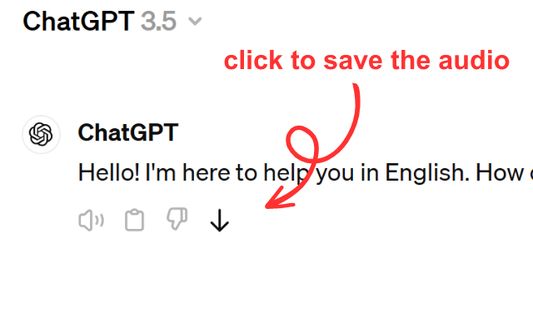
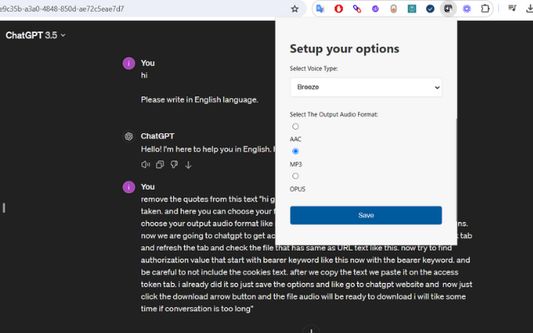
Save ChatGPT voice responses directly to your computer with a single click. This add-on adds a convenient download button next to ChatGPT's voice messages, allowing you to save the audio in your preferred format (AAC, MP3, or OPUS) and voice type. Perfect for language learners, content creators, or anyone who wants to revisit ChatGPT's spoken responses offline.
The extension is lightweight and integrates seamlessly with ChatGPT's interface. Simply click the download icon that appears next to voice messages to save them to your computer. You can customize your preferred voice type and audio format through the extension's options. Supports multiple languages and works on any ChatGPT conversation that includes voice responses.
The extension is lightweight and integrates seamlessly with ChatGPT's interface. Simply click the download icon that appears next to voice messages to save them to your computer. You can customize your preferred voice type and audio format through the extension's options. Supports multiple languages and works on any ChatGPT conversation that includes voice responses.
Ocenione na 5 przez jednego recenzenta
Uprawnienia i dane
Wymagane uprawnienia:
- Pobierać pliki oraz odczytywać i modyfikować historię pobranych plików przeglądarki
- Mieć dostęp do danych użytkownika w domenie „chatgpt.com”
Opcjonalne uprawnienia:
- Mieć dostęp do danych użytkownika na stronie „chatgpt.com”
Więcej informacji
- Odnośniki dodatku
- Wersja
- 1.0.0
- Rozmiar
- 62,64 KB
- Ostatnia aktualizacja
- rok temu (9 kwi 2025)
- Powiązane kategorie
- Licencja
- Licencja MIT
- Historia wersji
- Dodaj do kolekcji