
RandomSignatureQuotes in Gmail™ Autor: mort253
Browser Extension to inject random quotes in your Gmail signature.
8 użytkowników8 użytkowników
Metadane rozszerzenia
Zrzuty ekranu
O tym rozszerzeniu
Browser Extension to inject random quotes in your Gmail signature.
To replace the quotes with your own, click the extension icon, located by clicking the "puzzle" icon at the top-right of the Firefox browser and then clicking the "S" icon.
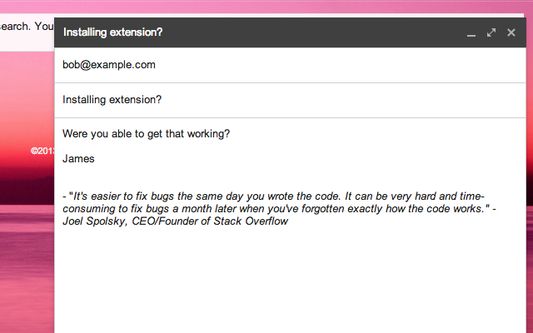
Whenever you compose an email or reply, a different quote is injected into the email compose window.
Version 2.0.2 includes a bug fix where a fade-in and fade-out on save feature was causing errors in the JSON panel.
----
This is version 2.0.1 of Random Signature Quotes for Gmail™, which includes the ability to add quotes to the signature for replies, not just initially composed messages. This has been a highly requested feature for many years now. 2.0.1 also includes upgrades to the extension architecture, moving from manifest v2 to v3, Chrome's newer extension platform.
----
Version 1.0.0 contained major improvements to the quote manager, accessible at the top right in the address bar. 1.0.0 made it much easier to add, edit, or remove quotes, without dealing with the complicated JSON markup from the previous version.
For power users, the JSON panel is still available, in case you want to export quotes or re-import a bulk collection of quotes.
----
To help inspire others, and so I could more easily see quotes I enjoyed hearing from famous, successful technology startup founders and other influential people, I wanted something that would put those quotes randomly in my Gmail signature.
Well, there wasn't anything out there that did that, so I created something that did. I specifically wanted to be able to control the quotes myself.
When you install this extension, my hand-picked quotes are selected by default, but you can change them by clicking the page action 'S' icon next to the favorites star in the address bar and editing the quotes.
The quotes are stored as a JavaScript array, so you may want to export them to a nice text editor like Sublime text if you're going to make extensive changes via the JSON editor.
Gmail™ is a trademark of Google Inc. Use of this trademark is subject to Google Permissions.
To replace the quotes with your own, click the extension icon, located by clicking the "puzzle" icon at the top-right of the Firefox browser and then clicking the "S" icon.
Whenever you compose an email or reply, a different quote is injected into the email compose window.
Version 2.0.2 includes a bug fix where a fade-in and fade-out on save feature was causing errors in the JSON panel.
----
This is version 2.0.1 of Random Signature Quotes for Gmail™, which includes the ability to add quotes to the signature for replies, not just initially composed messages. This has been a highly requested feature for many years now. 2.0.1 also includes upgrades to the extension architecture, moving from manifest v2 to v3, Chrome's newer extension platform.
----
Version 1.0.0 contained major improvements to the quote manager, accessible at the top right in the address bar. 1.0.0 made it much easier to add, edit, or remove quotes, without dealing with the complicated JSON markup from the previous version.
For power users, the JSON panel is still available, in case you want to export quotes or re-import a bulk collection of quotes.
----
To help inspire others, and so I could more easily see quotes I enjoyed hearing from famous, successful technology startup founders and other influential people, I wanted something that would put those quotes randomly in my Gmail signature.
Well, there wasn't anything out there that did that, so I created something that did. I specifically wanted to be able to control the quotes myself.
When you install this extension, my hand-picked quotes are selected by default, but you can change them by clicking the page action 'S' icon next to the favorites star in the address bar and editing the quotes.
The quotes are stored as a JavaScript array, so you may want to export them to a nice text editor like Sublime text if you're going to make extensive changes via the JSON editor.
Gmail™ is a trademark of Google Inc. Use of this trademark is subject to Google Permissions.
Ocenione na 5 przez 2 recenzentów
Uprawnienia i dane
Wymagane uprawnienia:
- Mieć dostęp do danych użytkownika na stronie „mail.google.com”
Więcej informacji
- Odnośniki dodatku
- Wersja
- 2.0.3
- Rozmiar
- 146,76 KB
- Ostatnia aktualizacja
- 2 lata temu (18 sie 2024)
- Powiązane kategorie
- Licencja
- Licencja MIT
- Historia wersji
- Dodaj do kolekcji