
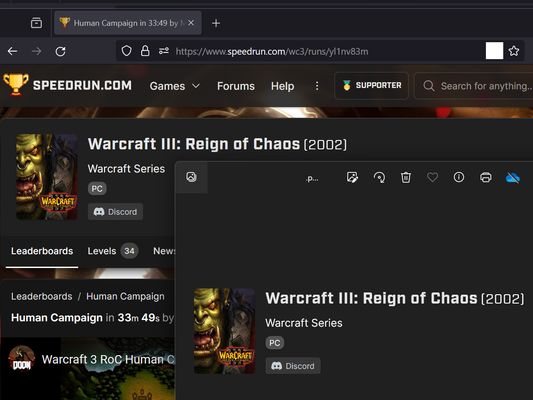
screenshot any element Autor: vacantthinker
webpage screenshot support: screenshot full page pick one element to screenshot
27 użytkowników27 użytkowników
Metadane rozszerzenia
Zrzuty ekranu



O tym rozszerzeniu
Extension User Guide
📸 1. How to Capture a Full Page
🎯 2. How to Capture a Specific Element
⚠️ 3. Known Limitations
Browser extensions are restricted by standard security architectures and cannot run on native browser pages or official extension stores.
Examples of restricted pages include:
* Official Stores: Mozilla Add-ons Store (
📸 1. How to Capture a Full Page
- Right-click anywhere on the web page to open the context menu.
- Select "Screenshot Full Page" from the list.
🎯 2. How to Capture a Specific Element
- Click the extension icon in your browser toolbar.
- Move your mouse over the specific web element you want to capture. A red selection box will highlight the targeted area.
- Left-click the element. The extension will automatically capture the highlighted area and download it as a
.pngfile.
⏳ Note: Capturing larger web elements or extensive sections may take a few moments to process and download.
⚠️ 3. Known Limitations
Browser extensions are restricted by standard security architectures and cannot run on native browser pages or official extension stores.
Examples of restricted pages include:
* Official Stores: Mozilla Add-ons Store (
addons.mozilla.org).Ocenione na 5 przez 2 recenzentów
Uprawnienia i dane
Wymagane uprawnienia:
- Wyświetlać powiadomienia
- Mieć dostęp do kart przeglądarki
- Mieć dostęp do danych użytkownika na wszystkich stronach
Zbieranie danych:
- Autorzy tego rozszerzenia twierdzą, że nie wymaga ono zbierania danych.
Więcej informacji
- Odnośniki dodatku
- Wersja
- 2026.5.30.1
- Rozmiar
- 12,11 KB
- Ostatnia aktualizacja
- 2 miesiące temu (30 maj 2026)
- Powiązane kategorie
- Historia wersji
- Etykiety
- Dodaj do kolekcji