Dodatki do przeglądarki Firefox
  • Rozszerzenia
  • Motywy
    • do Firefoksa
    • Słowniki i pakiety językowe
    • Inne strony
    • Dodatki na Androida
Zaloguj się
Podgląd „Take Youtube Video Screenshots (+ GIF Maker)”

Take Youtube Video Screenshots (+ GIF Maker) Autor: znwyrz

How to use - Download File : Left Click on Button - Download File with Prompt : Alt/Option + Left Click on Button - Copy to Clipboard : Shift + Left Click on Button - Selecting the Capture Area: Ctrl/Command + Left Click on Button

4.6 (recenzje: 38)4.6 (recenzje: 38)
579 użytkowników579 użytkowników
Pobierz Firefoksa i to rozszerzenie
Pobierz plik

Metadane rozszerzenia

Zrzuty ekranu
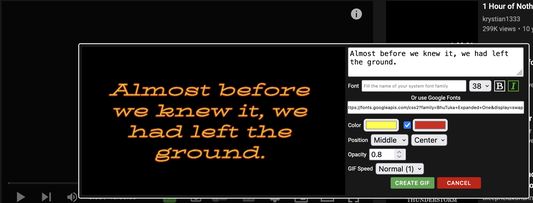
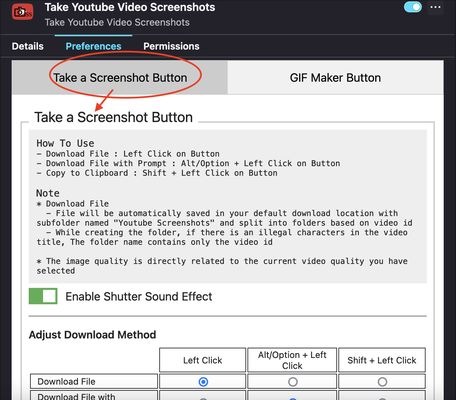
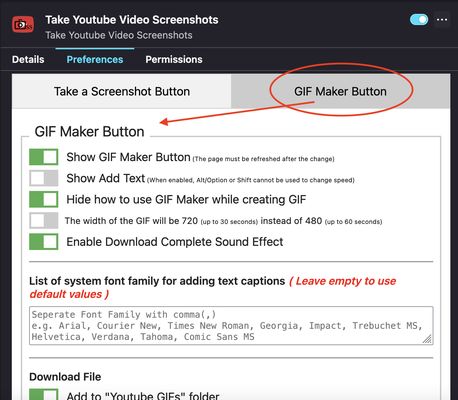
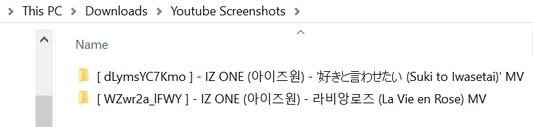
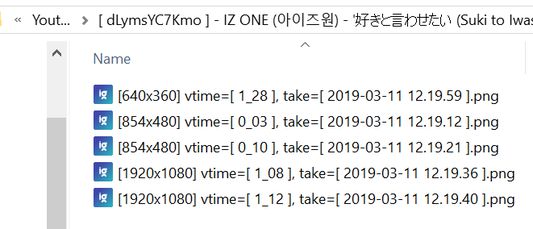
Add button to video toolbarAdd-on Preferences - Take a Screenshot ButtonAdd-on Preferences - GIF Maker ButtonGIF Maker Add Caption text PreviewSplit screenshot into folders based on video id and video titleFilename based on resolution, video time, current date and time
O tym rozszerzeniu
A toolbar button for easier take youtube video screenshots.

How to use
- Download File : Left Click on Button
- Download File with Prompt : Alt/Option + Left Click on Button
- Copy to Clipboard : Shift + Left Click on Button
- Selecting the Capture Area: Ctrl/Command + Left Click on Button
* For "Selecting the Capture Area" when rotating video or entering and exiting fullscreen mode, you should close the selection box first and open it again. Due to changes in the size of the video and the player, the previous code specifying the size of the area that can be dragged must be changed
* "Download File" / "Download File with Prompt" / "Copy to Clipboard" can be done on the capture button of "Selecting the Capture Area" with the same shortcuts
* Shutter sound can be disabled in the add-on Preferences
* Download Method can be adjust in the add-on Prefereces
* Added "GIF Maker" button to create simple GIFs

Note
* Download File
  - File will be automatically saved in your default download location with subfolder named "Youtube Screenshots" and split into folders based on video id
  - While creating the folder, if there is an illegal characters in the video title, The folder name contains only the video id
  • The image quality is directly related to the current video quality you have selected
If you want to create MPC-like "Save Thumbnails", try <a href="https://addons.mozilla.org/en-US/firefox/addon/youtube-storyboard/" target="_blank">this</a> add-on.
Ocenione na 4,6 przez 38 recenzentów
Zaloguj się, aby ocenić to rozszerzenie
Nie ma jeszcze ocen

Zapisano ocenę w gwiazdkach

5
32
4
3
3
0
2
0
1
3
38 recenzji
Uprawnienia i dane

Wymagane uprawnienia:

  • Pobierać pliki oraz odczytywać i modyfikować historię pobranych plików przeglądarki
  • Monitorować użycie rozszerzeń i zarządzać motywami
  • Mieć dostęp do kart przeglądarki
  • Mieć dostęp do danych użytkownika na stronie „www.youtube.com”

Opcjonalne uprawnienia:

  • Mieć dostęp do danych użytkownika na stronie „www.youtube.com”
Więcej informacji
Więcej informacji
Odnośniki dodatku
  • Pomoc
  • Skopiuj identyfikator dodatku
Wersja
3.0.6.0
Rozmiar
272,03 KB
Ostatnia aktualizacja
8 miesięcy temu (14 paź 2025)
Powiązane kategorie
  • Pobieranie plików
  • Zdjęcia, muzyka i filmy
  • Gry i rozrywka
Licencja
Custom LicenseCustom License for Take Youtube Video Screenshots (+ GIF Maker)
Historia wersji
  • Wszystkie wersje
Dodaj do kolekcji
Zgłoś ten dodatek
Strona domowa Mozilli

Dodatki

  • O serwisie
  • Blog dodatków do Firefoksa
  • Warsztat rozszerzeń
  • Strefa autora
  • Zasady programistów
  • Blog społeczności
  • Forum
  • Zgłoś błąd
  • Wytyczne recenzji

Przeglądarki

  • Desktop
  • Mobile
  • Enterprise

Produkty

  • Browsers
  • VPN
  • Relay
  • Monitor
  • Pocket
  • Bluesky (@firefox.com)
  • Instagram (Firefox)
  • YouTube (firefoxchannel)
  • Prywatność
  • Ciasteczka
  • Kwestie prawne

O ile nie wskazano inaczej, treść tej strony jest dostępna na warunkach licencji Creative Commons Attribution Share-Alike w wersji 3.0 lub nowszej.